
Base64 Encoding vs URL Encoding
Understand how Base64 and URL encoding differ, what problems they solve and why neither method should be treated as encryption.
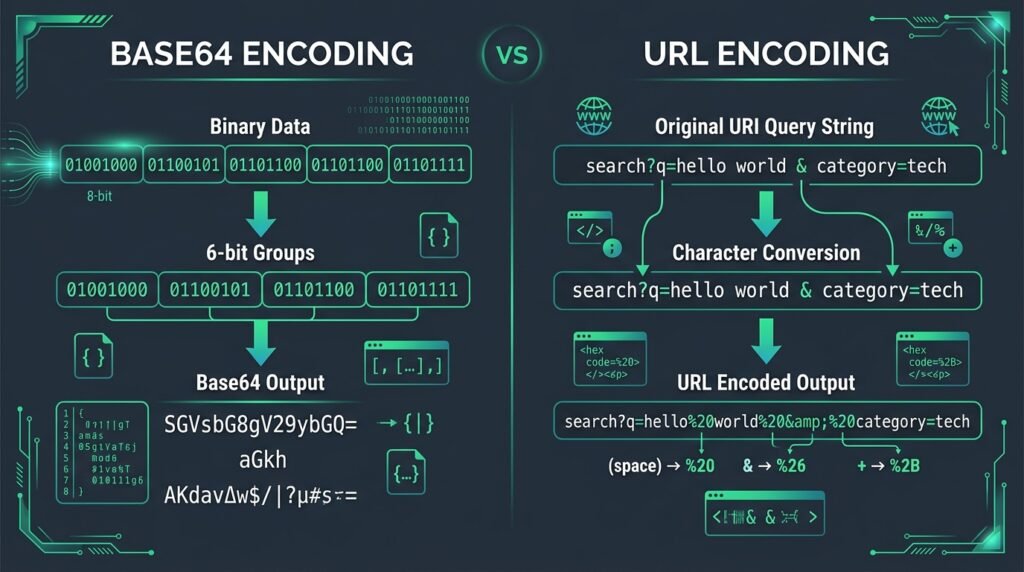
When engineering web architectures, APIs, and data transfer workflows, developers regularly format payloads across network protocols. The technical comparison of Base64 encoding vs URL encoding frequently creates confusion because both schemes transform data into text representations. However, Base64 encoding vs URL encoding represents two fundamentally different operations created for distinct engineering purposes. Evaluating Base64 encoding vs URL encoding correctly ensures you transmit data intact without corrupting bytes or introducing security vulnerabilities.
Base64 maps binary octets into 64 ASCII characters so binary objects travel safely across text channels. URL encoding escapes characters that conflict with URI syntax. Neither method provides data confidentiality.
To test values inside your browser privately, use EzzDo’s free Base64 Encoder and Decoder, URL Encoder and Decoder, and JSON Formatter. All three execute locally with zero server uploads.
Table of Contents
Base64 Encoding vs URL Encoding at a Glance
To understand the architectural landscape of Base64 encoding vs URL encoding, review this comparison table summarizing their foundational characteristics:
| Feature | Base64 | URL Encoding |
|---|---|---|
| Primary purpose | Convert binary data into printable ASCII text. | Escape reserved characters within URI components. |
| Input | Binary byte sequences or serialized text bytes. | Characters and octets placed into URI sections. |
| Typical output | Alphanumeric string [A-Za-z0-9+/] with optional [=]. | ASCII text where unsafe bytes become %XX hex triplets. |
| Common characters | A–Z, a–z, 0–9, +, /, and = padding. | Alphanumerics, percent sign (%), and hex digits. |
| Size effect | Expands data by ~33.3% (4 chars per 3 input bytes). | Variable: 0% unreserved; +200% per escaped byte. |
| Reversible | Yes, deterministic two-way conversion. | Yes, deterministic two-way conversion. |
| Compression | No. Base64 increases data size; never compresses. | No. URL encoding replaces characters; never compresses. |
| Encryption | No. Base64 provides zero confidentiality. | No. URL encoding provides zero confidentiality. |
| Typical uses | MIME email parts, data URLs, PEM keys, JSON binary. | Query parameters, form submissions, URI paths. |
| URL compatibility | Standard Base64 contains characters (+, /, =) requiring escaping. | Native and purpose-built for URI syntax. |
| Relevant standard | RFC 4648 | RFC 3986 |
This side-by-side analysis highlights the central difference in Base64 encoding vs URL encoding: Base64 translates raw binary bytes into printable text for transport gateways, whereas percent encoding enforces URI grammar rules so dynamic parameters coexist with routing syntax.
What Is Base64 Encoding?
Base64 is a binary-to-text representation scheme defined in RFC 4648 that converts arbitrary byte sequences into 64 printable ASCII characters. In Base64 encoding vs URL encoding, Base64 ensures transport compatibility across text-only systems.
The standard alphabet comprises uppercase letters (A–Z), lowercase letters (a–z), digits (0–9), plus (+), slash (/), and equals (=) padding. For example, the input word Hello:
Input: Hello -> Bytes: [0x48, 0x65, 0x6C, 0x6C, 0x6F] -> Base64: SGVsbG8=Software serializes non-ASCII characters to bytes using UTF-8 before applying Base64 mapping.
How Base64 Encoding Works
Understanding the conversion mechanism explains how Base64 encoding vs URL encoding handles data at the byte level:
- Byte Input: Input data is read as 8-bit bytes (groups of 3 bytes total 24 bits).
- Bit Grouping: The 24 bits are partitioned into four 6-bit units (values 0–63).
- Character Mapping: Each 6-bit index maps to an RFC 4648 character.
- Padding: If byte count is not divisible by 3, zero bits fill the final unit and
=aligns output.
This yields the formula: Encoded length = 4 × ceiling(original byte length ÷ 3), producing ~33.3% overhead.
Common Uses for Base64
In web development, Base64 is used for MIME email attachments, small data URLs, binary fields in JSON, and PEM certificates. Embedding large files as Base64 in HTML increases payload weight by 33.3%, inflates memory usage, and prevents caching. In Base64 encoding vs URL encoding, Base64 provides transport compatibility rather than delivery efficiency. Test your payloads with EzzDo’s Base64 Encoder and Decoder.
What Is URL Encoding?
URL encoding, formally termed percent encoding, is specified in RFC 3986. It represents characters safely within Uniform Resource Identifiers. In Base64 encoding vs URL encoding, percent encoding targets address grammar.
Unsafe or reserved characters are replaced by a percent sign (%) followed by the two-digit hexadecimal byte value. Examples include space (%20), ampersand (%26), hash (%23), and literal plus (%2B). For instance, the query value private PDF tools encodes to private%20PDF%20tools.
Why URLs Need Encoding
Characters such as ?, &, =, #, /, %, and + have reserved structural roles in URLs. In Base64 encoding vs URL encoding, encoding ensures data characters do not break web address parsing. In https://example.com/search?q=pdf&image, the unencoded ampersand splits parameters. Properly encoding produces https://example.com/search?q=pdf%26image, preserving query integrity.
Base64 Encoding vs URL Encoding: Key Differences
To choose appropriately between Base64 encoding vs URL encoding, evaluate these seven core engineering differences:
- Purpose: Base64 bridges binary into text; URL encoding escapes URI characters. Choose Base64 for binary files; choose URL encoding for URI values.
- Input: Base64 accepts arbitrary bytes; URL encoding accepts URI parameter strings. Choose Base64 for non-text bytes; choose URL encoding for parameters.
- Output: Base64 outputs 64 ASCII characters; URL encoding outputs %XX hex triplets.
- Size: Base64 expands data by ~33.3%; URL encoding expands only escaped bytes (200%).
- URL Compatibility: URL encoding is natively URL-safe; standard Base64 requires escaping.
- Reserved Characters: Base64 uses characters that conflict with URLs; URL encoding protects them.
- Use Cases: Base64 powers email MIME parts and data URLs; URL encoding powers query parameters.
Neither Encoding Method Is Encryption
A critical rule in web architecture is that encoding is not encryption. In Base64 encoding vs URL encoding, both algorithms are completely reversible representations. Anyone with access to the encoded text can decode it immediately without a key or password.
Never use either method to protect passwords, API keys, tokens, or credentials. Confidential data requires authenticated encryption (AES-256), salted hashing (Argon2id), and secure key storage. Query parameters remain exposed in browser history and server logs regardless of HTTPS.
Does Base64 Reduce File Size?
The clear technical answer is No. Base64 increases data size by approximately 33.3% because it encodes 3 binary bytes (24 bits) into 4 ASCII characters (32 bits). A 3 MB binary image expands to 4 MB of Base64 text. Base64 serves representation and compatibility, not compression. When comparing Base64 encoding vs URL encoding, use gzip or brotli when data reduction is needed.
Base64, Base64url and URL Encoding
Standard Base64 contains +, /, and =, which require special handling in URLs. RFC 4648 Section 5 defines Base64url, which replaces + with - and / with _, while omitting trailing = padding. In the study of Base64 encoding vs URL encoding, Base64url remains a binary-to-text representation scheme, distinct from percent encoding.
Can Base64 Be Placed in a URL?
Yes, but unescaped standard Base64 causes data corruption because URL parsers interpret + as spaces and / as path delimiters. When managing Base64 encoding vs URL encoding in web links, developers must either percent-encode standard Base64 (converting + to %2B, / to %2F, = to %3D) or adopt Base64url.
Understanding %20 and the Plus Sign
Under RFC 3986, %20 is the standard percent-encoded sequence for a space in all URI contexts. In application/x-www-form-urlencoded query data, a plus sign (+) represents a space, whereas in URI paths it represents a literal plus. In Base64 encoding vs URL encoding, encode literal pluses as %2B to prevent parser confusion.
Encoding Text Correctly with UTF-8
Base64 operates on bytes rather than abstract characters. When processing international text like café, こんにちは, or ✓, software must first serialize strings into UTF-8 bytes. Legacy JavaScript btoa() throws errors on non-ASCII characters without prior byte encoding. Distinguishing byte serialization from address escaping is essential in Base64 encoding vs URL encoding.
Practical Web Development Examples
Examine these production scenarios illustrating Base64 encoding vs URL encoding in web applications:
Base64 Encoding vs URL Encoding for Query Parameters
const term = "PDF & OCR Tools";
const safeUrl = `https://ezzdo.site/search?q=${encodeURIComponent(term)}`;
// Output: https://ezzdo.site/search?q=PDF%20%26%20OCR%20Tools
Encoding Small Text with Base64
const bytes = new TextEncoder().encode("Hello EzzDo");
const base64 = btoa(String.fromCharCode(...bytes)); // SGVsbG8gRXp6RG8=
Embedding a Small Image as a Data URL
Small icons can be embedded via data URLs: data:image/png;base64,iVBORw0KGgo.... Avoid large files to prevent size inflation.
Sending Binary Data in JSON
JSON requires text; Base64 allows binary signatures to be included inside JSON attributes. For large transfers, multipart streams are preferred.
Using Base64url in Tokens
JSON Web Tokens (JWT) use Base64url to allow headers and claims to pass safely in HTTP headers without URL escaping. Payloads remain readable.
Common Base64 and URL-Encoding Mistakes
Avoid these 15 frequent developer mistakes when working with Base64 encoding vs URL encoding:
- Base64 as encryption: Reversible without keys. Fix: Use AES-256.
- URL encoding as privacy: Visible in logs. Fix: Avoid secrets in URLs.
- Encoding entire URLs: Breaks path syntax. Fix: Escape query values only.
- Unencoded query values: Symbols split parameters. Fix: Use
encodeURIComponent(). - Double encoding: Creates corrupt
%2520. Fix: Encode once at boundaries. - Multiple decoding passes: Bypasses security filters. Fix: Decode once.
- Confusing %20 with +: Pluses in paths are literal. Fix: Use
%20. - Standard Base64 in queries: Plus and slash break URLs. Fix: Use Base64url.
- Stripping required padding: Strict decoders fail. Fix: Retain
=. - Padding in Base64url: JWT specifications fail. Fix: Omit
=padding. - Large files in Base64: Expands size 33.3%. Fix: Use multipart streams.
- Ignoring UTF-8 serialization: Corrupts text. Fix: Convert to UTF-8 bytes.
- Logging decoded parameters: Exposes tokens. Fix: Sanitize application logs.
- Assuming tokens are confidential: Signatures verify authenticity only. Fix: Encrypt payloads.
- Wrong encoder for components: Rules differ. Fix: Match encoder to URI context.
Security Risks of Incorrect Decoding
Improper decoding causes vulnerabilities in Base64 encoding vs URL encoding pipelines, including validation bypasses, path traversal, and open redirects. Multiple decoding cycles allow attackers to hide attacks via %252E%252E%252F. Always decode untrusted input once at ingestion and validate parameters against strict schemas using trusted platform APIs.
How to Use EzzDo’s Encoding Tools
EzzDo provides client-side developer tools for testing Base64 encoding vs URL encoding conversions with total privacy. All operations execute inside browser memory without server uploads.
Using the Base64 Encoder and Decoder
Follow these steps on EzzDo’s Base64 Encoder and Decoder: 1) Open tool. 2) Select Encode or Decode. 3) Enter text. 4) Process payload. 5) Inspect output. 6) Copy result. 7) Avoid pasting production credentials.
Using the URL Encoder and Decoder
To format query strings safely with EzzDo’s URL Encoder and Decoder: 1) Open tool. 2) Paste parameter value. 3) Choose Encode or Decode. 4) Process instantly. 5) Inspect percent sequences. 6) Insert into URI. 7) Test final URLs.
Which Encoding Method Should You Use?
Selecting between Base64 encoding vs URL encoding depends on the technical scenario. Review this architectural decision table:
| Situation | Recommended Method | Technical Reason |
|---|---|---|
| Search phrase in query string | URL Encoding | Escapes spaces and reserved delimiters like ampersands. |
| Small binary object in JSON | Base64 Encoding | JSON requires text; Base64 bridges binary octets. |
| Small icon in CSS stylesheet | Base64 (Data URL) | Embeds bytes inline to eliminate HTTP request latency. |
| Binary token in URL parameter | Base64url | Replaces + and / with URL-safe characters – and _. |
| Protecting user password | Neither Method | Encoding is not encryption; use Argon2id hashing. |
| Reducing binary file size | Neither Method | Base64 expands size by ~33.3%; use gzip compression. |
| Hiding confidential secrets | Neither Method | Encoding provides zero confidentiality; use AES-256. |
| Ampersand inside parameter value | URL Encoding | Replaces & with %26 to prevent query string truncation. |
Frequently Asked Questions
Can URL encoding replace Base64 encoding?
No. In Base64 encoding vs URL encoding, URL encoding escapes reserved URI characters, whereas Base64 bridges raw binary octets into a 64-character text alphabet.
Is Base64 safe for passwords?
No. Base64 is reversible in milliseconds without keys. Passwords require salted cryptographic hashes like Argon2id or bcrypt.
Why does Base64 sometimes end with an equals sign?
The equals sign (=) is padding to align byte sequences not divisible by three into four-character blocks.
Is %20 the same as a plus sign?
No. %20 is standard URI space encoding. A plus sign represents spaces only in form query strings.
Is Base64 a form of encryption?
No. Base64 is an open data format with zero cryptographic keys and zero confidentiality.
Does URL encoding hide private information?
No. URL encoding escapes characters; encoded values remain visible in browser histories and server logs.
Does Base64 make files smaller?
No. Base64 increases data size by ~33.3%, converting every 3 binary bytes into 4 ASCII text characters.
What is Base64url?
Base64url (RFC 4648) replaces + with - and / with _, omitting padding characters for web safety.
Can Base64 be used in query strings?
Yes, provided you use Base64url or percent-encode standard Base64 characters (+, /, =) to prevent parser corruption.
Should an entire URL be encoded?
No. Encoding entire URLs escapes scheme delimiters (://) and breaks routing. Encode only individual parameter values.
What happens if a value is encoded twice?
Double encoding converts percent signs to %25, producing broken strings like %2520 instead of intended characters.
Does HTTPS make encoded query values private?
HTTPS protects network transport, but query strings remain exposed in browser history, proxy logs, and analytics.
Can Unicode text be converted directly to Base64?
Unicode text must be serialized to UTF-8 bytes first. Legacy btoa() throws exceptions on multi-byte characters.
Is a Base64-encoded token secure?
In formats like JWT, payloads are Base64url-encoded and readable by anyone. Signatures verify authenticity, not secrecy.
When should I use percent encoding?
In Base64 encoding vs URL encoding decisions, use percent encoding whenever you insert dynamic values into query strings, API paths, or web form submissions.
Final Base64 and URL-Encoding Checklist
Review this developer checklist to ensure standard compliance and security in Base64 encoding vs URL encoding workflows:
- Identify problem: Bridge binary with Base64; escape URI characters with percent encoding.
- Determine data type: Process binary with Base64; format URI queries with percent encoding.
- Determine component: Match escaping rules to query parameters or path segments.
- Use UTF-8: Serialize international characters to UTF-8 bytes before Base64 conversion.
- Standard Base64: Format MIME parts and JSON payloads under RFC 4648.
- Base64url: Adopt the
-and_alphabet for URL-safe tokens. - Percent-encode values: Never encode whole URLs; escape parameter values independently.
- Avoid double encoding: Escape data once at transport boundaries.
- Ingestion decoding: Decode parameters once and validate schemas immediately.
- Never treat encoding as encryption: Deploy AES-256 for confidentiality and Argon2id for passwords.
- Keep secrets out of URLs: Prevent credential leakage in query strings and logs.
- Test implementations: Verify output compatibility with verified developer utilities.
Choosing Between Base64 and URL Encoding
In conclusion, the decision between Base64 encoding vs URL encoding depends on your architectural layer. Base64 is an essential binary-to-text bridge allowing binary files and keys to travel safely through ASCII systems. URL encoding acts as the syntax guardian of web addresses, ensuring parameters and symbols coexist safely.
By understanding the technical boundaries of Base64 encoding vs URL encoding and remembering neither provides encryption, developers build reliable applications. To convert data and test query strings inside your browser with 100% privacy, bookmark EzzDo’s free Base64 Encoder and Decoder and URL Encoder and Decoder.