
Initializing Base64 Encoder / Decoder securely in browser…
Zero server uploads. Your data stays private on your device.
Welcome to the Base64 Encoder Decoder, a high-performance, privacy-first digital utility designed to convert raw text, binary payloads, and data streams into standard Base64 representation or decode Base64 strings back to their original human-readable format. Whether integrating RESTful APIs, debugging JSON Web Tokens, configuring HTTP Basic Authentication headers, embedding inline Data URIs in web templates, or inspecting email MIME payloads, our online base64 encoder decoder delivers instantaneous conversions directly in your browser with complete UTF-8 character integrity.
Unlike traditional online tools that transmit sensitive credentials or private tokens to third-party web servers for processing, this specialized base64 encoder decoder executes 100% of its encoding and decoding algorithms locally within client-side memory. Your confidential strings, cryptographic hashes, and private keys never leave your machine, ensuring total data compliance and zero risk of network interception.
For broader development workflows, pair this utility with our URL Encoder / Decoder to safely escape query string parameters, use our Image to Base64 converter for inline graphic assets, verify cryptographic integrity with our Hash Generator, or explore our complete suite of developer utilities across the EzzDo Tools directory.
Table of Contents
How to Use the Free Base64 Encoder Decoder
Operating our client-side base64 encoder decoder is straightforward and lightning fast. The interface was engineered for zero latency, handling large payloads without page reloads or server bottlenecks. Follow these three simple steps:
- Enter Your Text or Encoded Payload: Paste raw plain text (such as JSON data, credentials, or code snippets) or an existing Base64 encoded string into the primary input textarea. You can also type directly using your keyboard.
- Select Your Desired Mode: Click Encode to Base64 to transform raw text into standard ASCII Base64 format, or click Decode from Base64 to unpack an encoded string back to original plain text. The base64 encoder decoder automatically parses UTF-8 multi-byte characters and international emoji symbols without data loss.
- Copy or Swap the Result: The converted output instantly displays in the secondary output box. Click Copy Result to save the output to your clipboard, or click Swap Input / Output to immediately reverse the transformation and verify round-trip fidelity.
If you encounter an invalid Base64 input string (such as non-alphabet characters or improper padding length), our smart base64 encoder decoder displays clear inline validation warnings to help you identify missing characters or syntax errors immediately.
Key Features of the EzzDo Base64 Encoder Decoder
Modern software engineers and system administrators rely on our base64 encoder decoder for mission-critical development tasks. Core technical capabilities built into this online utility include:
- 100% Client-Side Sandboxing: All character encoding, bitwise masking, and byte transformations happen entirely in your local browser JavaScript engine. Sensitive API tokens and database passwords are never broadcast across the web.
- Comprehensive UTF-8 and Unicode Support: Many simplistic encoder implementations fail when processing multi-byte Unicode strings (such as accented letters, Asian logograms, or emoji). Our base64 encoder decoder transparently handles full UTF-8 byte arrays using standard TextEncoder and TextDecoder APIs.
- Instant Bidirectional Transformation: Seamlessly toggle between encoding and decoding modes with instantaneous sub-millisecond execution.
- Smart Padding and Error Detection: The tool automatically validates input strings according to RFC 4648 official standards, gracefully handling missing trailing equal signs (
=) when decoding loose payloads. - One-Click Clipboard Integration: Cleanly copy output with a single tap, eliminating accidental whitespace selection or truncated string errors.
- Zero Cost and No Account Required: Completely free forever without daily usage limits, captchas, software installation, or user registration barriers.
Binary Mechanics of Base64 Encoding: The 6-Bit Workflow
To understand why Base64 exists, we must examine the architectural constraints of early computer networks. Historical telecommunication protocols, such as 7-bit ASCII teletype networks and early SMTP email relays, were engineered to transmit printable text characters. When raw 8-bit binary data (such as compiled executables, compressed zip archives, or images) was sent across these channels, control characters (such as null bytes, line feeds, and carriage returns) caused packet corruption and dropped connections.
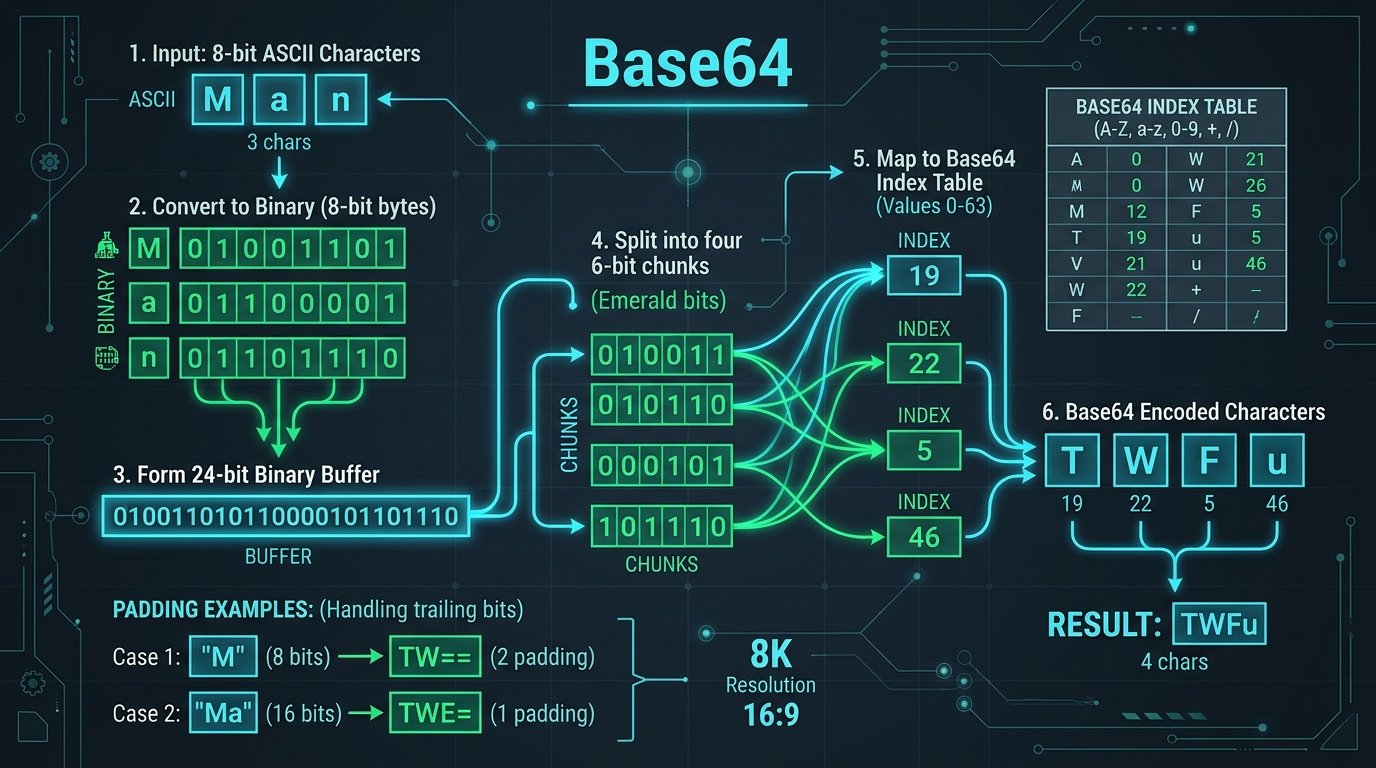
Base64 solved this dilemma by mapping arbitrary 8-bit binary data into an invariant set of 64 printable ASCII characters. The mathematical mechanics of this transformation execute in a structured 4-step sequence inside our base64 encoder decoder:
1. 24-Bit Buffer Concatenation
The encoding algorithm reads input bytes in groups of three. Because each byte contains 8 bits, three bytes produce exactly 24 bits of continuous binary information: 3 bytes × 8 bits = 24 bits.
2. 6-Bit Chunk Partitioning
Next, the 24-bit buffer is split into four distinct 6-bit chunks: 24 bits ÷ 6 bits = 4 chunks. Because 2 raised to the power of 6 equals 64 (2^6 = 64), each 6-bit chunk represents a decimal integer value ranging precisely from 0 to 63.
3. Character Index Table Lookup
Each decimal value from 0 to 63 maps to a specific printable ASCII character defined in the standardized Base64 alphabet table. Thus, three input bytes are seamlessly transformed into four printable ASCII characters.
4. The 33% Payload Expansion Trade-off
Because four characters (32 bits in standard 8-bit storage) are required to transmit every three bytes (24 bits) of raw data, Base64 encoding introduces an unavoidable mathematical size overhead of approximately 33.33%: (4 - 3) ÷ 3 = 33.33%. This payload expansion is the acceptable price paid for guaranteed universal transport across legacy network protocols.
The RFC 4648 Standard and Alphabet Index Table
The canonical specification governing modern Base64 encoding is established by the Internet Engineering Task Force in RFC 4648. To observe how our base64 encoder decoder maps 6-bit binary indices to printable characters, examine the reference architecture below:

The standard 64-character alphabet is organized into four clean structural tiers:
- Uppercase Latin Letters (A–Z): Represent decimal indices 0 through 25 (binary
000000to011001). - Lowercase Latin Letters (a–z): Represent decimal indices 26 through 51 (binary
011010to110011). - Arabic Numerals (0–9): Represent decimal indices 52 through 61 (binary
110100to111101). - Special Punctuation Characters (+ and /): Represent index 62 (
+, binary111110) and index 63 (/, binary111111). - Padding Character (=): When the input length is not an exact multiple of three bytes, the equal sign (
=) serves as a syntactic padding placeholder.
Step-by-Step Manual Math: Encoding and Decoding by Hand
Understanding how to compute Base64 by hand solidifies your grasp of computer architecture and bitwise operations. Consider a practical demonstration: manually encoding the word “Man” using our base64 encoder decoder formula:
- Retrieve ASCII Hex and Binary Values:
- Character
'M'= ASCII 77 = Binary01001101 - Character
'a'= ASCII 97 = Binary01100001 - Character
'n'= ASCII 110 = Binary01101110
- Character
- Concatenate into a 24-Bit Stream:
010011010110000101101110 - Divide into Four 6-Bit Chunks:
- Chunk 1:
010011= Decimal 19 - Chunk 2:
010110= Decimal 22 - Chunk 3:
000101= Decimal 5 - Chunk 4:
101110= Decimal 46
- Chunk 1:
- Lookup Chars in RFC 4648 Table:
- Index 19 maps to ‘T’
- Index 22 maps to ‘W’
- Index 5 maps to ‘F’
- Index 46 maps to ‘u’
- Final Encoded String:
"Man"encodes perfectly to “TWFu”.
Understanding Padding Rules (= and ==)
What happens when your input payload does not divide evenly into 3-byte blocks? Our base64 encoder decoder applies rigorous RFC padding logic:
- Remainder of 1 Byte (e.g., “M”): One byte contains only 8 bits. It forms one 6-bit chunk with 2 leftover bits. The algorithm pads 4 zero bits to create a second 6-bit chunk, followed by two equal signs (
==) to fill the 4-character slot:"M"becomes “TQ==”. - Remainder of 2 Bytes (e.g., “Ma”): Two bytes provide 16 bits. They form two 6-bit chunks with 4 leftover bits. Padding 2 zero bits completes a third 6-bit chunk, followed by a single equal sign (
=):"Ma"becomes “TWE=”.
Data URIs and Inline Web Asset Embedding
One of the most widespread practical applications of our base64 encoder decoder is constructing RFC 2397 Data URIs. A Data URI allows web developers to embed binary assets (such as PNG icons, SVG vectors, WOFF2 fonts, and audio chimes) directly inside HTML markup or CSS stylesheets, bypassing external HTTP network requests:
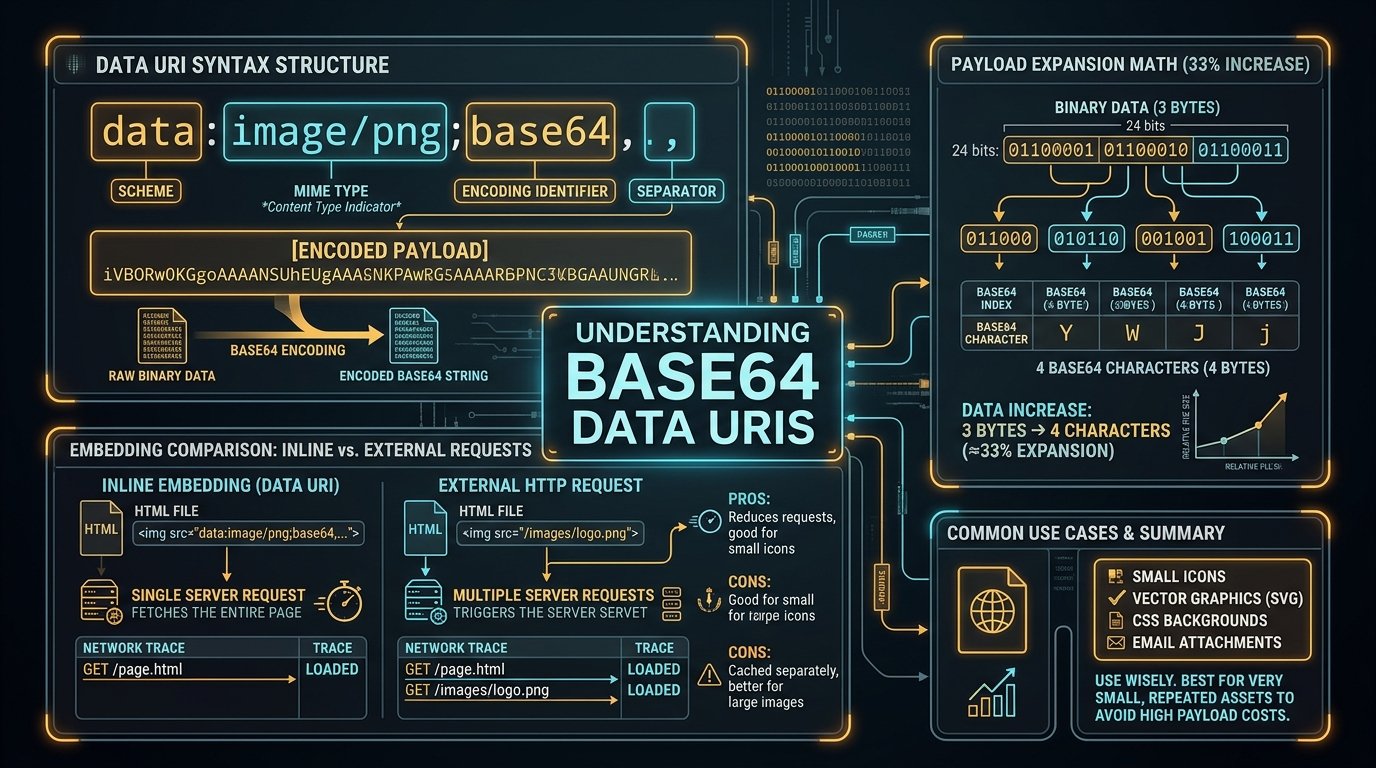
The standardized syntax structure for a Base64 Data URI is composed of four distinct segments:
data:[<mediatype>][;base64],<data>
For example, embedding a tiny transparent 1×1 GIF icon directly in an image tag avoids an unnecessary round-trip server latency:
<img src="data:image/gif;base64,R0lGODlhAQABAIAAAAAAAP///yH5BAEAAAAALAAAAAABAAEAAAIBRAA7" alt="Blank Spacer" />
While Data URIs eliminate TCP handshakes and DNS lookups, remember the 33% size penalty. As documented in the MDN Web Docs Base64 documentation, developers should restrict inline Data URIs to small graphics (under 10 KB) or critical rendering path assets to prevent excessive DOM memory bloat.
Standard Base64 vs URL-Safe Base64 (Base64URL)
In standard Base64 encoding, characters 62 (+) and 63 (/) present severe compatibility hazards when placed in web URLs or URL query strings. Web servers interpret + as an encoded space character, while / is reserved as a hierarchical path directory delimiter. Furthermore, the padding character = is reserved for URL query parameter assignments.
To solve this incompatibility, RFC 4648 Section 5 introduced Base64URL. When working with modern cloud services, comparing standard Base64 with Base64URL in our base64 encoder decoder reveals three critical differences:
| Feature | Standard Base64 | URL-Safe Base64 (Base64URL) | Primary Use Case |
|---|---|---|---|
| Character 62 | + (Plus sign) | – (Minus / Hyphen) | Prevents space translation in URLs |
| Character 63 | / (Forward slash) | _ (Underscore) | Prevents URL directory path routing errors |
| Padding (=) | Mandatory (= or ==) | Typically Omitted (Unpadded) | Avoids URL parameter assignment conflicts |
| Common Applications | MIME Email, SSL Certificates, Data URIs | JSON Web Tokens (JWT), OAuth2 Tokens | Web authentication and RESTful APIs |
Our online base64 encoder decoder seamlessly accepts both standard and URL-safe encoded variants, automatically reconciling hyphens and underscores during decoding.
Base64 in Security Protocols and System Integration
Modern enterprise infrastructure relies on Base64 encoding across virtually every communication layer. Key systems where our base64 encoder decoder is regularly utilized include:
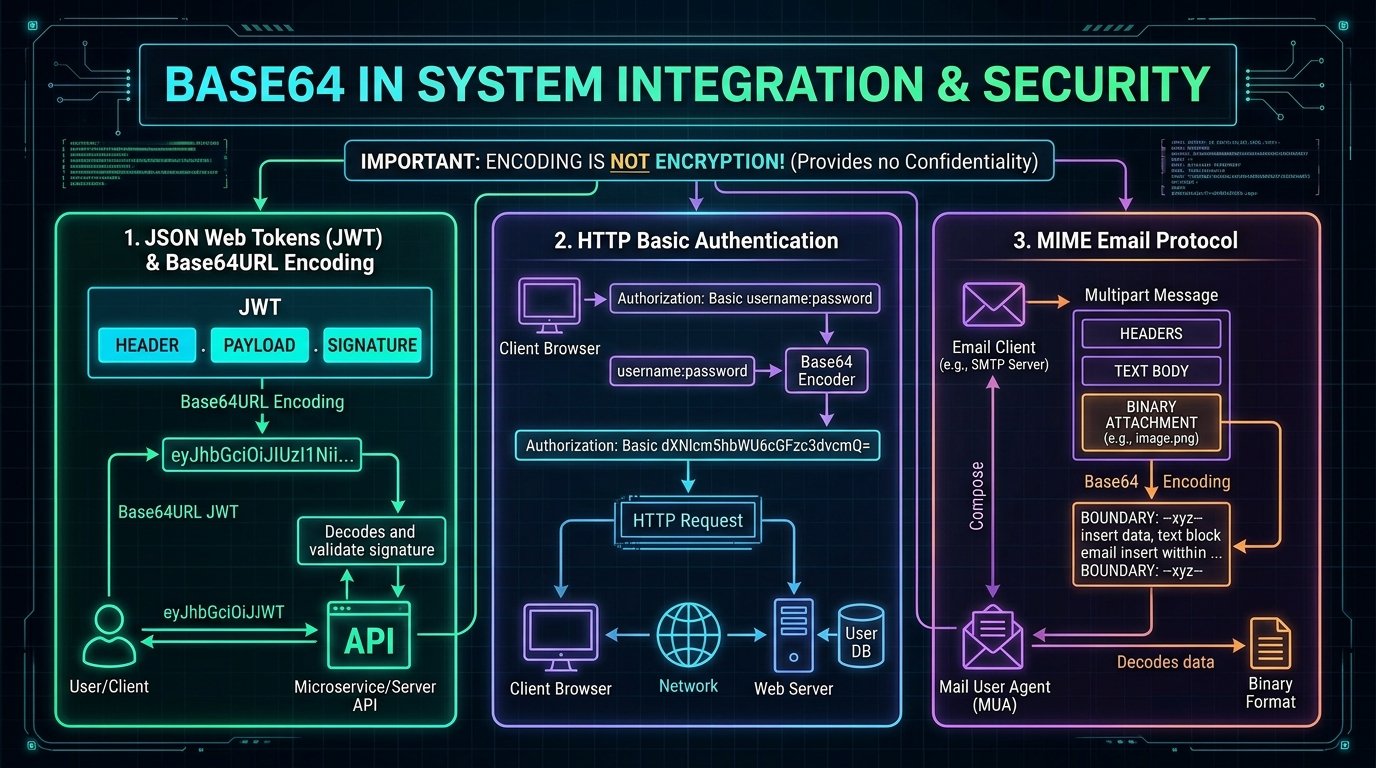
- JSON Web Tokens (JWT): The de facto standard for stateless cloud authorization. A JWT consists of three parts concatenated by dots:
Header.Payload.Signature. Both the Header and Payload are Base64URL-encoded JSON objects. Using our base64 encoder decoder allows developers to rapidly inspect token claims and expiry timestamps without writing terminal scripts. - HTTP Basic Authentication: When client applications authenticate via standard HTTP Basic Auth, they transmit an Authorization header formatted as
Authorization: Basic <credentials>, where credentials representusername:passwordencoded in Base64. - MIME Multipart Email Transmission: Modern email attachments (PDF invoices, JPEG photos, audio files) are encoded in Base64 blocks wrapped at 76 characters per line to guarantee safe delivery through legacy SMTP mail transfer agents.
- X.509 TLS Certificates and SSH Keys: Cryptographic keys formatted as PEM files store raw DER binary certificates encoded in Base64 wrapped between
-----BEGIN CERTIFICATE-----and-----END CERTIFICATE-----boundaries.
Encoding versus Encryption: Crucial Security Distinctions
One of the most dangerous misconceptions among novice software engineers is assuming that Base64 represents a method of data encryption. It is imperative to remember: Base64 is an encoding format, NOT an encryption scheme.
Understanding the distinction is vital for application security:
- Encoding (Base64): The sole purpose of encoding is data usability and transport safety. The algorithm is publicly standardized, deterministic, and requires no secret key. Anyone with access to a base64 encoder decoder can reverse the transformation in microseconds. Encoding provides zero confidentiality.
- Encryption (AES-256, RSA): Encryption transforms plaintext into ciphertext specifically to protect confidentiality against unauthorized observers. Reversing encryption requires possession of a secret cryptographic key.
- Hashing (SHA-256, MD5): Hashing is a one-way mathematical function designed for data verification. Unlike Base64, raw hash digests cannot be decoded back to original plaintext.
Never store plaintext passwords, credit card numbers, or personally identifiable information (PII) in databases using only Base64 encoding. Always apply authenticated symmetric encryption (such as AES-GCM) before encoding binary ciphertexts for transport.
Common Base64 Pitfalls and How to Avoid Them
When implementing Base64 encoding and decoding pipelines, software engineers frequently run into subtle edge cases. Using our online base64 encoder decoder helps you diagnose and resolve these common errors:
- The JavaScript
btoa()Latin1 Limitation: In client-side browsers, the legacywindow.btoa()function throws aDOMException: The string to be encoded contains characters outside of the Latin1 rangewhenever text includes multi-byte Unicode or emojis. Our base64 encoder decoder employs modern Uint8Array buffer streaming to completely eliminate Latin1 encoding crashes. - Whitespace and Newline Line Breaks: MIME standards insert line breaks every 76 characters. If a decoder expects a continuous string, embedded newlines can trigger silent decoding errors. Our tool automatically strips extraneous carriage returns before decoding.
- Truncated Padding Corruptions: Stripping trailing
=padding without utilizing a Base64URL-aware decoder can cause off-by-one bit shifts, corrupting the final decoded byte. - URL Query Parameter Collisions: Failing to use Base64URL in web query strings causes servers to replace
+signs with literal spaces, rendering payloads unparseable.
Frequently Asked Questions
What is a Base64 encoder decoder used for?
A base64 encoder decoder converts arbitrary binary data or text into 64 printable ASCII characters, ensuring safe data transmission across network protocols (like email, HTTP headers, and URLs) that might otherwise corrupt raw binary control characters.
Does Base64 encoding encrypt my sensitive data?
No. Base64 is an open, reversible encoding scheme, not encryption. It provides zero data security or obfuscation. Anyone can paste an encoded string into a base64 encoder decoder to retrieve the original plaintext.
Why does Base64 increase file size by 33%?
Because Base64 translates 3 bytes (24 bits) of raw data into 4 characters (32 bits of text), it requires 33.33% more bytes to represent the identical information.
What do the equal signs (=) at the end of a Base64 string mean?
Equal signs serve as syntactic padding placeholders. When the original input does not divide evenly into 3-byte groups, one or two equal signs (= or ==) are appended to complete the 4-character block alignment required by RFC 4648.
What is the difference between Base64 and Base64URL?
Standard Base64 uses + and / with = padding. Base64URL replaces + with - (hyphen) and / with _ (underscore), and omits padding so the string can be safely placed in web URLs and JSON Web Tokens without escaping.
Is my text or data uploaded to any server when using this tool?
No. EzzDo operates on a strict zero-server privacy architecture. All encoding and decoding runs 100% locally in your browser memory. Your data never touches our servers.
Can this online base64 encoder decoder handle emojis and international characters?
Yes. Our base64 encoder decoder natively supports full UTF-8 encoding, correctly handling multi-byte international alphabets, Chinese and Japanese logograms, and modern emoji symbols without corruption.
Explore Companion Developer and Text Utilities
Once you have encoded or decoded your payloads, explore our complete suite of client-side developer utilities designed for instant browser execution:
URL Encoder / Decoder
Safely escape and unescape query string components and URL parameters for web requests.
Image to Base64
Convert PNG, JPEG, SVG, and WebP images into compact inline Base64 Data URIs.
Hash Generator
Generate cryptographically secure SHA-256, SHA-512, and MD5 message digests locally.
UUID Generator
Generate random UUID v4 and GUID identifiers for databases, tokens, and distributed systems.
JSON Formatter
Prettify, format, validate, and minify complex JSON payload trees with syntax highlighting.
Case Converter
Transform text seamlessly between camelCase, snake_case, kebab-case, UPPERCASE, and title case.