
AI Video Prompts: 7 Proven Formulas, Examples and Camera Movements
Master AI video prompts with 7 proven formulas, 15 epic examples, cinematography camera movements, and model-specific syntax guides.
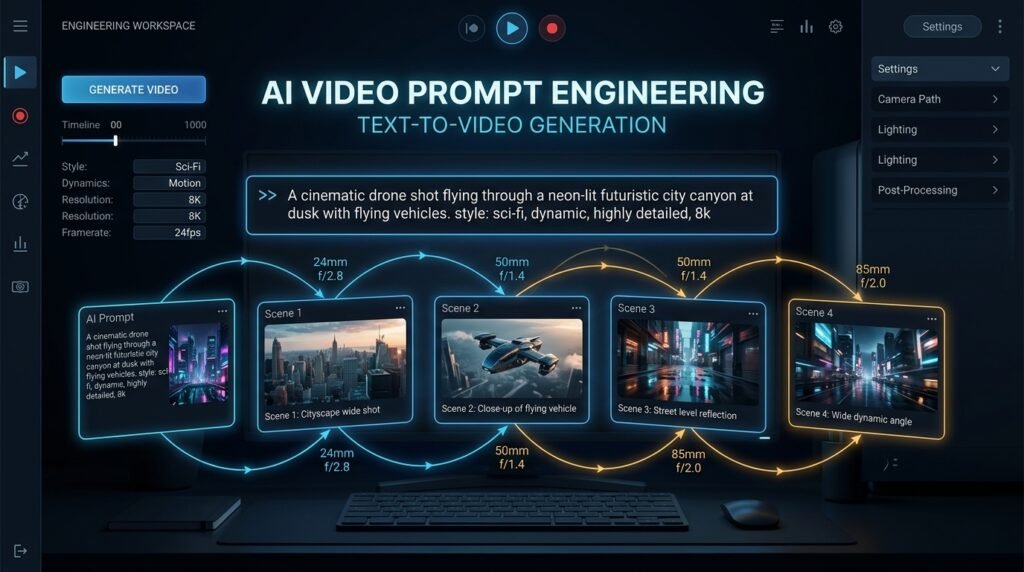
Creating a breathtaking, production-ready synthetic film begins long before a generative model calculates its first temporal frame. In the rapidly evolving domain of generative media, mastering AI video prompts is the single most valuable technical skill for creators, commercial video editors, and digital artists. While text-to-image models only require a static spatial description, AI video prompts must orchestrate motion trajectories, camera choreography, lighting dynamics, and temporal persistence across every passing second.
A simplistic command like “generate a cinematic video of a futuristic sports car” gives a diffusion model boundless room for hallucination, resulting in distorted physics, rubbery motion, and abrupt scene morphing. Conversely, structured AI video prompts communicate precise visual directives: what the viewer sees, how subjects interact with physical forces, and how the virtual camera navigates through the spatial environment. By learning proven architectural formulas, you can eliminate guesswork and produce visually stunning footage on your very first generation.
To accelerate your creative workflow, you can compose and test structured ideas in real time with EzzDo’s free, in-browser AI Video Prompt Generator. Because our suite of EzzDo free online tools processes logic client-side, your intellectual concepts remain 100% private on your local device without ever being stored on external servers.
Table of Contents
What Are AI Video Prompts and How Do Models Interpret Them?
An AI video prompt is a natural-language specification that guides deep generative models—such as diffusion transformers and latent video architectures—to synthesize coherent temporal sequences from noise. Unlike traditional 3D rendering engines that rely on geometry, vertex meshes, and keyframed rigs, AI video generators predict frame-to-frame pixel continuity based on mathematical representations derived from vast multimodal video datasets.
When compiling effective AI video prompts, you are directing a temporal simulation. Leading foundational architectures—such as OpenAI Sora, Runway Gen-3 Alpha, Luma Dream Machine, and Kling AI—evaluate your input across spatial and temporal dimensions simultaneously. To minimize visual artifacts and maintain logical consistency, professional AI video prompts must account for eight distinct variables:
- Subject Identity: Distinct anatomical, material, or mechanical characteristics of the primary subject.
- Primary Action: A focused, physically plausible kinetic motion occurring over time.
- Velocity and Pacing: The exact tempo of the motion (e.g., brisk sprint, slow-motion float, gradual acceleration).
- Spatial Environment: The architectural, atmospheric, and geographic setting anchoring the scene.
- Camera Perspective & Framing: Focal length, camera distance, and composition according to professional cinematic photography standards.
- Camera Trajectory: Precise mechanical movement through 3D space (tracking, dolly, pan, tilt, or crane).
- Illumination & Volumetric Atmosphere: Color temperature, key-to-fill light ratios, and environmental haze.
- Rendering & Film Stock Emulation: Lens texture, depth of field, shutter angle, and color grading palette.
The ultimate goal when crafting AI video prompts is not endless verbosity. Rather, superior AI video prompts remove semantic ambiguity, ensuring the neural network assigns its attention weights to intentional cinematic details rather than random probabilistic guesses.
A Practical Formula for Writing Structured AI Video Prompts
Professional cinematographers never arrive on set without a shot list and a blocking diagram. Similarly, professional prompt engineers do not write ad-hoc paragraphs; they employ standardized prompt formulas. The following battle-tested syntax forms the gold standard for high-fidelity AI video prompts:
[Shot Type & Angle] of [Subject Description] performing [Specific Motion] in [Environment & Weather], [Camera Movement & Lens], [Lighting Scheme & Palette], [Visual Aesthetic & Film Stock], [Atmospheric Depth], [Physics & Temporal Continuity Directive].
Let us observe this formula in practice through an authentic cinematic production prompt:
“Low-angle wide tracking shot of an athletic female runner in a reflective obsidian waterproof jacket sprinting through a rain-slicked Tokyo alley at twilight, camera tracking backward at matched speed from knee height, vibrant magenta and cyan neon signs reflecting across standing water puddles, volumetric street mist, 35mm anamorphic lens with subtle horizontal blue flare, natural kinetic stride physics, hyper-consistent clothing textures throughout the clip.”
Notice how every clause serves a distinct functional purpose. The AI video model receives unequivocal instructions on subject anatomy, camera speed, lens geometry, lighting sources, and physical realism. When writing your own AI video prompts, adherence to this formula guarantees consistent, repeatable visual results.
The 7 Essential Elements of High-Converting AI Video Prompts
To master the nuance of AI video prompts, you must dissect the seven building blocks that govern temporal diffusion models. Understanding how each parameter influences generation enables you to isolate and troubleshoot visual defects quickly.
1. Subject Definition and Anchor Attributes
The subject is the focal anchor of your frame. If your description is ambiguous, the neural network will struggle to maintain facial geometry and attire consistency from frame 1 to frame 120.
A businessman walking.A silver-haired Scandinavian architect in his late fifties wearing a tailored charcoal wool overcoat and dark horn-rimmed spectacles, carrying an olive canvas portfolio folder.Select three to four defining material markers—such as distinct eyewear, a specific textile weave, or recognizable color accents. In long-form AI video prompts, these visual anchors prevent the subject’s clothing from morphing into adjacent background textures.
2. Action Isolation and Velocity Vectors
A common error in novice AI video prompts is stringing together too many compound actions. Prompting a subject to “open the car door, sit down, ignite the engine, glance in the rear-view mirror, and drive off” will inevitably result in anatomical melting. In 4-second to 10-second clips, limit your generation to one primary kinetic action and specify its direction and speed.
A chef prepares a dish and talks to customers.A sushi master methodically slices a fresh salmon fillet with a polished yanagiba knife in a smooth, continuous single motion, lifting the translucent slice with practiced delicacy.3. Environmental Complexity and Spatial Depth
Backgrounds should never be flat backdrops; they provide physical context and depth cues that stabilize AI motion tracking. When crafting AI video prompts, delineate the foreground, midground, and background elements:
4. Camera Framing and Lens Focal Lengths
Rather than using informal phrases like “zoom in close,” leverage authentic optical terminology that contemporary video models have ingested during training. Specific millimeter focal lengths produce immediate optical fidelity:
5. Camera Trajectory and Kinetic Rigging
Camera motion transforms a static image into a dynamic visual narrative. In sophisticated AI video prompts, always designate whether the camera movement is matched to the subject or independent of it:
6. Lighting Architecture and Color Grading
Lighting establishes emotional tone, defines volumetric contours, and guides the viewer’s gaze. Generic descriptions like “bright lighting” result in flat, uninspired video renders. Enhance your AI video prompts with precise illumination styles:
7. Film Emulation and Shutter Dynamics
Finally, ground your synthetic video in authentic analog cinema aesthetics to avoid the stereotypical “smooth plastic AI look.” Incorporate film stock descriptors into your AI video prompts:
Kodak Vision3 500T 5219: Rich cinematic grain, authentic tungsten halation, and rich shadow detail.Technicolor 3-Strip: Punchy vintage saturation, hyper-distinct reds and greens, reminiscent of classic Hollywood.180-Degree Shutter Angle: Natural motion blur that mimics standard 24fps cinema projection without stutter or temporal jitter.Weak vs. Improved AI Video Prompts: Real-World Comparisons
The difference between amateur results and commercial-grade generation lies entirely in how you engineer your AI video prompts. Examine these real-world transformations to understand how specific descriptors rectify common generation defects:
Scenario A: Luxury Automotive Commercial
Amateur Prompt: “A fast luxury sports car driving on a coastal road at sunset with cinematic lighting.”
Failure Mode: The car warps into different models, wheels spin backwards, and background mountains drift unnaturally.
Optimized AI Video Prompt: “Wide low-angle tracking shot of a metallic silver Porsche 911 cruising smoothly along California Highway 1, camera mounted to chase vehicle maintaining 45mph parallel distance, golden sunset light casting long warm reflections along the polished aerodynamic curves, ocean waves crashing against sea cliffs in the background, 35mm Arri Alexa LF look, photorealistic physics, crisp rim illumination.”
Scenario B: Cyberpunk Sci-Fi Character Sequence
Amateur Prompt: “Cyberpunk girl looking around in a future city with neon lights.”
Failure Mode: Rubbery eye movements, melting cybernetic implants, flickering background signage.
Optimized AI Video Prompt: “Medium close-up push-in shot of a young East Asian female hacker with braided lavender hair and chrome sub-dermal neck ports, slowly turning her head toward camera with an intense determined expression, bustling multi-level Neo-Seoul night market in soft background focus, holographic advertisements casting alternating cobalt and vermilion light across her skin, 85mm prime lens, shallow depth of field, 24fps motion cadence.”
15 Tested AI Video Prompts Across Popular Creative Niches
Below is a curated library of 15 production-ready AI video prompts across five distinct commercial categories. You can copy, modify, and deploy these prompt frameworks directly into your chosen generative platform:
Category 1: Cinematic Narrative and Film Production
Prompt 1 (Neo-Noir Detective): “Slow dolly-in shot toward a grizzled private investigator in a wet beige trench coat leaning against a brick doorway under flickering streetlight, exhale of dense cigarette smoke drifting up into heavy rain, high-contrast black-and-white film noir aesthetic, deep shadows, 50mm vintage Cooke lens, authentic film grain.”
Prompt 2 (Sci-Fi Space Exploration): “Over-the-shoulder wide tracking shot of an astronaut in an orange EVA pressure suit gazing out an orbital station observation cupola at planet Earth revolving below, slow celestial camera drift, pristine sunlight spilling across the cockpit instrumentation, zero-gravity dust motes, IMAX 70mm clarity.”
Prompt 3 (Historical Epic Battle): “Low-angle sweeping crane shot rising above a medieval knight in battered plate armor standing amidst banners in a misty Scottish highland dawn, fabric whipping violently in the cold wind, desaturated earth tones, gritty volumetric fog, 24mm wide angle, visceral historical realism.”
Category 2: Commercial Product Showcases & Advertising
Prompt 4 (Luxury Timepiece): “Extreme macro 360-degree orbital rotation around a skeletonized titanium wristwatch resting on obsidian glass, razor-sharp studio edge-lighting revealing micro-engraved gears oscillating steadily, deep black infinite void, pristine optical reflections, premium luxury commercial grade.”
Prompt 5 (Cosmetic Skincare): “Gentle slow-motion push-in toward an amber glass serum bottle resting on wet basalt stone, a single translucent viscous droplet sliding down the dropper, soft diffused spa morning daylight, fresh eucalyptus foliage blurred in background, ultra-clean commercial aesthetic.”
Prompt 6 (Beverage Refreshment): “High-speed macro tracking shot following chilled sparkling water being poured forcefully into a condensation-covered crystal tumbler with lime wedges, fizzy bubbles erupting upwards in 120fps slow motion, backlight creating brilliant diamond glints, hyper-crisp beverage commercial.”
Category 3: Nature, Wildlife, and Environmental Documentaries
Prompt 7 (Arctic Wildlife Tracking): “Telephoto 200mm side tracking shot of a majestic polar bear lumbering across a jagged blue sea-ice shelf, breath condensing heavily in sub-zero Arctic air, soft pale overcast daylight, powdery snow kicking up behind massive paws, National Geographic documentary authenticity.”
Prompt 8 (Rainforest Canopy Drone): “Smooth aerial drone flyover gliding gently above a misty Amazonian rainforest canopy at dawn, golden sunrise rays breaking through rising humidity fog, flock of scarlet macaws bursting across the green expanse, expansive cinematic depth, stabilized horizon.”
Prompt 9 (Desert Solitude): “Ultra-wide static landscape framing of wind howling across the sculpted red sand dunes of the Namib Desert, continuous rhythmic ripple patterns forming across sand crests, harsh midday desert heat haze, vivid blue sky contrast, BBC Planet Earth cinematography.”
Category 4: Animated, Fantasy, and Stylized Aesthetics
Prompt 10 (Studio Ghibli Anime Fantasy): “Medium wide pan following a young girl in an indigo pinafore riding a vintage bicycle across an emerald seaside meadow, fluffy cumulus clouds towering across an azure sky, vibrant hand-painted anime watercolor background, wind fluttering grass and ribbon, warm nostalgic summer atmosphere.”
Prompt 11 (Claymation Stop-Motion): “Quirky close-up of a whimsical clay detective inspecting miniature clue footprints on a wooden parquet floor with a magnifying glass, visible fingerprint impressions on clay surfaces, charming 12fps tactile stop-motion stutter, warm tungsten desk lamp lighting, Laika studio aesthetic.”
Prompt 12 (Cyberpunk Isometric Miniature): “Tilt-shift miniature perspective looking down into a crowded neon-lit Tokyo crossroads, miniature synthetic delivery vehicles scurrying like clockwork, blurred top and bottom focal planes, vibrant bioluminescent purples and magentas, whimsical futuristic diorama.”
Category 5: Architectural Walkthroughs & Industrial Design
Prompt 13 (Brutalist Minimalist Interior): “Slow steadycam forward push through a monumental raw concrete villa living pavilion, floor-to-ceiling glass reveals a tranquil Japanese stone garden, morning light casting geometric diagonal window shadows across polished oak floors, Architectural Digest editorial elegance.”
Prompt 14 (Automated High-Tech Manufacturing): “Smooth robotic dolly tracking across a pristine microchip cleanroom, multi-axis automated robotic arms welding silicon wafers with precision golden laser pulses, sterile white LED lighting, specular stainless steel reflections, cutting-edge semiconductor industry documentary.”
Prompt 15 (Futuristic Solarpunk Cityscape): “Sweeping aerial panoramic orbit of a lush vertical garden skyscraper covered in blooming terraces and solar-paneled canopies, clean electric airborne transit shuttles gliding silently between towers, crystal-clear blue skies, hopeful utopian Solarpunk architectural visualization.”
Each of these AI video prompts incorporates the foundational pillars of subject, environment, motion, lighting, and camera mechanics, guaranteeing dependable model execution across platforms.
How to Maintain Character Consistency in AI Video Prompts
The greatest hurdle when building narrative projects with AI video prompts is character drift. Because diffusion models generate frames from randomized seed noise, the facial structure, hairstyle, or attire of your protagonist can change dramatically between shots. To enforce strict identity retention across successive AI video prompts, implement these advanced strategies:
- Establish an Unyielding Baseline Persona: Create a persistent 25-word character description and paste it verbatim into every single prompt in your sequence. Never alter the subject’s stated age, ethnic traits, or distinguishing markers.
- Select High-Contrast, Immutable Wardrobe Pieces: Dress your protagonist in unique, unmistakable garments—such as an emerald trench coat with brass buttons or a distinctive amber scarf. Video models cling to high-contrast textile anchors far better than generic shirts.
- Leverage Multimodal Image-to-Video References: Whenever supported (such as Runway Gen-3 or Kling AI), use a clean photographic headshot as the first-frame reference input, utilizing text solely to prompt camera trajectory and kinetics.
- Limit Co-Starring Characters: Introducing three or four interacting humans into one prompt exponentially multiplies facial warping. Isolate single-subject actions and intercut between individual character close-ups during editing.
- Utilize Consistent Seed Values: In platforms supporting explicit seed configuration, lock the integer seed across similar lighting setups to minimize facial drift.
Here is an example of an immutable character descriptor that holds its fidelity across dozens of individual AI video prompts:
“Persistent Subject Directive: Elena, a 32-year-old Mediterranean wildlife biologist with shoulder-length curly chestnut hair tied in a loose bandana, wearing a weathered olive ripstop field vest over an ivory henley, carrying brass binoculars.”
Architecting Multi-Shot Cinematic Sequences with AI Video Prompts
Amateur creators frequently try to condense a complete 3-act story into a single 5-second video clip. The outcome is inevitably distorted. Professional filmmakers utilize AI video prompts to construct individual, atomic shots that are later assembled in a video editor. A standard 5-shot cinematic sequence should follow classical Hollywood blocking:
- Shot 1: Extreme Wide Establishing Shot (EWS): Ground the geography. Focus entirely on the atmosphere, architectural scale, and weather conditions. Minimal subject motion.
- Shot 2: Medium Full Shot (MFS): Introduce the primary subject within their immediate environment. Establish their physical posture and spatial orientation.
- Shot 3: Dynamic Tracking / Action Shot: Capture the primary kinetic action (running, crafting, inspecting an artifact) with matched camera tracking.
- Shot 4: Close-Up Reaction Shot (CU): Zero in on emotional nuance, eye line, and psychological response using an 85mm prime lens and shallow depth of field.
- Shot 5: Wide Pull-Back Ending Shot: The camera pulls back or cranes upward, releasing emotional tension and leaving the subject within the broader world.
By engineering separate AI video prompts for each individual shot while preserving the environmental and character anchors, you can produce a professional 30-second commercial or narrative scene with cinematic continuity.
Model-Specific Syntax Guide for Modern AI Video Prompts
While fundamental cinematography concepts translate across all generative engines, individual platforms interpret AI video prompts through distinct algorithmic lenses. Adapting your prompt syntax to your destination engine unlocks superior fidelity:
OpenAI Sora Prompting Nuances
OpenAI Sora relies heavily on expansive descriptive prose rather than comma-separated keywords. Sora excels at world simulation, physical dynamics, and multi-element spatial choreography. Structure your Sora AI video prompts with complete, grammatically sophisticated narrative paragraphs that describe cause and effect.
Runway Gen-3 Alpha Camera Controls
Runway Gen-3 Alpha responds with astonishing precision to standard cinematic camera commands. Explicit directives like [Camera: Slow zoom in], [Motion: Fast dolly track], or Focal Length: 24mm directly constrain camera vectors. Avoid purple prose; prioritize objective optical descriptions.
Kling AI and Luma Dream Machine Physics
Kling AI demonstrates unmatched capability in simulating realistic human limb movements, cloth physics, and extended 10-second sequences. Meanwhile, Luma Dream Machine shines in fluid object morphing, dynamic camera speed ramps, and surreal conceptual sequences. When drafting AI video prompts for these engines, clearly indicate the mechanical speed and physical weight of objects.
Common Mistakes to Avoid When Drafting AI Video Prompts
Even seasoned digital creators encounter frustrating generation failures. Analyzing hundreds of degraded clips reveals seven recurring pitfalls that undermine AI video prompts:
- Relying on Empty Buzzwords: Appending adjectives like “hyper-realistic,” “mind-blowing,” “4K,” or “trending on ArtStation” consumes attention budget without conveying actionable spatial instructions. Replace buzzwords with specific lighting, lens, and textural parameters.
- Overloading Multiple Unrelated Actions: Demanding that a character “run, drop their bag, jump into a river, and swim across” in a single generation creates warped limbs and impossible trajectories. Isolate each action into dedicated AI video prompts.
- Conflicting Directional Directives: Specifying “camera locked off on tripod, fast orbital crane sweep” forces the diffusion model to reconcile mutually exclusive directives, leading to jittery frame stutter.
- Ignoring Aspect Ratio Parameters: Forgetting to declare aspect ratios (such as
--ar 16:9for horizontal cinema or--ar 9:16for vertical TikTok/Reels) leads to awkward cropping and distorted focal lengths. - Neglecting Negative Prompting Where Supported: On platforms supporting negative parameters, failing to exclude common artifacts—such as “mutated limbs, duplicate faces, floating objects, watermark, distorted hands”—substantially increases failure rates.
- Expecting Perfection on Attempt #1: Generative models are probabilistic. Systematic creators treat AI video prompts as code: adjust one variable at a time (e.g., modify only the lighting clause) to isolate what enhances the output.
- Over-Describing Microscopic Details: Attempting to specify the exact button engravings on a character’s cuff will confuse the global latent representation. Focus on prominent silhouettes and macro light interactions.
How to Use the EzzDo AI Video Prompt Generator
To streamline the engineering process and ensure you never miss critical cinematographic parameters, we developed the free EzzDo AI Video Prompt Generator. Follow these simple steps to assemble production-grade prompts in under 60 seconds:
- Select Your Core Creative Style: Choose from presets including Cinematic Photorealism, Vintage 35mm Grain, Anime Watercolor, Cyberpunk Neon, or Studio Product Showcase.
- Define the Primary Anchor Subject: Input your subject’s physical traits, attire, and core visual markers.
- Specify Action and Kinetic Velocity: Describe the singular movement vector occurring across the shot.
- Select Camera Framing & Lens Geometry: Choose optical focal lengths ranging from 16mm ultra-wide to 105mm telephoto compression.
- Configure Camera Mechanical Movement: Choose dynamic tracking, slow cinematic push-ins, high-speed drone sweeps, or tripod locked-off framing.
- Set Lighting Temperature & Environment: Select volumetric dawn haze, studio softboxes, chiaroscuro rim lighting, or bioluminescent neon reflections.
- Synthesize and Copy: Review your compiled formula in our live typing console, copy the text to your clipboard with one click, and paste it directly into your video generation platform.
For video producers managing client campaigns, check out our companion tools such as the Keyword Density Checker to audit your prompt vocabulary, or the Meta Tag Generator to optimize your video portfolio pages for search engines.
Responsible and Ethical Guidelines for AI Video Creation
With great generative power comes significant societal responsibility. As synthetic video technology attains photorealistic fidelity, creators must uphold high ethical and legal standards when drafting AI video prompts:
Frequently Asked Questions About AI Video Prompts
What is the ideal word count for effective AI video prompts?
There is no rigid character ceiling, but most leading video models deliver optimal results with AI video prompts between 40 and 80 words (approximately 250 to 500 characters). This length provides sufficient detail to establish subject, camera, lighting, and physics without diluting the model’s latent attention.
How do camera movement terms improve AI video prompts?
Authentic camera terminology (e.g., “tracking shot,” “dolly in,” “crane boom,” “35mm lens”) provides mathematical constraints on spatial translation. Because video models are trained on tagged cinematography footage, these keywords directly guide camera vector interpolation.
Can a single AI video prompt generate multiple sequential scenes?
While emerging platforms experiment with multi-shot prompts, results frequently suffer from abrupt visual jumping and inconsistent characters. The industry best practice is generating individual shots using dedicated AI video prompts and editing them together in software like DaVinci Resolve or Premiere Pro.
Should I use negative prompts when building AI video prompts?
Yes. When supported by your platform, negative prompts filter out undesirable artifacts such as frame warping, rubbery hands, flickering textures, and unexpected morphing, dramatically boosting your success rate.
Can I use generated AI video prompts commercially?
Yes. Prompts and creative concepts you author are your intellectual property. Commercial usage rights for the rendered video clips depend on the specific licensing terms of your chosen video generation platform.
Does EzzDo store my creative concepts or prompts?
No. The EzzDo AI Video Prompt Generator runs 100% client-side inside your browser sandbox. No creative prompts, ideas, or text entries are ever uploaded or saved to EzzDo servers.
Why does the generated video output deviate from my prompt?
Diffusion models interpret prompt tokens probabilistically rather than deterministically. Conflicting instructions, excessive actions, or unfamiliar terms cause the model to improvise. Simplify your prompt to its core components and iterate systematically.