
How to Calculate Percentage Increase and Percentage Decrease
Calculate how much a value has risen or fallen and understand the difference between percentage change and percentage points.
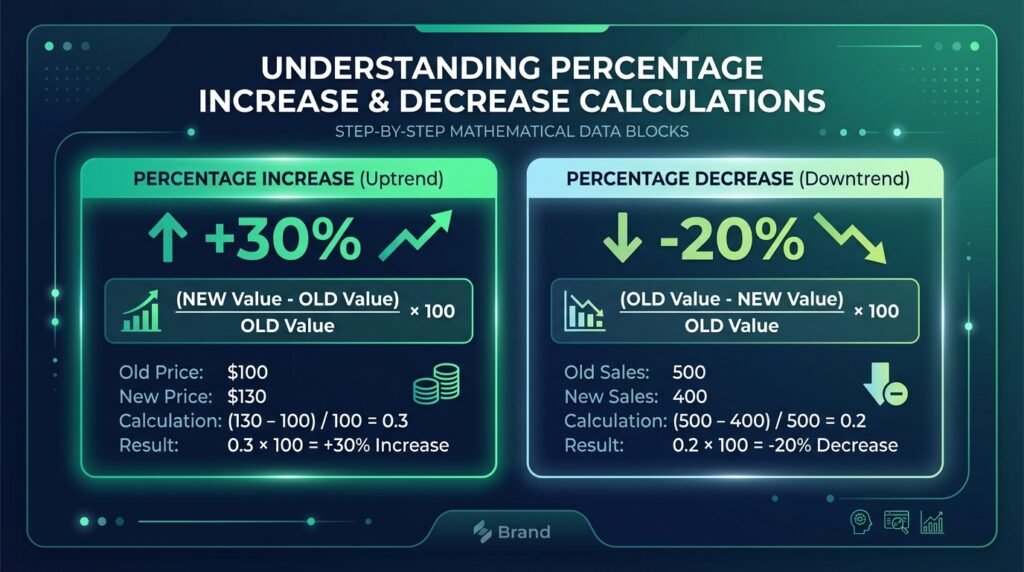
Learning how to calculate percentage increase and percentage decrease is an indispensable quantitative skill for financial analysts, business owners, software engineers, marketers, and students. Percentage change measures how much a value has increased or decreased relative to its original amount, providing an intuitive, normalized metric that transcends absolute currency denominations or physical unit scales. Whether you are reviewing quarterly earnings reports, tracking retail inflation, adjusting engineering server loads, or evaluating personal investment portfolios, understanding the mathematical mechanics of relative percentage change ensures you interpret numerical shifts with precision.
In modern commercial and technical environments, professionals routinely track and calculate percentage changes across a wide spectrum of essential performance indicators:
- Prices: Tracking supplier cost updates, seasonal markdowns, and consumer inflation indices published by the Bureau of Labor Statistics.
- Revenue: Measuring quarterly revenue growth, annual sales velocity, and gross margin shifts across commercial units.
- Website traffic: Auditing monthly increases in unique site visits, organic search impressions, and ad conversion rates.
- Salaries: Evaluating merit pay increases, cost-of-living salary bumps, and departmental payroll budgets.
- Expenses: Monitoring software hosting subscriptions, utility costs, and logistical freight charges.
- Test results: Assessing student exam score improvements and clinical trial efficacy metrics.
- Investment values: Benchmarking stock market gains, dividend yields, and asset portfolio performance.
- Inventory levels: Managing warehouse reorder thresholds and supply chain depletion velocity.
To evaluate these shifts instantly without manual long division or scratch paper, use EzzDo’s free online Percentage Calculator for an immediate, reliable result.
Table of Contents
The Core Mathematical Formula to Calculate Percentage Increase
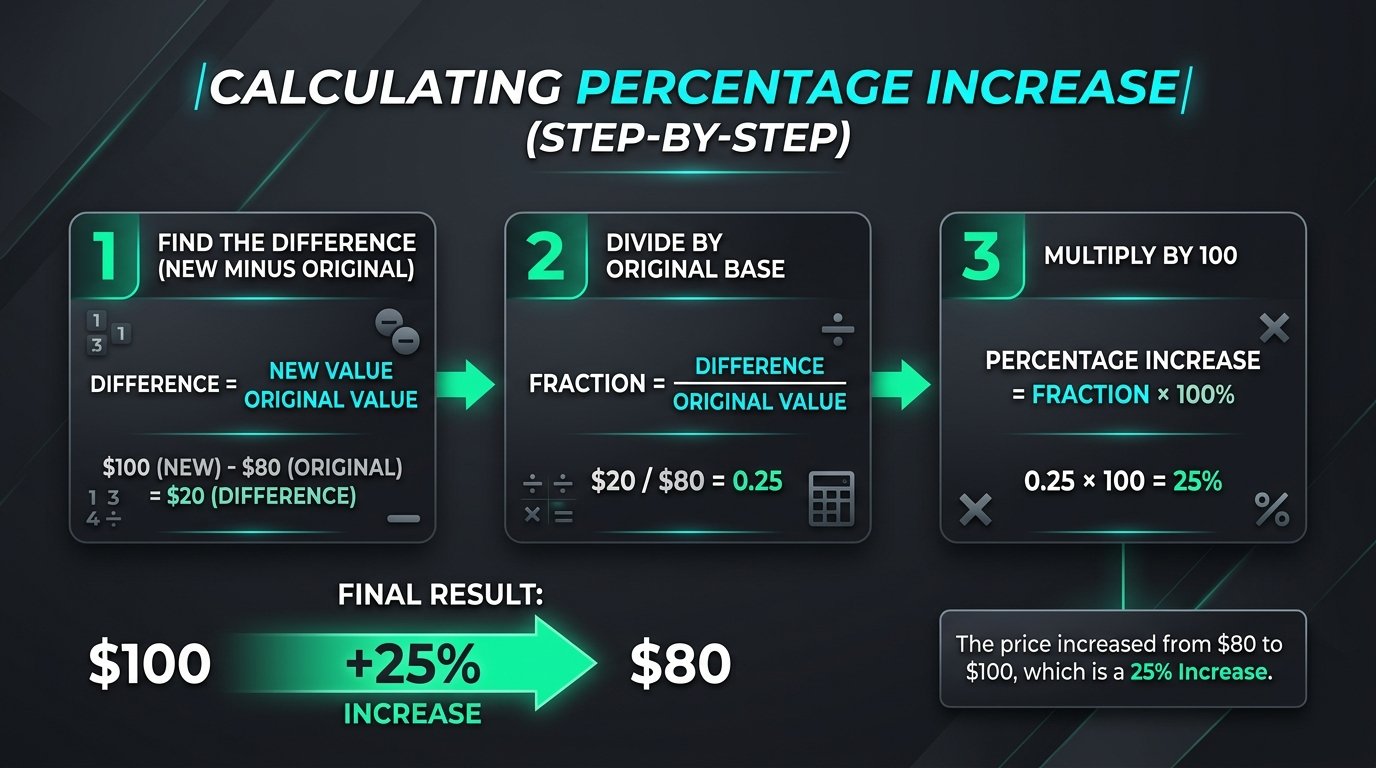
When you need to calculate percentage increase, you are determining the relative growth of a quantity from its initial starting point to its new, higher value. The fundamental formula expresses the difference between the two numbers as a fraction of the original baseline, which is subsequently converted into a percentage by multiplying by 100:
Percentage Increase = ((New Value - Original Value) / Original Value) * 100Alternatively, whenever analysts calculate percentage increase, they conceptualize the operation in three distinct, easily verifiable stages:
- Determine the Absolute Difference: Subtract the original value from the new value.
- Divide by the Original Value: Divide that difference by the original baseline amount.
- Scale to a Percentage: Multiply the resulting quotient by 100 to yield a percentage.
Step-by-Step Worked Example: Calculating a Retail Price Increase
Suppose the retail price of an item rises from $80 to $100. Let us calculate percentage increase step by step:
- Step 1: Calculate the difference:
$100 - $80 = $20 - Step 2: Divide by the original value:
$20 / $80 = 0.25 - Step 3: Convert to a percentage:
0.25 * 100 = 25%
The price increased by exactly 25%. In this calculation, the $20 rise is evaluated strictly relative to the starting price of $80, meaning that every dollar of increase represents 1.25% of the starting value. When businesses calculate percentage increase across product lines, this relative view reveals true growth momentum.
Percentage Decrease Formula: Mathematical Rules and Practical Calculations
Just as an upward shift is quantified as an increase, a downward movement is measured as a percentage decrease. The percentage decrease formula calculates how much a value has dropped relative to its starting amount:
Percentage Decrease = ((Original Value - New Value) / Original Value) * 100If you prefer using a single universal equation for both positive and negative movements, you can consistently apply ((New Value - Original Value) / Original Value) * 100. When the result is negative, the negative sign mathematically indicates a percentage decrease of that magnitude. Financial modelers use this unified method so they can calculate percentage increase or decrease within the same spreadsheet cell.
Step-by-Step Worked Example: Monthly Expense Reduction
Suppose a business implements efficiency measures and successfully reduces its monthly expenses from $500 to $425:
- Step 1: Calculate the difference:
$500 - $425 = $75 - Step 2: Divide by the original value:
$75 / $500 = 0.15 - Step 3: Convert to a percentage:
0.15 * 100 = 15%
Monthly expenses decreased by 15%. Whenever budget managers calculate percentage increase or decrease across fiscal quarters, pairing these formulas with EzzDo’s Discount Calculator ensures clear commercial projections.
Why the Original Value Matters: The Mathematical Law of Denominator Asymmetry
One of the most frequent misconceptions in quantitative reasoning arises from ignoring the denominator. When people observe two numbers, they often assume that moving from point A to point B involves the same percentage magnitude as moving from point B back to point A. In mathematical reality, percentage change uses the original amount as the fundamental reference baseline. Whenever you calculate percentage increase, your baseline denominator controls the entire proportion.
Consider the comparison of moving between 50 and 75:
- An increase from 50 to 75 is:
25 / 50 * 100 = 50% - A decrease from 75 back to 50 is:
25 / 75 * 100 = 33.33%
The increase and decrease percentages are not equal because they use different original values. An increase from 50 to 75 evaluates the 25-unit rise against a smaller base (50), yielding 50%. A decrease from 75 to 50 evaluates the same 25-unit fall against a larger base (75), yielding 33.33%. Economists who calculate percentage increase across macroeconomic indicators constantly account for this base effect.
Reversing a Percentage Change: Why Symmetrical Shifts Create Asymmetric Outcomes
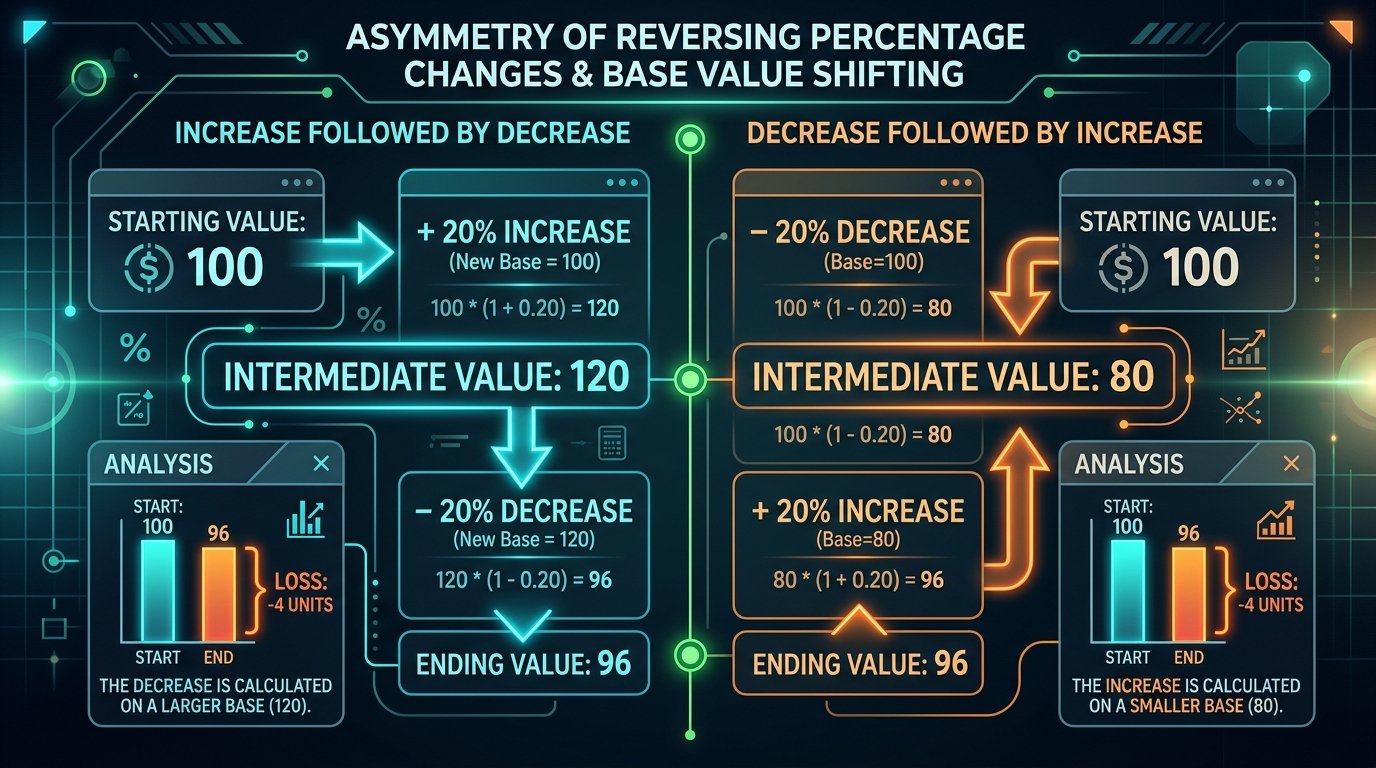
A 20% increase followed by a 20% decrease does not return to the starting value. When investors calculate percentage increase on market assets, failing to recognize this asymmetry creates distorted growth expectations.
Let us trace what occurs starting with an initial balance of 100:
- Start with 100: 100 increased by 20% = 120.
- Decrease 120 by 20%:
120 - 24 = 96.
The final value is 96, not 100. To reverse a percentage increase exactly, calculate using the changed base rather than subtracting the same percentage. When evaluating volatile market assets, knowing how to calculate percentage increase and subsequent drawdown dynamics protects investor capital.
The Exact Formula Required to Reverse a Percentage Shift
If a value has increased by p%, the required decrease percentage to return to the original value is given by (p / (100 + p)) * 100. For a 20% increase, you need a decrease of (20 / 120) * 100 = 16.67%. Similarly, if an asset drops 50%, an investor must achieve a 100% gain—doubling the remaining balance—to reach break-even. To model strategic financial yields when you calculate percentage increase, evaluate capital trajectories with EzzDo’s ROI Calculator.
Percentage Difference vs Percentage Change: Comparing Unordered Datasets
Percentage difference is often used when comparing two values without treating either one as the original. When analysts mistakenly try to calculate percentage increase on unordered items, the choice of denominator distorts the finding.
A common formula is: Percentage Difference = (Absolute Difference / Average of Both Values) * 100.
Worked Example: Comparing Two Unordered Numbers
For 80 and 100, we compute:
- Absolute Difference:
|80 - 100| = 20 - Average:
(80 + 100) / 2 = 90 - Percentage Difference:
20 / 90 * 100 = 22.22%
Percentage difference and percentage change answer different questions. If 80 is the original, you calculate percentage increase as 25%. If 100 is original, the decrease is 20%. Percentage difference bridges both via neutral midpoint benchmarking recognized by the National Institute of Standards and Technology.
Percentage vs Percentage Points: Avoiding Costly Communication Errors
Suppose an interest rate rises from 5% to 7%. Conflating percentages with percentage points creates significant financial confusion. If an analyst fails to distinguish them when they calculate percentage increase, stakeholders receive distorted projections.
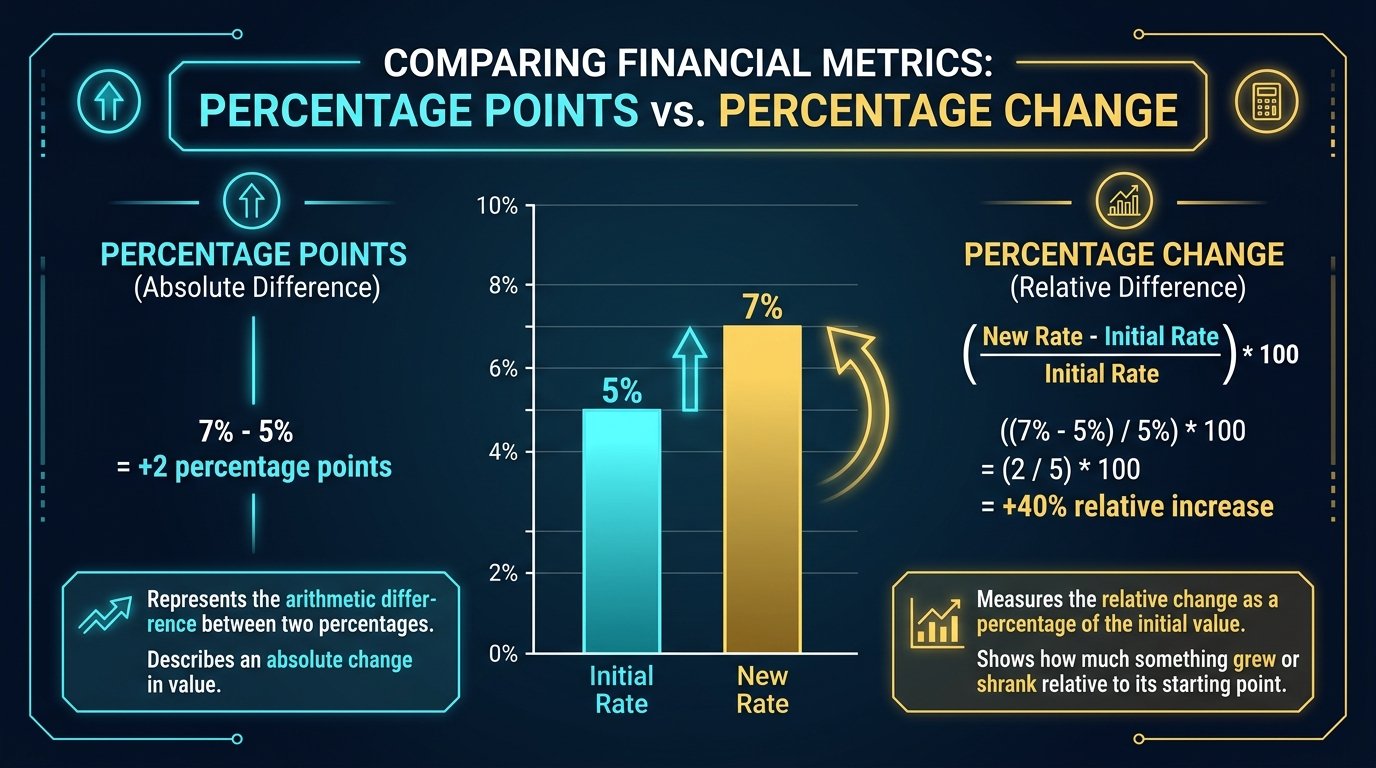
- The increase is: 2 percentage points (
7% - 5% = 2). - The relative percentage increase is:
(7 - 5) / 5 * 100 = 40%.
Saying “a 2% increase” would be ambiguous and inaccurate. A 2% increase on 5% is only 5.10%. Use “percentage points” when comparing two percentages directly, and use “percentage change” whenever you calculate percentage increase across relative financial metrics.
Finding a Percentage of a Number: Everyday Proportions and Commercial Discounts
Before you calculate percentage increase across sequential events, you must frequently compute the basic percentage portion of a known quantity:
Result = Value * (Percentage / 100)Practical Example: Calculating 15% of 240
To calculate 15% of 240:
- Multiply by the decimal:
240 * 0.15 = 36 - Therefore: 15% of 240 is 36.
This elementary operation forms the building block for calculating sales taxes, estimating commissions, and configuring commercial markdowns. When business teams need to calculate percentage increase or proportional shares, EzzDo’s online Percentage Calculator provides instantaneous numerical validation.
Edge Cases, Negative Bases, and Compounding in Percentage Analysis
Edge Cases and Advanced Scenarios When You Calculate Percentage Increase
In real-world data science and business operations, financial figures do not always behave like tidy positive integers. Analysts must navigate several critical edge cases whenever they calculate percentage increase across volatile metrics:
| Scenario Type | Mathematical Challenge | Proper Analytical Treatment |
|---|---|---|
| Starting Base is Zero | Division by zero is undefined (X / 0). |
Do not calculate percentage change. Report as absolute unit increase or denote as “N/A / New Baseline”. |
| Negative to Positive Shift | Negative denominator flips sign unpredictably. | Standard formula produces misleading negative signs. Use absolute denominator (New - Old) / |Old| * 100 with explanatory footnotes. |
| Values Exceeding 100% | Growth exceeds double the original baseline. | Completely valid. A triple-digit percentage increase (e.g., +250%) accurately reflects exponential expansion. |
| Decreases Beyond 100% | Physical counts cannot fall below zero. | Only applicable if metric permits negative states (e.g., cash flow). For physical goods, 100% drop is the absolute ceiling. |
When analyzing historical stock performance or multi-year economic data documented on Investopedia, financial professionals also distinguish between simple arithmetic percentage changes and the Compound Annual Growth Rate (CAGR), which accounts for exponential compounding over successive annual intervals when experts calculate percentage increase across extended periods.
7 Best Rules to Calculate Percentage Increase Accurately
To eliminate computational errors in your reports and software applications, adopt this definitive 7-step checklist whenever you need to calculate percentage increase or decrease:
- Explicitly Identify the Original Reference Baseline: Always pinpoint the chronologically earlier or true baseline amount. Your denominator governs the scale of your entire result whenever you calculate percentage increase.
- Confirm Movement Direction Before Calculating: Note whether the new value represents an upward trajectory or downward slide to prevent inverted signs when you calculate percentage increase or decrease.
- Calculate the Exact Numerical Difference: Subtract the smaller number from the larger number to obtain clean, unambiguous absolute difference values before dividing.
- Divide Exclusively by the Original Denominator: Ensure you never mistakenly divide by the new resulting value or an arbitrary midpoint unless calculating percentage difference.
- Scale Decimal Quotients by 100: Accurately shift decimal positions two places to the right to express decimal proportions as clean percentage values.
- Distinguish Between Percentages and Percentage Points: When comparing metrics that already represent rates, explicitly state percentage points to avoid communication ambiguity.
- Preserve Full Intermediate Precision: Never round early during division. Retain floating-point accuracy and apply display rounding only to the final percentage output.
Practical Industry Verification Workflows and Analytical Best Practices
In quantitative corporate reporting and financial analytics, practitioners must consistently calculate percentage increase with rigorous auditability. Whether managing venture capital portfolios, assessing municipal tax shifts, or analyzing supply chain logistics, numerical clarity ensures sound decision-making.
Modern enterprise resource planning software and business intelligence dashboards frequently automate growth calculations across millions of transaction rows. However, data engineers and financial analysts must understand the underlying mathematical foundations so they can validate reporting integrity whenever discrepancies emerge between raw transactional databases and aggregated executive reports.
To ensure consistent mathematical rigor across organizational workflows, always combine automated tooling with manual spot checks on sample data cohorts. Leveraging validated tools like EzzDo’s online Percentage Calculator provides rapid verification for financial modeling, retail merchandise pricing, and performance analytics across all standard commercial applications.
In spreadsheet applications like Microsoft Excel and Google Sheets, computing relative changes is among the most frequent everyday quantitative tasks. To determine growth between two sequential data points, you input the formula with parentheses ensuring subtraction occurs before division. Formatting the resulting cell with the percentage style command automatically shifts the decimal point two places and appends the standard universal percent symbol. Furthermore, database queries written in structured query language frequently compute proportional shifts using similar arithmetic expressions within aggregate select statements. By standardizing these computational formulas across analytical systems and operational dashboards, technical teams ensure that financial reports remain consistent, auditable, and reliable across all departmental stakeholders and corporate executive teams.