
How to Create SEO-Friendly URL Slugs for Blog Posts
Discover how to turn article titles into readable URL slugs and avoid common mistakes that make website addresses difficult to understand.
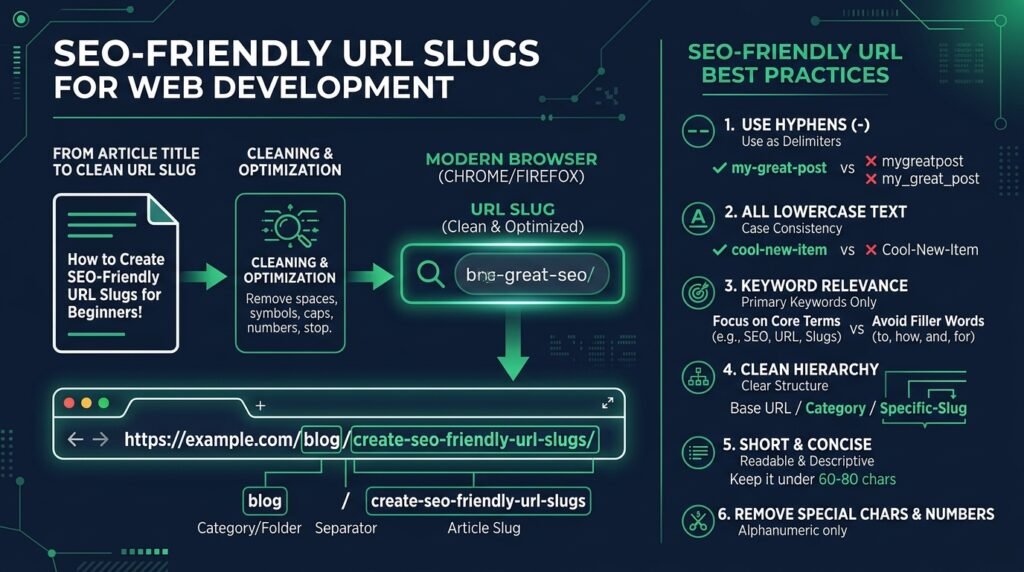
Mastering how to create SEO-friendly URL slugs is a fundamental building block of modern website architecture and digital content strategy. A URL slug is the specific part of a web address that identifies a particular page or post in a human-readable format. When users browse search engine results, social media feeds, or shared links, clean and descriptive web addresses communicate immediate topic relevance. Designing structured SEO-friendly URL slugs improves organic search visibility, enhances user navigation, and ensures long-term link durability.
For example, an article titled “How to Create Clean Permalinks for Blog Posts” should avoid cryptic database query parameters and instead adopt a clean, keyword-focused path:
https://example.com/blog/create-seo-friendly-url-slugs/
In this address, the terminal path segment create-seo-friendly-url-slugs serves as the slug. Whenever you need to transform draft headlines into clean permalinks, you can generate a suitable starting point using EzzDo’s free online Slug Generator to automate case formatting, stop word removal, and delimiter conversion.
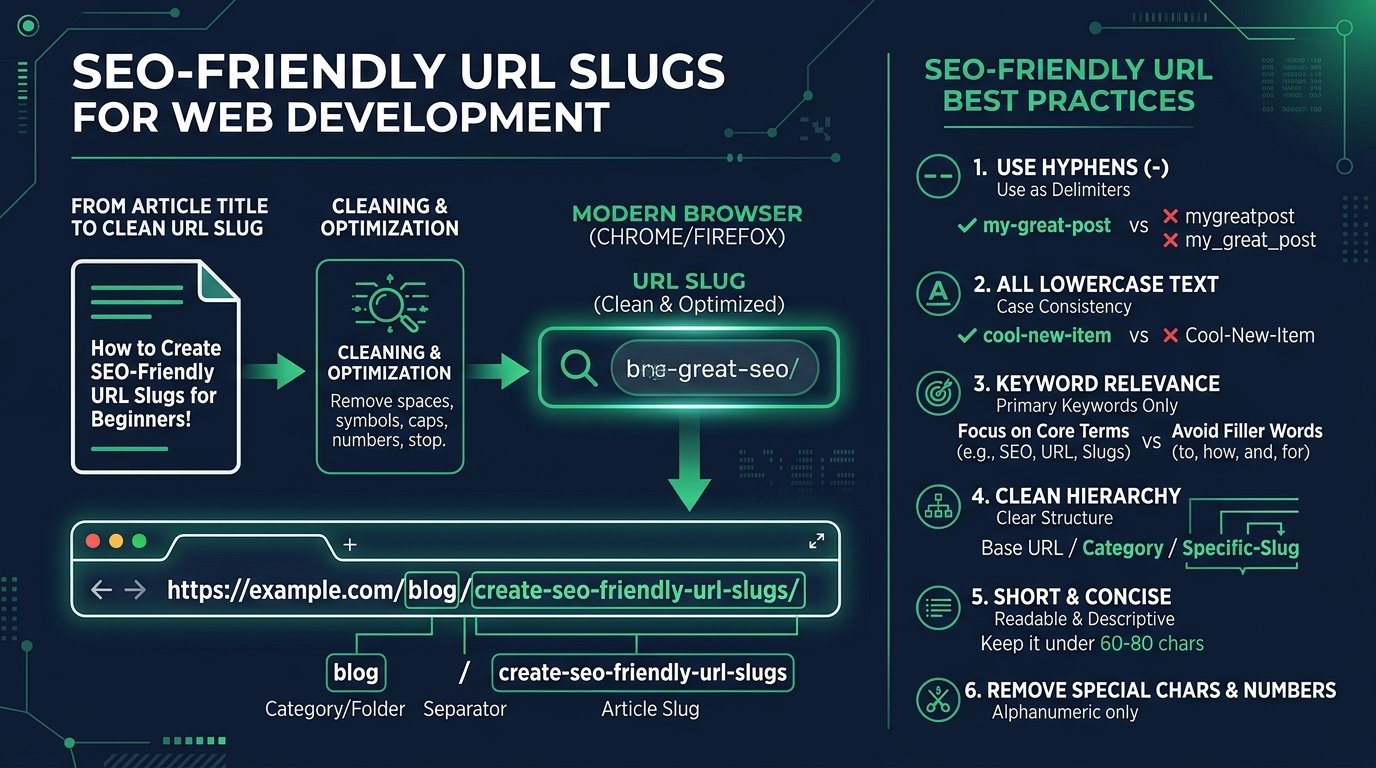
Understanding the architectural principles behind SEO-friendly URL slugs allows publishers and engineering teams to construct maintainable permalink taxonomies that stand the test of time.
Table of Contents
Understanding SEO-Friendly URL Slugs: Architecture and Impact
In web mechanics, a Uniform Resource Locator consists of several distinct layers: the protocol scheme (https://), the domain name (example.com), optional subdirectory folders (/blog/), and the final resource identifier known as the slug. In content management systems, this terminal path segment functions as the human-facing handle for the database record.
Modern search engines prioritize user experience when evaluating web content. When you establish SEO-friendly URL slugs, you provide search crawlers with immediate semantic clues regarding the document hierarchy. According to official guidelines in Google Search Central URL Structure Documentation, maintaining simple, descriptive URLs helps Googlebot index content more efficiently.
From an indexing perspective, web spiders parse URL paths as hierarchical navigation breadcrumbs. When your permalink structure mirrors directory logic (such as /category/slug/), search engines correlate parent taxonomy with target topics, reinforcing domain-wide semantic authority across related articles.
Furthermore, web addresses frequently travel through plain text mediums where HTML anchor tags are stripped, such as instant messaging applications, forum comments, and email bodies. In these contexts, naked URLs serve as their own anchor text. A descriptive slug informs recipients exactly what content awaits them, driving significantly higher click-through rates.
What Makes a Good URL Slug? 7 Foundational Characteristics
A successful permalink must be readable, descriptive, and fully consistent with your site’s overall taxonomic structure. When auditing SEO-friendly URL slugs, seasoned technical SEO specialists look for 7 core attributes:
- Accurate Representation: The slug must describe the page content truthfully, matching user search intent.
- Targeted Keyword Placement: Include primary topic keywords without diluting the path with extraneous synonyms.
- Stop Word Elimination: Omit unnecessary grammatical conjunctions, prepositions, and articles.
- Consistent Lowercase Casing: Keep all characters strictly lowercase to avoid server-level routing duplicate issues.
- Hyphen Delimiters: Use hyphens to separate distinct words instead of underscores, spaces, or plus signs.
- Clean Alphanumeric Characters: Avoid special characters, percent-encoded entities, and random query parameters.
- Concise Brevity: Maintain concise lengths that remain easy to read, copy, and share across devices.
Consider the contrasting approaches illustrated below:
| Approach | Example URL Path | Evaluation and Usability Impact |
|---|---|---|
| Poor Slug | /blog/post?id=8472&Category=SEO |
Opaque, difficult to remember, contains zero topical relevance for crawlers. |
| Optimized Slug | /blog/seo-friendly-url-slugs/ |
Human-readable, descriptive, clearly reinforces target topic keywords. |
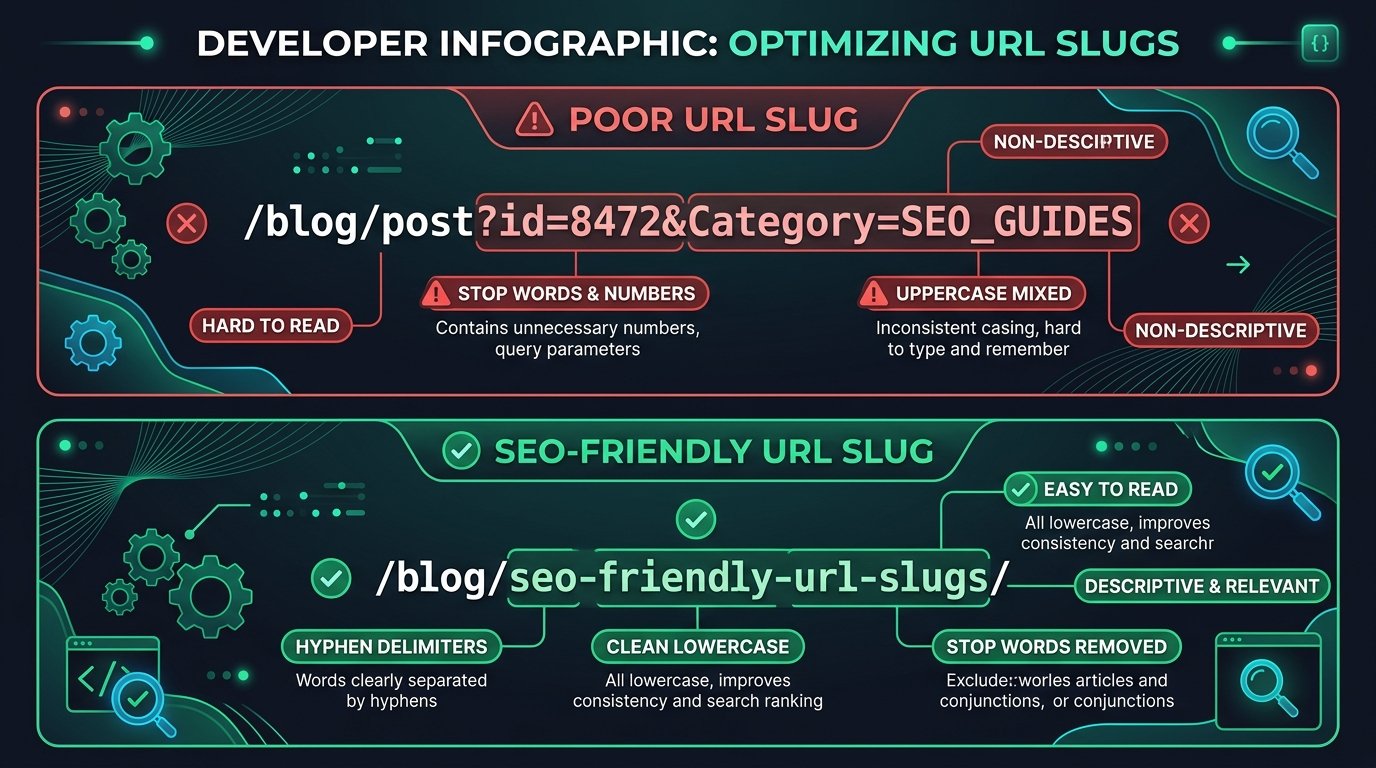
Adhering to these foundational criteria ensures that clean URL structures deliver maximum value to both search engines and end users.
Using Relevant Keywords Naturally Without Over-Optimization
A primary objective when crafting SEO-friendly URL slugs is reflecting the central subject matter of the page. However, there is a fine line between strategic keyword placement and spammy over-optimization that damages brand perception.
Suppose your blog publishes a technical tutorial with the following comprehensive headline:
“How to Convert JSON to CSV Without Losing Important Data”
A well-optimized, natural slug extracts the primary semantic intent without copying every single word from the headline:
Recommended Slug: convert-json-to-csv-without-losing-data
Alternative Slug:   convert-json-to-csv
Both options capture the core query while discarding conversational noise. Crucially, avoid repeating related search variations. A slug like convert-json-to-csv-json-csv-converter-tool is blatant keyword stuffing. Search algorithms penalize unnatural URL construction, whereas clean SEO-friendly URL slugs convey professionalism and clarity.
Modern natural language processing algorithms evaluate contextual entities rather than simple keyword repetition. Prioritize high-intent nouns and action verbs that succinctly define user goals. A well-constructed permalink communicates immediate value to prospective readers scanning organic SERPs.
Hyphens Versus Underscores: Why Delimiters Matter in Search
Word separation is another critical technical consideration when engineering SEO-friendly URL slugs. When words run together without delimiters (such as /seofriendlyurlslugs/), parsing becomes difficult for human readers and machine algorithms alike.
Historically, developers debated whether to separate words with hyphens (-) or underscores (_). Google’s search engine documentation explicitly states that search spiders treat hyphens as standard word separators. When a crawler encounters json-to-csv, it interprets the string as three distinct words: “json”, “to”, and “csv”.
In contrast, search engines frequently treat underscores as word joiners. A slug constructed as json_to_csv might be evaluated as a single compound token jsontocsv. Furthermore, when hyperlinks appear underlined in standard browser rendering, underscores often become completely invisible, confusing users.
Standardizing on hyphens across all SEO-friendly URL slugs eliminates ambiguity, supports natural text parsing, and adheres to universally recognized web conventions.
Case Sensitivity and Lowercase URLs: Web Server Realities
Enforcing uniform lowercase typography is an absolute rule for maintaining SEO-friendly URL slugs across production environments. While domain names are inherently case-insensitive, URL paths are technically case-sensitive according to RFC specifications.
On Linux-based web servers (such as Apache and Nginx), the server treats different letter cases as completely separate files or virtual endpoints. For example, the following addresses can represent three distinct requests:
https://example.com/blog/seo-friendly-url-slugs/
https://example.com/blog/SEO-Friendly-URL-Slugs/
https://example.com/blog/Seo-Friendly-Url-Slugs/
If external websites link to your content with mixed capitalization, visitors on strict servers may trigger 404 Not Found errors. Even when content management systems rewrite requests automatically, search crawlers may index both versions, dividing backlink equity and diluting search rankings.
By enforcing lowercase rules across all SEO-friendly URL slugs and implementing global server redirects from uppercase variations to lowercase, you eliminate duplicate content hazards permanently.
To enforce lowercase consistency automatically, web architects routinely configure server-side rewrite rules. In Apache environments, mod_speling or RewriteMap directives can automatically lowercase incoming request paths. Similarly, Nginx configurations can leverage Lua modules to enforce lowercase routing before dispatching requests to application backends.
Removing Unnecessary Words and Stop Words Without Losing Meaning
Stop words are common grammatical particles such as “the,” “a,” “an,” “in,” “on,” “at,” and “about.” When transforming editorial titles into SEO-friendly URL slugs, filtering out unnecessary words produces clean, compact paths.
Compare these two structural paths:
Verbose Slug:  /how-to-learn-about-json-to-csv-conversion/
Optimized Slug: /json-to-csv-conversion/
The shorter version conveys the identical subject matter with greater visual punch. Search engines understand semantic context without requiring conversational fillers. Removing fluff also prevents mobile browsers from truncating URLs in search snippets.
However, exercise careful judgment. Never remove a stop word if doing so alters the core definition of the topic. For example, in an article discussing “Who vs Whom,” removing the pronoun “whom” destroys the premise. Pruning words intelligently preserves meaning while maximizing the efficiency of SEO-friendly URL slugs.
Should You Include Dates in URL Slugs? Evergreen vs News Strategy
Deciding whether to incorporate chronological dates in SEO-friendly URL slugs depends on your publication model and editorial lifecycle. While dates make sense for time-sensitive news, they frequently penalize evergreen content.
Consider an in-depth technical resource published with a calendar year in its slug:
Dated Slug:     /blog/2026-json-conversion-guide/
Evergreen Slug: /blog/json-conversion-guide/
When the editorial team updates this guide in subsequent years, the dated URL creates a serious dilemma: keep the outdated year in the address (confusing users into thinking the content is obsolete), or change the URL (requiring 301 redirects and risking temporary search volatility). An evergreen slug avoids this maintenance overhead entirely.
Search engines crawl and re-index updated articles based on HTTP headers, XML sitemap timestamps, and schema markup (such as dateModified). Removing dates from slugs allows editorial teams to refresh content freely without triggering complex migration workflows or losing historical backlink authority.
Save dates exclusively for daily news publications, press releases, and annual event schedules. For timeless tutorials, building date-free SEO-friendly URL slugs ensures your content remains relevant and authoritative indefinitely.
Should You Change an Existing URL Slug? 301 Redirect Rules
One of the most consequential decisions in technical website maintenance is modifying published permalinks. Before restructuring live SEO-friendly URL slugs, teams must assess the architectural risks involved.
As web pioneer Tim Berners-Lee famously observed in the W3C Axiom of URI Persistence, “Cool URIs don’t change.” Changing an established URL breaks external backlinks, disrupts bookmarks, and erases cached shares unless comprehensive server redirections are deployed.
Before modifying any published slug, verify these 5 critical requirements:
- Audit Existing Traffic: Verify whether the current URL drives substantial organic impressions or referrers.
- Implement 301 Redirects: Configure permanent HTTP 301 redirect rules in Apache
.htaccessor Nginx configuration files. - Update Internal Links: Update database references and navigation menus to point directly to the new slug.
- Synchronize Canonical Tags: Update
<link rel="canonical">tags to reference the new destination. - Refresh XML Sitemaps: Remove the legacy URL from sitemaps and submit the updated sitemap to search consoles.

Never change an established, top-ranking URL merely for minor aesthetic preferences. Preserve existing link equity unless a comprehensive architectural migration warrants adopting new SEO-friendly URL slugs.
Step-by-Step Guide: How to Turn Any Article Title into an Optimized Slug
Translating an editorial article title into clean SEO-friendly URL slugs is a repeatable, methodical process. By implementing a standardized pipeline, publishers maintain high consistency across hundreds of articles.
Follow these 8 operational steps whenever preparing content for publication:
- Draft a Clear Title: Create an accurate headline establishing user intent.
- Isolate Primary Keywords: Identify the core 2 to 4 words defining the topic.
- Prune Filler Particles: Remove prepositions and articles like “how,” “to,” and “the.”
- Convert to Lowercase: Standardize all letters to lowercase for server consistency.
- Substitute Hyphens for Spaces: Use hyphens for clean word boundary parsing.
- Strip Unsafe Punctuation: Remove quotes, question marks, and currency signs.
- Check Length and Readability: Ensure the slug remains descriptive under 60 characters.
- Confirm Uniqueness: Verify the proposed path does not collide with existing pages.
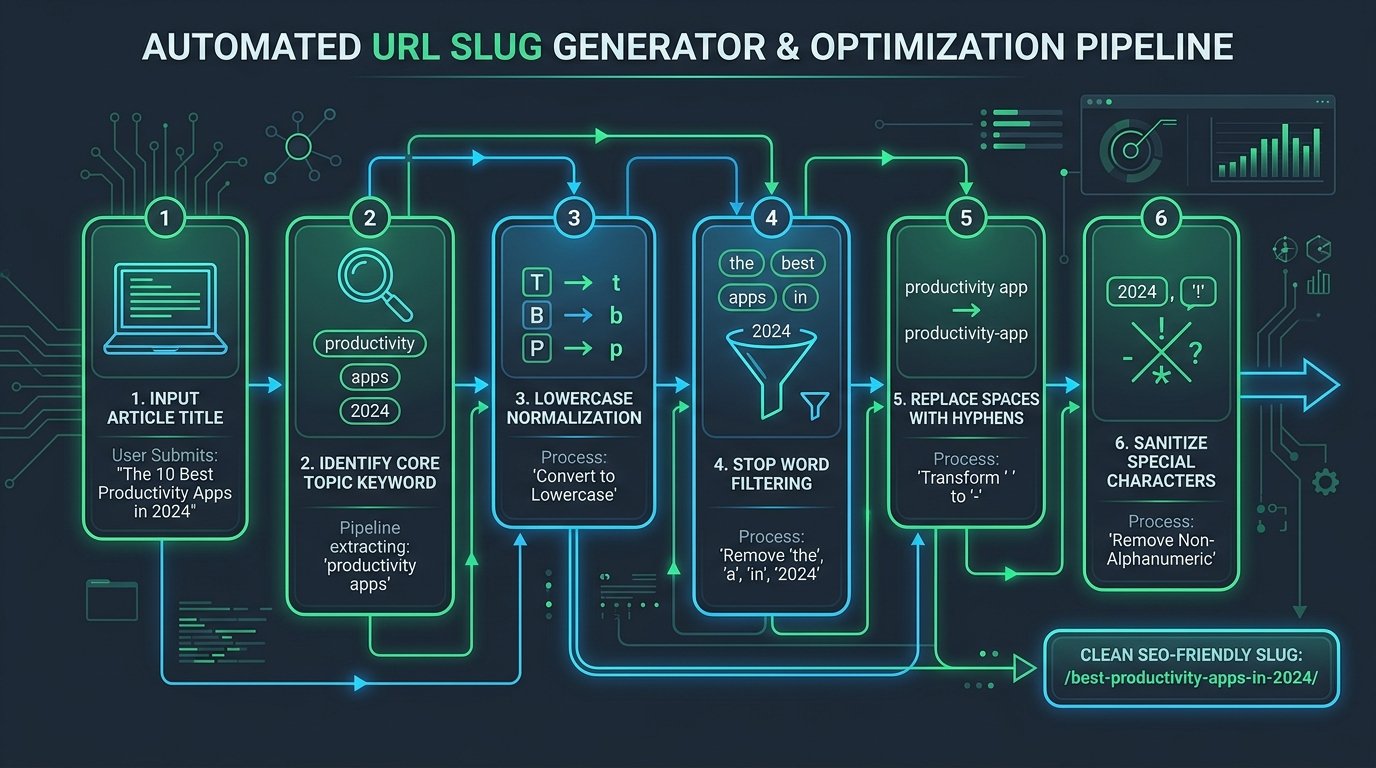
To streamline this workflow, bookmark EzzDo’s free online Slug Generator. If your project involves query strings or encoded characters, explore our URL Encoder and Decoder alongside our complete SEO Tools and Tools Directory to construct reliable, professional SEO-friendly URL slugs effortlessly.
Common URL Slug Mistakes to Avoid: Keyword Stuffing and Dead Links
Even experienced webmasters fall into subtle traps that undermine the effectiveness of SEO-friendly URL slugs. Avoiding these 5 widespread errors will keep your site architecture robust:
1. Repetitive Keyword Stuffing
Stuffing multiple query iterations into a single address (e.g., /json-csv-json-to-csv-best-json-csv-tool/) looks spammy to search crawlers and alienates human visitors. Focus on clarity over keyword density.
2. Using Opaque, Non-Descriptive Identifiers
Paths like /page-12/ or /item-4921/ provide zero contextual value. Always give users and search bots informative clues about destination content.
3. Over-Truncating to Cryptic Abbreviations
While brevity is desirable, shortening slugs excessively destroys meaning. A path like /jsn-cnv/ is worse than /json-converter/ because neither users nor search engines can interpret abbreviated jargon.
4. Modifying Slugs Without 301 Redirects
Renaming permalinks without configuring permanent redirects generates 404 errors, strands visitors, and drops accumulated backlink authority. Always pair URL edits with immediate redirection rules.
5. Creating Duplicate URL Slugs
Allowing two distinct posts to compete for identical or near-identical slugs creates keyword cannibalization. Ensure every piece of content targets a distinct semantic address.
Eliminating these common mistakes ensures that your website delivers dependable, user-friendly permalinks that support sustainable organic growth.
7 Best Rules for SEO-Friendly URL Slugs in Production Codebases
To establish organizational discipline across your engineering and content teams, adhere to these 7 best production rules whenever deploying SEO-friendly URL slugs:
- Lock Slugs at Publication: Finalize permalink structures prior to launch and avoid retroactive edits whenever possible.
- Standardize on Lowercase Hyphens: Never use underscores, uppercase letters, or raw spaces in URL paths.
- Keep Length Under 60 Characters: Maintain concise slugs that display completely on mobile search snippet cards.
- Reflect Primary Search Intent: Feature the primary target query without stuffing secondary variants.
- Omit Ephemeral Calendar Dates: Protect evergreen content longevity by excluding temporary year markers.
- Automate Generation with Trusted Tools: Accelerate editorial workflows using specialized tools like EzzDo’s Slug Generator.
- Audit URL Structure Regularly: Monitor crawl reports in search consoles to catch accidental 404 errors and redirect loops promptly.
Whenever modern technical marketing teams and content architects design SEO-friendly URL slugs across digital publications automated algorithmic verification ensures consistent taxonomic integrity across all editorial templates and customer facing interfaces throughout the entire commercial enterprise infrastructure protecting search equity while providing dependable navigational clarity for.