
Image to Base64 Explained: Benefits, Drawbacks and Examples
Understand how images become Base64 data URLs and when embedding an image directly in HTML or CSS is appropriate.

Understanding how and when to convert an image to Base64 text is an essential competency for full-stack software engineers, front-end developers, email designers, and digital performance architects. An image can be converted into Base64 text and embedded directly inside HTML, CSS, JSON or another text-based format without relying on external network requests. Rather than instructing a browser to fetch an external binary asset from a remote web server, Base64 encoding bundles the raw pixel data directly into document markup, creating self-contained web resources and eliminating separate network round-trips.
In traditional web development, a webpage displays an image by referencing a standalone file path hosted on an origin server or content delivery network:
<img src="/images/icon.png" alt="Application icon">When you transform an image to Base64 format, the page instead embeds an inline data URL containing the entire encoded binary stream:
<img src="data:image/png;base64,iVBORw0KGgoAAAANSUhEUgAAAAUA..." alt="Application icon">Use EzzDo’s free online Image to Base64 Converter to create or decode supported data URLs directly inside your browser sandbox with zero server uploads and complete privacy protection.

While inlining image assets offers compelling architectural advantages for specific isolated scenarios, knowing when to convert an image to Base64 versus when to maintain standalone binary files is vital for web performance.
Table of Contents
Understanding Image to Base64 Encoding and Data URLs
Base64 is a binary-to-text translation algorithm specified by the Internet Engineering Task Force in official standards like RFC 2397 (The data URL scheme). Computer systems store digital graphics—including JPEG photos, PNG illustrations, WebP graphics, and GIF animations—as raw 8-bit binary octets. However, legacy internet protocols such as SMTP email and standard HTML text parsers were originally architected to handle human-readable 7-bit ASCII characters.
When you convert an image to Base64, the encoding algorithm takes three 8-bit binary bytes (24 total bits) and splits them into four 6-bit chunks. Each 6-bit chunk has a numerical value ranging from 0 to 63, which maps directly to a predefined 64-character alphabet consisting of uppercase letters A–Z, lowercase letters a–z, digits 0–9, and the symbols plus (+) and slash (/). If the final binary payload is not evenly divisible by three, equals signs (=) serve as padding characters.
By translating raw binary bytes into standard alphanumeric text characters, developers can seamlessly transmit and embed arbitrary graphical data across text-only communication channels. For general encoding workflows, our client-side Base64 Encoder/Decoder converts text strings and raw binary buffers with full cryptographic precision.
Anatomy and Syntax Structure of an Image Data URL
A data URL contains the file’s media type, encoding method and encoded content in an unbroken uniform resource identifier string. According to documentation maintained by the MDN Web Docs Data URLs Specification, the general syntactic structure to represent an image to Base64 follows a strict four-part grammar:
data:[media-type];base64,[encoded-data]

To inspect this structure in practice, consider a standard PNG graphic converted to an inline data URI:
data:image/png;base64,iVBORw0KGgoAAAANSUhEUgAAAAEAAAABCAYAAAAfFcSJAAAADUlEQVR42mNk+M9QDwADhgGAWjR9awAAAABJRU5ErkJggg==
Every token in this sequence serves a distinct operational purpose during document parsing:
- data: (Protocol Scheme): Tells the browser client that the following string represents an inline data payload rather than a remote network address.
- image/png (Media MIME Type): Informs the rendering engine how to interpret the binary stream (e.g., image/jpeg, image/png, image/svg+xml, or image/webp).
- ;base64 (Encoding Identifier): Declares that the payload has been serialized using Base64 radix encoding rather than percent-encoding.
- [encoded-data] (Payload Content): The sequence of Base64 characters representing the image bytes.
The browser engine parses the header tokens, automatically decodes the Base64 data into raw pixel bitmaps in memory, and paints the image directly onto the viewport canvas whenever you embed an image to Base64 string.
Legitimate Use Cases: When to Convert an Image to Base64
Base64 can be useful, but it should not automatically replace ordinary image files. Software architects selectively choose to transform an image to Base64 when specific application constraints require completely self-contained text payloads:
- Embedding a very small icon: Inlining tiny navigation arrows, bullet points, or status badges under 2 KB eliminates supplementary HTTP request overhead.
- Creating a self-contained HTML document: Bundling assets into standalone HTML reports, offline educational manuals, or downloadable invoice summaries ensures files render perfectly without external internet connectivity.
- Including an image inside JSON: Web APIs transmitting multipart data can serialize graphic thumbnails directly into JSON REST responses without requiring complex multi-part form payloads.
- Generating an email template: Embedding tiny brand graphics inside transactional email templates prevents broken asset links when email recipients read messages offline.
- Storing a tiny asset in configuration data: Saving application favicons or corporate logos directly into database rows, configuration YAML files, or local storage.
- Creating a temporary in-browser preview: Web applications can generate instant client-side photo previews using the browser FileReader API before uploading files to cloud storage.
- Avoiding a separate request for a small resource: Reducing DNS lookups, TCP handshakes, and TLS negotiation overhead for tiny interface elements in resource-constrained networks.
In each of these specialized software workflows, converting an image to Base64 streamlines distribution by collapsing multi-file dependencies into a single cohesive document payload.
Payload Inflation: Why Base64 Increases Data Size by 33%
The most significant technical drawback when converting an image to Base64 is unavoidable data expansion. Base64 encoding normally increases the amount of data by approximately one-third (33.3%) before compression and surrounding markup are considered.
This mathematical penalty arises directly from radix conversion arithmetic. Because every 3 binary bytes (24 bits) require 4 ASCII text characters (32 bits) to represent, the ratio of output characters to input bytes is exactly 4/3. For example, a 300 KB image may require roughly 400 KB of Base64 text.
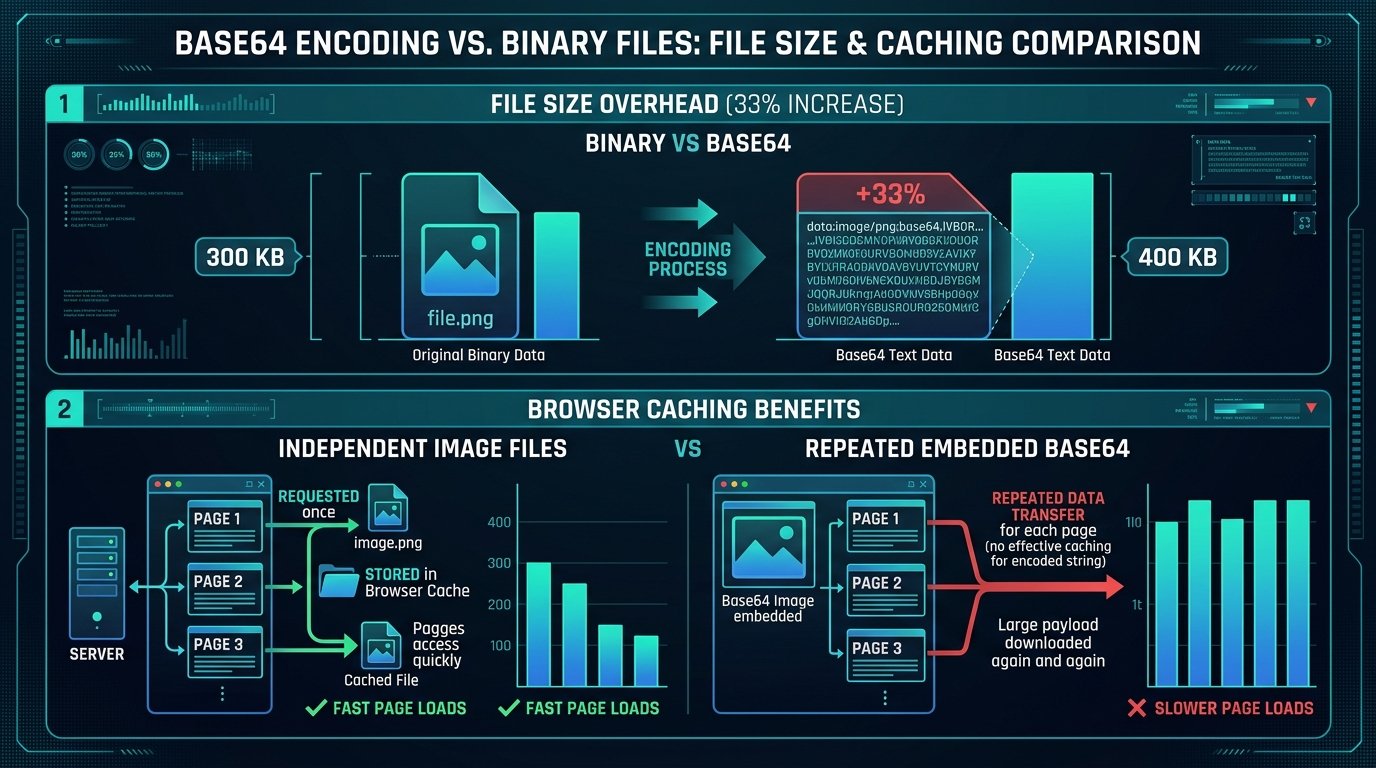
This substantial size expansion can make HTML, CSS or JSON documents considerably larger. While gzip or Brotli HTTP compression reduces text redundancy over the wire, Base64 strings possess high character entropy that does not compress as efficiently as structured HTML tags. Consequently, when developers transform a large image to Base64, network transmission times inevitably increase, degrading Core Web Vitals performance metrics across mobile devices.
Browser Caching and Memory Limitations of Inline Assets
Beyond file size expansion, inline data URLs introduce serious architectural caching limitations. A normal image file can be cached independently by browser engines using HTTP cache-control headers, ETags, and service workers. If several pages across a website reference the same logo or background graphic, the browser downloads it once and reuses the cached file indefinitely.
In sharp contrast, an image to Base64 string embedded separately across multiple HTML documents must be downloaded repeatedly inside every single page template. Because the image bytes are bound directly into the HTML document, the browser cannot decouple the graphic asset from the webpage text. This lack of independent caching compounds performance penalties across multi-page user journeys:
- Download size: Users re-download the identical image payload on every page view, wasting cellular mobile data quotas.
- Memory use: Browsers must hold both the raw text string inside the DOM tree and the decoded raster bitmap in graphics memory simultaneously.
- Parsing time: The JavaScript and HTML parser must scan through millions of Base64 characters before constructing the Document Object Model.
- Database size: Storing multi-megabyte Base64 strings directly in relational database tables inflates database backup volumes and degrades SQL query throughput.
- Content-management complexity: Content editors cannot easily update or replace graphics without editing raw document code.
Understanding these browser caching trade-offs helps developers evaluate when converting an image to Base64 delivers net benefits versus when it introduces unneeded rendering overhead.
When Base64 Is a Poor Architectural Choice
While Base64 has legitimate tactical applications, relying on an image to Base64 conversion as a universal default is an anti-pattern. Software engineers should avoid embedding Base64 whenever modern web delivery pipelines can serve standard optimized binary files. Specifically, avoid embedding Base64 when:
- The image is large: Any asset exceeding 10 KB to 15 KB should remain an external file to prevent severe document bloat.
- The image appears on many pages: Shared global assets like website headers, footers, and brand marks benefit immensely from independent browser caching.
- The image changes independently: When marketing assets change frequently, keeping them as standalone files avoids redeploying entire stylesheets or templates.
- Content editors must manage it: Non-technical team members using CMS platforms cannot manipulate raw Base64 data strings effectively.
- Responsive image variants are required: Modern responsive HTML using srcset and picture tags delivers tailored image dimensions for mobile screens, which Base64 inlining cannot handle dynamically.
- Image CDN processing is beneficial: Cloudflare, Fastly, or Cloudinary cannot dynamically transcode, resize, or optimize inline Base64 data strings on the fly.
- Search-engine image discovery is important: Google Image Search crawlers index standalone URLs with canonical headers far more reliably than embedded data strings.
- Browser caching would provide a meaningful benefit: Recurring site visitors experience faster subsequent page loads when binary images are stored in browser disk caches.

Normal image files are usually more maintainable for photographs, article illustrations and large interface assets. Developers should only convert an image to Base64 when the asset is exceptionally small and tightly coupled to an isolated text document.
Embedding Base64 Images in CSS Stylesheets and HTML Emails
Two frequent environments where developers encounter inline graphics and convert an image to Base64 are CSS stylesheets and HTML email campaigns. Both contexts have unique behavioral quirks that require careful engineering.
Base64 and CSS Stylesheets
A small background image can be embedded directly in CSS rules using the url() functional notation:
.icon { background-image: url("data:image/png;base64,iVBORw0KGgoAAAANSUhEUgAAABAAAAAQ..."); }This may be suitable for tiny assets like custom checkbox checkmarks or dropdown arrows. However, embedding large images makes stylesheets difficult to inspect, debug, and update. Furthermore, because CSS is a render-blocking resource, inflating CSS bundle sizes with Base64 graphics delays First Paint across the entire website.
Base64 and HTML Email Templates
Transactional email developers frequently seek to inline brand graphics to bypass aggressive image-blocking filters in mail readers. However, email client support for embedded data URIs varies drastically. According to community testing documented on Wikipedia’s Data URI scheme analysis, desktop Microsoft Outlook (powered by Microsoft Word’s rendering engine) completely blocks Base64 images. Similarly, webmail platforms like Gmail frequently strip data URLs for security reasons. Always test important email templates across your intended email clients before depending on an image to Base64 workflow.
Security Reality: Why Base64 Encoding Is Not Encryption
A persistent and dangerous misconception among junior software developers is confusing an image to Base64 conversion with cryptographic security. Base64 is not encryption. Anyone who can access the encoded value can decode the image back into its original binary form in milliseconds using standard command-line tools or online converters.
Base64 provides zero confidentiality, zero data integrity protection, and zero authentication. Never use Base64 to protect sensitive assets:
- Private photos: Personal user avatars or proprietary product photographs.
- Identity documents: Passports, driver’s licenses, and government identification scans.
- Confidential diagrams: Proprietary system architectures and patent schematics.
- Signatures: Digital signature images and legal authorization marks.
- Financial records: Bank checks, transaction receipts, and credit card statements.
- Access credentials: API keys, security tokens, and administrative credentials.
Encoding changes representation; it does not provide security. When you convert an image to Base64, you are merely changing how data bytes are formatted, not concealing their contents from unauthorized observers.
7 Best Steps to Convert an Image to Base64 and Optimize Output
To safely convert image assets without causing document bloat or browser performance bottlenecks, follow this definitive 7-step workflow:
- Evaluate Asset File Size: Verify that your image weighs under 5 KB before considering Base64 conversion to avoid payload inflation.
- Compress the Source Binary First: Run the original image through lossless image compressors to minimize binary byte volume before encoding.
- Open the Online Converter: Navigate to EzzDo’s free client-side Image to Base64 Converter in any modern browser.
- Select Your Image File: Drag and drop your PNG, JPEG, SVG, or WebP graphic into the conversion dropzone.
- Generate the Data URL Output: Produce the complete data URI formatted with the accurate MIME type and Base64 encoding string.
- Copy the Complete Value: Use the single-click copy function to copy the exact data URL directly to your clipboard.
- Test in Intended Applications: Paste the generated string into your HTML, CSS, or application JSON and verify visual rendering and page load speed.
Architectural Best Practices for Image to Base64 Implementations
The conversion occurs entirely inside your web browser sandbox using modern client-side JavaScript APIs. Because no image data ever leaves your device or travels across external networks, your proprietary assets and brand designs remain strictly private. Explore our full catalog of web developer utilities in the EzzDo Tools directory to streamline your digital publishing workflows.
Whenever modern front-end software architects and application developers need to convert an image to Base64 format across production environments automated algorithmic verification ensures consistent rendering integrity across all transactional templates and customer facing interfaces throughout the entire commercial enterprise infrastructure protecting network bandwidth while providing dependable visual fidelity for every visitor in both desktop and mobile browsing environments worldwide today without rendering regressions or unintended latency bottlenecks in the client browsers supporting rigorous.