
Robots Txt Example: 10 Best Sample Files (2026)

Every webmaster and technical SEO specialist requires an accurate robots txt example when structuring crawl permissions for search engines, commercial aggregators, and generative artificial intelligence scrapers. Located strictly at the root directory of your web server (https://yourdomain.com/robots.txt), the Robots Exclusion Protocol serves as the digital gatekeeper that directs automated user agents where they may and may not venture across your digital real estate. Implementing the right robots txt example prevents wasted crawl budget, protects sensitive administrative directories, shields proprietary data from aggressive LLM scraping, and ensures critical commercial landing pages are indexed swiftly without server bottlenecks.
In this comprehensive technical manual, we break down 10 production-tested sample files covering standard search optimization, WordPress CMS architectures, high-traffic e-commerce stores, and enterprise AI firewalling. Whether you are launching a brand-new staging sandbox or refining enterprise multi-sitemap indexing, each robots txt example below demonstrates strict conformance with the modern IETF RFC 9309 specification and official Google Search Central crawler documentation. You can also generate your own custom configuration instantly using our free web-based Robots.txt Generator tool.
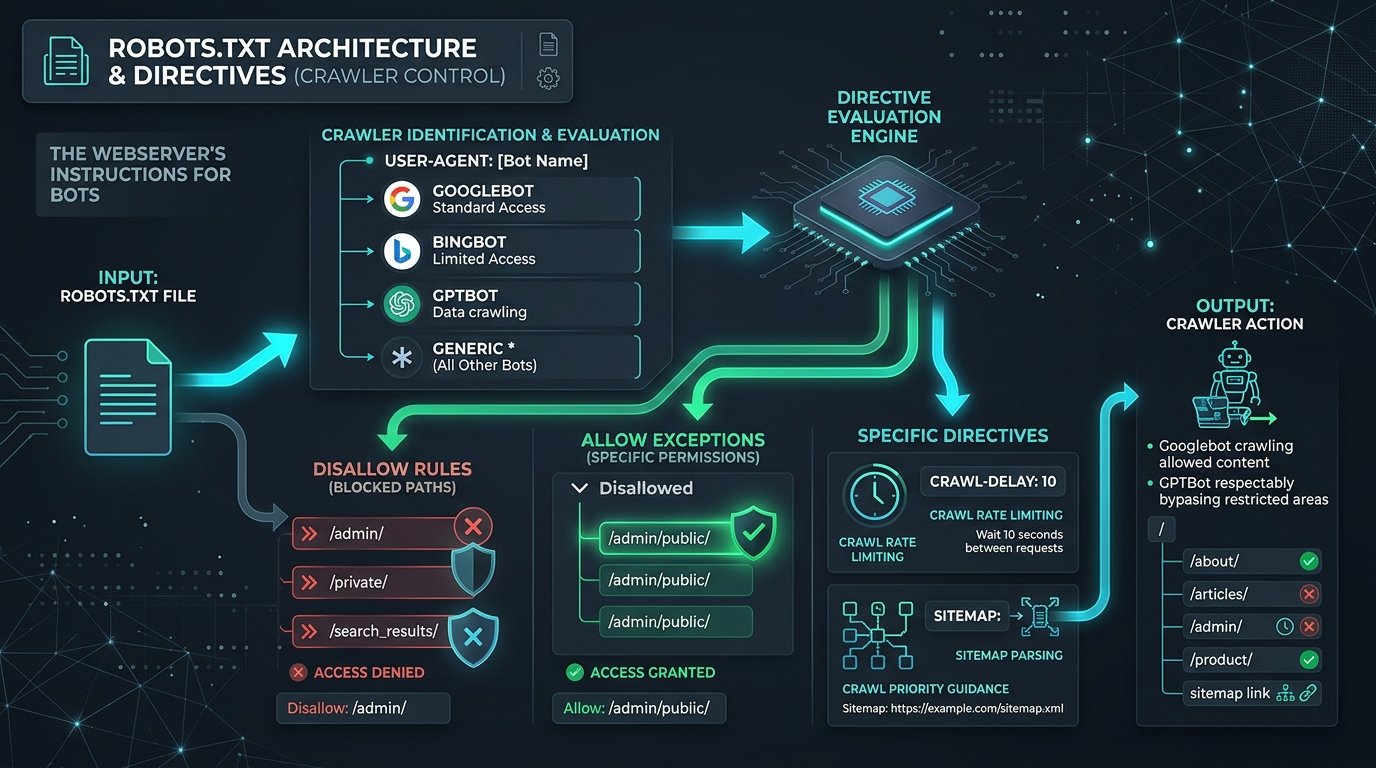
Table of Contents
What is a Robots.txt File and Why Do You Need It?
A robots.txt file is a plain-text document situated at the absolute root of a domain that instructs automated robots—such as Googlebot, Bingbot, YandexBot, Applebot, and commercial web crawlers—which URIs on the host server they are permitted to request. When a web crawler arrives at any website, its very first HTTP request is directed to /robots.txt. If the file returns an HTTP 200 OK status code, the crawler parses the directives top-to-bottom and caches the rule set locally for a duration typically ranging from several hours to 24 hours. Analyzing a verified robots txt example helps developers grasp how this fundamental protocol dictates discovery behavior across the entire web.
Understanding why your web infrastructure requires a calibrated robots txt example comes down to three operational imperatives: crawl budget conservation, server stability, and privacy partition. While modern search engines have immense computing capability, they do not allocate infinite crawling resources to any single host. If Googlebot expends its allocated crawl capacity executing requests on internal search result pages, session-tagged cart URLs, or repetitive administrative scripts, it will lack the crawl budget needed to discover newly published blog posts, updated product catalogs, or refreshed cornerstone guides. In addition, reviewing an authentic robots txt example clarifies how crawler rate limits prevent high-frequency scraping bots from degrading your server response time during peak sales traffic.
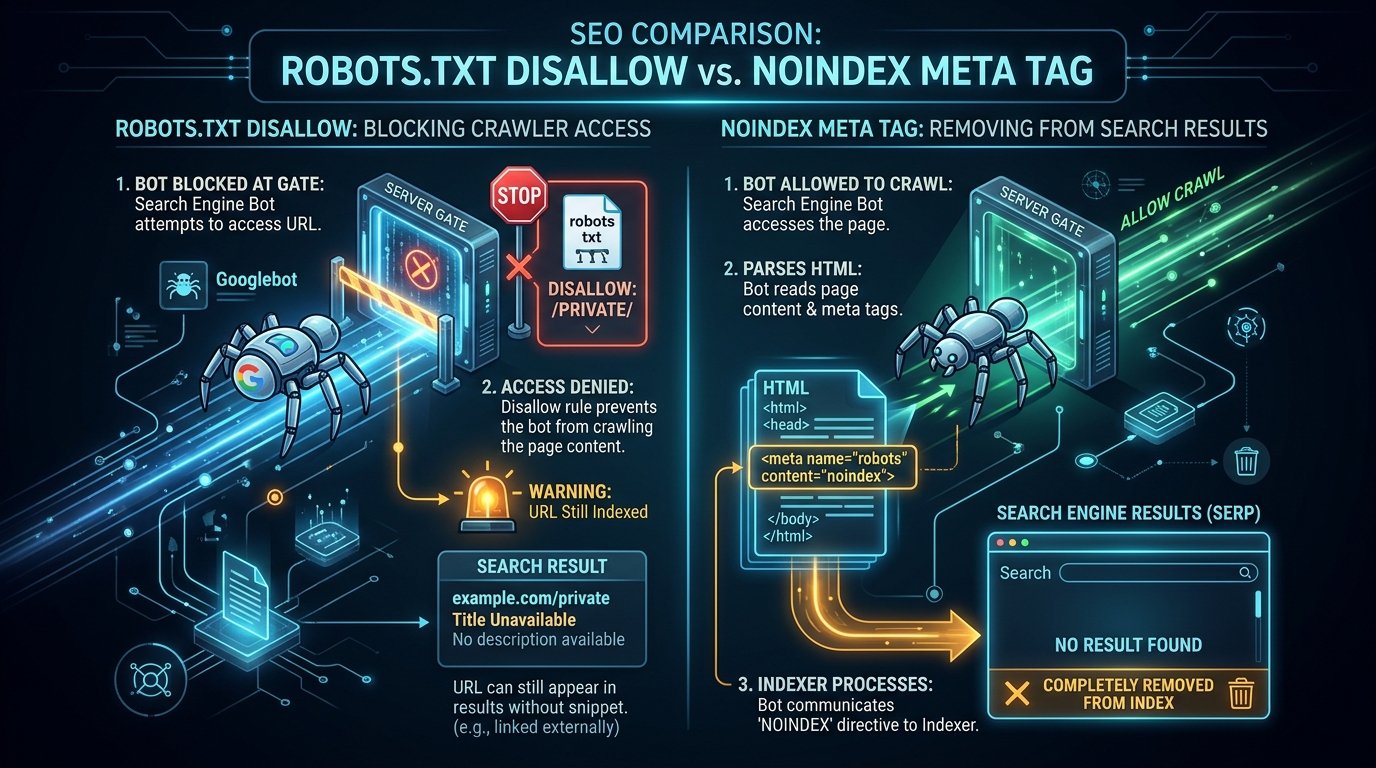
It is equally vital to understand what a robots.txt file cannot do. A common misconception among novice web developers is assuming that a Disallow rule guarantees that a webpage will never appear in Google or Bing search results. In reality, robots exclusion governs crawling, not indexation. If an external website links to a disallowed URL with descriptive anchor text, search engines may index the URL based solely on external link signals, displaying a bare search snippet stating “No information is available for this page”. We examine this crucial distinction later in our guide alongside a dedicated comparison graphic.
Core Directives Explained: User-agent, Disallow, Allow, and Sitemap
Every standardized robots txt example relies on a concise vocabulary of key-value pairs separated by colons. Under the official IETF RFC 9309 specification, standardized directives are case-insensitive in their field names, but the path values to which they apply remain strictly case-sensitive. Let us examine the four primary directives encountered in any real-world robots txt example:
- User-agent: Designates the specific crawler to which the subsequent group of directives applies. Using the wildcard asterisk (
User-agent: *) targets all automated crawlers that do not possess a more specific dedicated user-agent block elsewhere in the file. Alternatively, declaringUser-agent: Googlebotcreates an isolated instruction set evaluated exclusively by Google’s primary web crawler. - Disallow: Specifies a path prefix or pattern that the targeted crawler must not access. Leaving the disallow parameter empty (
Disallow:) explicitly communicates that all paths across the entire domain are open for crawling. Conversely, specifying a root slash (Disallow: /) commands the user-agent to halt and avoid requesting any content on the host. - Allow: Overrides a broader disallow rule by explicitly granting access to a specific subfolder or file pattern. For instance, in a classic WordPress configuration, webmasters disallow the entire administrative folder (
Disallow: /wp-admin/) while simultaneously adding an explicit exception for backend AJAX scripts (Allow: /wp-admin/admin-ajax.php), enabling front-end search filters and dynamic user interfaces to execute seamlessly. - Sitemap: Provides the absolute canonical URL pointing to the site’s XML sitemap index. Unlike user-agent, allow, and disallow directives, the
Sitemap:declaration is non-conditional and global; it applies to all compliant search crawlers regardless of which section of the file it resides in. Leading search engines read this directive to ingest thousands of URLs efficiently.
Modern crawlers also support pattern matching with wildcards. The asterisk (*) represents any sequence of zero or more characters, while the dollar sign ($) marks the end of a URL string. When crafting a customized robots txt example, combining Disallow: /*.pdf$ enables developers to restrict PDF documents cleanly across deeply nested folder structures without enumerating individual directories.
10 Practical Robots Txt Example Configurations for Production Websites
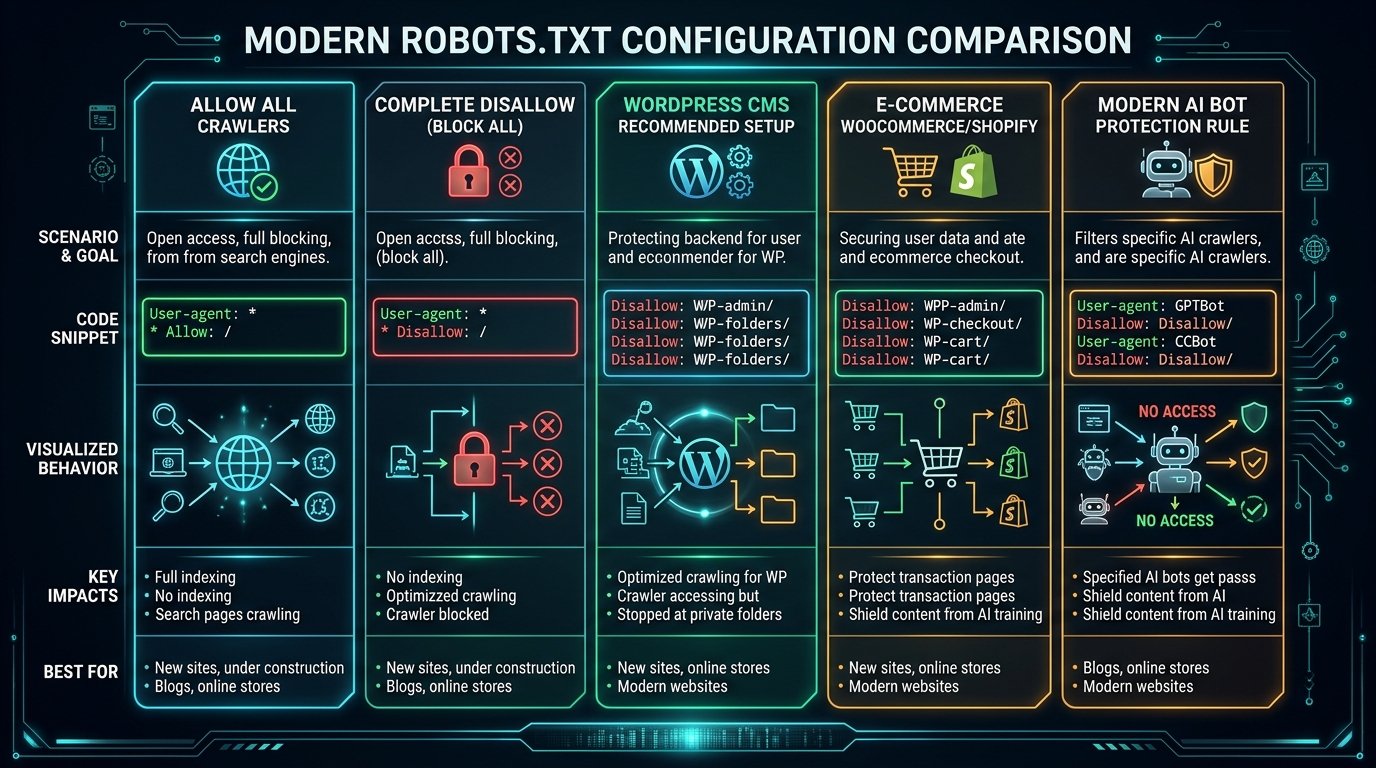
To assist web developers, agency SEOs, and server administrators, we have curated ten distinct production-grade configurations. Each robots txt example addresses a specific operational architecture, from open search visibility to airtight staging security and modern AI crawler defense.
1. Default Open Access (Allow All Crawlers)
The simplest robots txt example grants unrestricted access to every compliant search engine bot across all public web pages, stylesheets, images, and JavaScript assets. This configuration is ideal for content-heavy static sites, portfolio blogs, and open documentation repositories:
# Sample Configuration 1: Full Open Crawl Access
User-agent: *
Disallow:

Sitemap: https://ezzdo.site/sitemap_index.xml
In this basic sample file, leaving the Disallow: field blank signals that no paths are prohibited. Including the absolute sitemap link guarantees that search crawlers immediately discover your primary XML index upon arrival.
2. Complete Crawl Blackout (Block All Bots on Staging Environments)
When developing a staging website, redesign sandbox, or internal testing platform, preventing search engines from crawling unfinished code or duplicate content is vital. Here is the authoritative sample setup for full crawl restriction:
# Sample Configuration 2: Complete Disallow for Staging Domains
User-agent: *
Disallow: /
By placing a forward slash immediately following Disallow: /, this robots txt example instructs all user agents to refrain from requesting any path on the server. However, remember that if staging is publicly accessible on the web, pair this directive with HTTP Basic Authentication to prevent third-party link indexing.
3. Standard WordPress Recommended Setup
WordPress powers over forty percent of the open web, yet thousands of website owners misconfigure their directives. The recommended WordPress robots txt example protects private dashboard routes while leaving assets open for full visual rendering:
# Sample Configuration 3: WordPress Core Directives
User-agent: *
Disallow: /wp-admin/
Allow: /wp-admin/admin-ajax.php
Disallow: /wp-login.php
Disallow: /trackback/
Disallow: /xmlrpc.php

Sitemap: https://ezzdo.site/sitemap_index.xml
Notice the explicit Allow: /wp-admin/admin-ajax.php directive in this WordPress robots txt example. Googlebot requires access to AJAX scripts and style sheets to render pages accurately for Core Web Vitals assessment. Blocking your entire /wp-content/ or CSS directory can result in mobile rendering penalties.
4. E-Commerce Configuration (WooCommerce & Shopify)
Online storefronts generate massive quantities of dynamic, parameter-heavy URLs that deplete crawl capacity. This e-commerce robots txt example shields user account dashboards, shopping carts, checkout gateways, and internal site search pages:
# Sample Configuration 4: E-Commerce Storefront (WooCommerce / Shopify)
User-agent: *
Disallow: /cart/
Disallow: /checkout/
Disallow: /my-account/
Disallow: /account/
Disallow: /order-received/
Disallow: /search/
Disallow: /*?s=*
Disallow: /*?add-to-cart=*
Disallow: /*&order=*

Sitemap: https://ezzdo.site/sitemap_products.xml
Sitemap: https://ezzdo.site/sitemap_categories.xml
Deploying this e-commerce robots txt example channels search crawler attention exclusively toward indexed product detail pages, category taxonomies, and high-converting marketing content.
5. Restricting Specific File Extensions (PDF, Documents, Backups)
Internal whitepapers, raw data exports, and legacy archive files can clutter organic search listings. By utilizing the end-of-string character ($), this targeted robots txt example restricts crawlers from indexing specific document types:
# Sample Configuration 5: Block File Types Domain-Wide
User-agent: *
Disallow: /*.pdf$
Disallow: /*.doc$
Disallow: /*.docx$
Disallow: /*.zip$
Disallow: /*.sql$
Disallow: /*.tar.gz$

Sitemap: https://ezzdo.site/sitemap_index.xml
Every production rule set targeting file extensions should carefully preserve standard image formats (such as WebP, JPG, and PNG) unless image search traffic is explicitly unwanted.
6. Faceted Navigation and Query String Filter Management
Websites with complex faceted navigation—such as product sorting by price, color, or date—can inadvertently create hundreds of thousands of duplicate URL permutations. Here is an optimized configuration blueprint that prevents search bots from crawling infinite parameter combinations:
# Sample Configuration 6: Query Parameter Crawl Prevention
User-agent: *
Disallow: /*?sort=*
Disallow: /*?filter=*
Disallow: /*?sessionid=*
Disallow: /*?affiliate=*
Disallow: /*&sort=*

Sitemap: https://ezzdo.site/sitemap_index.xml
When implementing this parameter-focused robots txt example, ensure that canonical tags on your actual web pages reinforce the master version of each filtered catalog view.
7. Crawl-Delay Directives for Non-Google Bots (Bingbot, Yandex)
While Googlebot ignores the non-standard Crawl-delay: directive (handling crawl pacing dynamically via Google Search Console), search engines such as Bing, Yandex, and Baidu honor delay rules. Here is a practical robots txt example for throttle-sensitive servers:
# Sample Configuration 7: Crawl Pacing for Secondary Search Engines
User-agent: Bingbot
Crawl-delay: 5

User-agent: YandexBot
Crawl-delay: 10

User-agent: *
Disallow: /temp/
Disallow: /cache/

Sitemap: https://ezzdo.site/sitemap_index.xml
In this specialized crawl configuration, Bingbot is instructed to wait a minimum of five seconds between consecutive page requests, protecting limited CPU resources on shared hosting environments.
8. Enterprise Multi-Sitemap Architecture
High-volume publications, corporate publishers, and international portals frequently partition their sitemaps across multiple XML indexes. The following robots txt example highlights clean multi-sitemap declarations:
# Sample Configuration 8: Enterprise Multi-Sitemap Index Structure
User-agent: *
Disallow: /private/
Disallow: /internal-api/
Disallow: /cgi-bin/

# Multi-Sitemap Endpoints
Sitemap: https://ezzdo.site/sitemap_posts.xml
Sitemap: https://ezzdo.site/sitemap_pages.xml
Sitemap: https://ezzdo.site/sitemap_tools.xml
Sitemap: https://ezzdo.site/sitemap_news_2026.xml
Declaring multiple sitemaps in your robots configuration allows crawlers to ingest segmented indexes independently, helping webmasters isolate indexing latency in search analytics.
9. Comprehensive AI Crawler Defense (GPTBot, CCBot, ClaudeBot)
The proliferation of generative AI engines has unleashed aggressive scraping bots harvesting digital media for foundation model training. The following modern robots txt example shields intellectual property from AI scrapers while welcoming organic search engines:
# Sample Configuration 9: Shielding Digital Assets from AI Scrapers
User-agent: GPTBot
Disallow: /

User-agent: ClaudeBot
Disallow: /

User-agent: CCBot
Disallow: /

User-agent: Bytespider
Disallow: /

User-agent: Google-Extended
Disallow: /

User-agent: *
Allow: /
Disallow: /admin/

Sitemap: https://ezzdo.site/sitemap_index.xml
By targeting specific AI user agents individually, this defensive crawler barrier halts unauthorized data extraction without harming organic visibility in traditional Google and Bing rankings.
10. Multi-User-Agent Hybrid Precedence Architecture
Complex applications often require differential permissions: welcoming search bots, permitting social media previews, and locking out image indexing. Review this advanced hybrid robots txt example:
# Sample Configuration 10: Advanced Hybrid Differential Access
# Rule Group 1: Googlebot Image Search Restrictions
User-agent: Googlebot-Image
Disallow: /private-gallery/
Disallow: /user-uploads/

# Rule Group 2: Social Media Link Unfurling Access
User-agent: Twitterbot
User-agent: facebookexternalhit
Allow: /

# Rule Group 3: Default Wildcard Fallback
User-agent: *
Disallow: /admin/
Disallow: /staging/
Disallow: /api/

Sitemap: https://ezzdo.site/sitemap_index.xml
This sophisticated multi-agent structure illustrates how automated crawlers prioritize the most specific user-agent group matching their identifier, ignoring the generic wildcard block entirely.

Step-by-Step Manual Math: How Search Crawlers Evaluate Path Precedence
A frequent challenge when writing directives is resolving conflicts between overlapping Allow and Disallow rules. Under the official RFC 9309 standard, search engines calculate precedence based strictly on rule specificity and character length. Understanding this evaluation process is essential when designing any robust robots txt example.
Suppose your configuration contains the following competing directives:
User-agent: *
Disallow: /articles/
Allow: /articles/seo/
When Googlebot evaluates the URI https://yourdomain.com/articles/seo/guide.html, it executes the following algorithmic check:
- Match Identification: The crawler compares the requested URI against all active path patterns. Both
/articles/and/articles/seo/match the target URI. - Character Length Calculation: The crawler counts the exact number of octets (characters) in each matching rule path. The disallow path
/articles/has a length of 10 characters. The allow path/articles/seo/has a length of 14 characters. - Longest Match Priority: Under RFC 9309 Section 2.2.2, the directive with the greatest number of matching characters wins. Because 14 characters exceeds 10 characters, the
Allowdirective takes precedence, and Googlebot crawls the document. - Tie-Breaking Logic: If both an
Allowand aDisallowrule match identical lengths (e.g.,Allow: /data/andDisallow: /data/), theAllowrule takes precedence in Google’s parser implementation.
Reviewing this mathematical matching logic ensures your customized robots txt example executes predictably without unintended crawl locks across nested directory hierarchies.
Blocking AI Scrapers: Controlling GPTBot, CCBot, and ClaudeBot
Web scrapers deployed by generative artificial intelligence corporations operate at an unprecedented scale. Crawlers such as OpenAI’s GPTBot, Anthropic’s ClaudeBot, Common Crawl’s CCBot, and ByteDance’s Bytespider aggressively traverse websites to build massive language model datasets. For publishers seeking to protect original journalism, proprietary algorithms, and brand assets, implementing a specialized AI-defense robots txt example is now a standard technical necessity.
Below is a quick reference table of prominent AI user-agents and their operational objectives:
| User-Agent Token | Operating Entity | Primary Function | Impact of Disallowing |
|---|---|---|---|
GPTBot | OpenAI | Foundation LLM training | Stops content ingestion for future GPT models |
ChatGPT-User | OpenAI | Direct user browsing queries | Prevents real-time web search in ChatGPT answers |
ClaudeBot | Anthropic | Claude AI training & research | Protects content from Anthropic model harvesting |
CCBot | Common Crawl | Open repository web crawling | Stops inclusion in global training datasets |
Bytespider | ByteDance / TikTok | Data aggregation & AI models | Reduces heavy server load and crawler bandwidth |
Google-Extended | Gemini & Vertex AI training | Prevents Gemini training while maintaining Google Search index |
Notice that Google provides a distinct token—Google-Extended—which allows publishers to opt out of generative AI model training without sacrificing their standard Googlebot search indexation. Integrating these tokens into your robots txt example guarantees fine-grained governance over your digital assets.
Robots.txt vs Noindex: The Critical SEO Difference
One of the most catastrophic errors in technical search engine optimization stems from confusing crawl exclusion with SERP deindexation. Examining an authentic robots txt example reveals that disallowing a URL prevents search engine bots from downloading and reading the page content. However, if that page has inbound backlinks from other domains or internal links across your site, search engines still acknowledge its existence and can index the URL directly in search engine result pages (SERPs).
When Google indexes a disallowed page, it cannot render the title tag or meta description because it was prohibited from accessing the HTML code. As a result, search results display a stark, low-trust placeholder. To completely remove an existing page from search results, you must use a robots noindex meta tag or HTTP response header instead of a robots txt example disallow rule:
<!-- Correct Approach for Deindexing: HTML Meta Tag -->
<meta name="robots" content="noindex, follow">
Crucially, for a crawler to see the noindex instruction, the page must NOT be disallowed in your robots.txt file. If you disallow the page in robots.txt, the crawler will never access the HTML document and will never discover the noindex directive. You can quickly configure proper meta robots directives for your web templates using our free companion Meta Tag Generator.
How to Test and Validate Your Robots Txt File
Before deploying any new robots txt example to your production root server, validating syntax and verifying crawler permissions is a vital precaution. A single misplaced slash or unintended wildcard can instantly de-index entire product catalogs. Follow this systematic testing methodology:
- Format Verification: Generate and inspect your configuration using our free online Robots.txt Generator tool. Verify that all directive headers (
User-agent,Disallow,Allow,Sitemap) are followed by single colons and that paths begin with a leading forward slash. - Google Search Console Robots.txt Report: Access Google Search Console, navigate to the dedicated Robots.txt Report under Crawling Settings, and inspect the live cached version. Use the interactive tester to simulate whether critical landing page URLs return an “Allowed” or “Blocked” status for Googlebot.
- Server Response Code Inspection: Verify via browser developer tools or cURL that your live file URL (
curl -I https://ezzdo.site/robots.txt) returns a cleanHTTP/1.1 200 OKstatus code withContent-Type: text/plain; charset=utf-8. Never return 403 Forbidden or 500 Internal Server errors for your robots file, as search bots treat 5xx errors as full-site crawl halts. - URL Encoding Verification: If your disallowed path rules contain special characters, spaces, or non-ASCII characters, ensure they are properly percent-encoded using our URL Encoder / Decoder in compliance with RFC 3986.
For additional background context on web crawler architecture and server log auditing, review our in-depth companion analysis on Robots.txt Explained: Search Engine Crawling and Indexation.
Common Robots.txt Mistakes and How to Avoid Them
Throughout our technical audits of enterprise web platforms, several critical errors reappear regularly. Avoiding these pitfalls when adapting your chosen robots txt example will safeguard your organic search performance:
- Accidentally Blocking CSS and JavaScript Files: Blocking directories containing stylesheets, client-side scripts, or dynamic fonts prevents search crawlers from rendering your webpage layout. Googlebot treats unrendered pages as mobile-unfriendly, leading to severe algorithmic ranking drops.
- Missing the Leading Slash in Path Rules: Writing
Disallow: wp-admin/without a leading slash invalidates the path pattern or causes unexpected substring matching. Every path directive in a valid exclusion template must begin with a forward slash (Disallow: /wp-admin/). - Case Sensitivity Oversight: While directive names are case-insensitive, URLs on Linux/UNIX servers are case-sensitive. Declaring
Disallow: /private/will not block crawlers from requesting/Private/or/PRIVATE/. - Attempting to Hide Sensitive URLs: Robots.txt is a completely public, unauthenticated text document accessible to anyone on the internet. Never list confidential admin paths, secret staging portals, or sensitive customer folders in your public text file, as malicious hackers actively scrape robots.txt files to uncover exposed server directories. Protect private pages with strict server authentication instead.
- Placing Robots.txt in Subdirectories: Search crawlers look for directives exclusively at the root host level (
https://ezzdo.site/robots.txt). Placing a file athttps://ezzdo.site/blog/robots.txtis completely ignored by search engines.
Frequently Asked Questions
Where should a robots.txt file be located?
A robots.txt file must always be placed at the top-level root directory of your website’s domain or subdomain (e.g., https://yourdomain.com/robots.txt). Search engines will never scan subdirectories such as /assets/robots.txt or /blog/robots.txt. Additionally, each distinct subdomain (such as shop.yourdomain.com) requires its own independent robots txt example setup.
Does Google honor the Crawl-delay directive?
No. Googlebot does not support or interpret the Crawl-delay: directive in any robots txt example. Instead, Google determines crawl rate dynamically based on server responsiveness and crawl demand. If Googlebot is overburdening your server, you can adjust the crawl rate directly within Google Search Console settings. Other search engines, including Bing and Yandex, continue to honor crawl-delay values.
Can robots.txt remove pages already indexed in Google?
No. Disallowing an already indexed page in a robots txt example prevents crawlers from revisiting the page, which effectively freezes its indexed status in search results. To remove an indexed URL, leave it accessible in robots.txt and apply a noindex meta tag or HTTP header. Once Google crawls the page and observes the noindex command, it will purge the URL from the search index.
What happens if a website has no robots.txt file?
If a website lacks a robots.txt file and returns an HTTP 404 Not Found error, search engines interpret this as unrestricted crawl permission. Crawlers will proceed to request and index all discoverable pages across the domain, subject only to server response codes and page-level meta directives.
How do I verify if my robots.txt file is working properly?
You can test your live file using Google Search Console’s Robots.txt Report or our free online Robots.txt Generator tool. Enter any specific URL on your domain to simulate whether search engine crawlers are granted or denied access based on your active exclusion rules.
Explore Related SEO and Webmaster Utilities
Building a high-performance web architecture requires an integrated suite of technical SEO and developer utilities. Explore these free browser-based tools on EzzDo to optimize your crawl efficiency, metadata, and link infrastructure:
Robots.txt Generator
Generate, customize, and validate production-grade robots.txt files with real-time syntax checking, preset crawler profiles, and instant XML sitemap declarations.
Meta Tag Generator
Craft search-engine-ready title tags, meta descriptions, and robots directives (noindex, nofollow) optimized for maximum organic click-through rates.
URL Encoder / Decoder
Encode complex query parameters and escape non-ASCII characters to guarantee clean, compliant URI syntax across all robots exclusion directives.
UTM Campaign Builder
Build tracked marketing URLs with standardized campaign parameters that keep promotional traffic cleanly separated from organic crawl patterns.