
Word Count Is Calculated and Why Tools Give Different Results
Understand the rules behind word counting and why two tools can produce slightly different results for the same text.
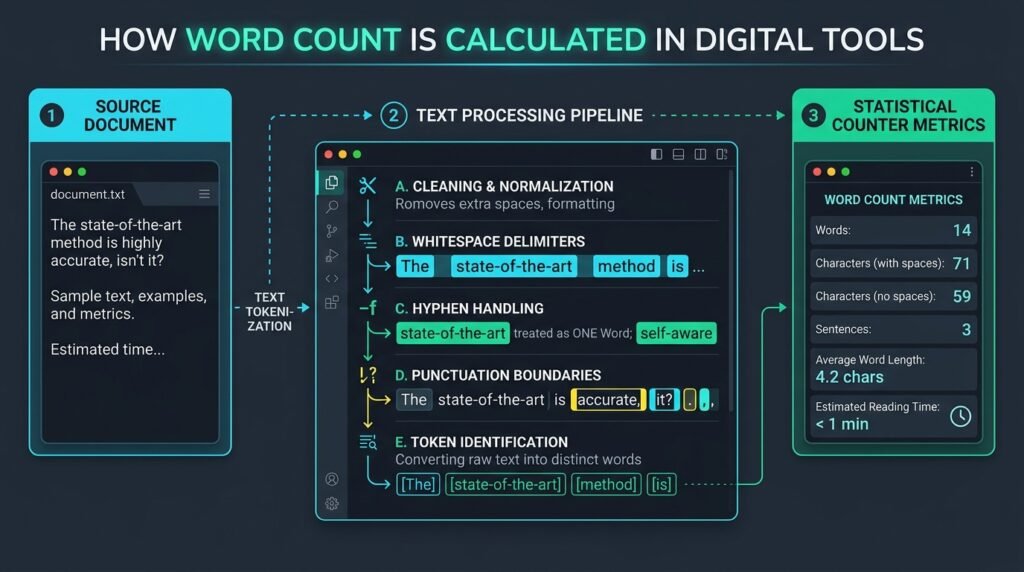
Understanding exactly how word count is calculated across modern software reveals why two professional tools produce noticeably different totals for the same text. Word count appears straightforward: count the words in a document. In practice, different applications report slightly different totals because their underlying parsing engines interpret linguistic boundaries through contrasting programmatic rules.
When writers and students submit manuscripts against strict thresholds, even a slight variance can trigger editorial rejection. Exploring how word count is calculated across text processors helps you understand discrepancies and maintain numerical consistency.
The statistical difference between document counters usually comes from how each distinct software system handles:
- Hyphenated terms: Whether compound words are treated as one token or split.
- Contractions: How apostrophes are evaluated in grammatical contractions.
- Numbers and dates: Distinguishing numeric values, currency, and dates.
- URLs and emails: Parsing web links and addresses without fragmenting protocols.
- Symbols and punctuation: Handling typographic dashes, slashes, and symbols.
- Emoji: Counting multi-byte Unicode pictograms and flags.
- Repeated whitespace: Normalizing redundant spaces, tabs, and line breaks.
- Languages without spaces: Segmenting script like Chinese, Japanese, and Thai.
You can inspect several writing metrics using EzzDo’s Word Counter. Because our suite of EzzDo online tools operates client-side in your browser, your entered manuscripts and private essays remain confidential without transmitting data across external cloud networks.

Table of Contents
The Basic Word Count Method and Whitespace Normalization
At its basic architectural level, a script determines length by separating text wherever whitespace appears. Consider how word count is calculated in the classic pangram sentence:
The quick brown fox jumps.
This classic sentence contains five whitespace-separated items and is normally counted as five words by every standard processor. However, before how word count is calculated can produce reliable data across complex documents, software must systematically normalize unformatted input strings. Without robust normalization, hidden structural anomalies skew document metrics significantly.
Professional tokenization pipelines apply normalization across several invisible whitespace variants:
- Multiple spaces: Double spaces after periods must not register as ghost words.
- Tab stops: Tab characters (
\t) must convert into standard space delimiters. - Line breaks: Carriage returns (
\r) and newlines (\n) must separate words cleanly. - Leading whitespace: Indentations at paragraph beginnings must be trimmed before scanning.
- Trailing whitespace: Unintentional trailing spaces must be discarded immediately.
- Non-breaking spaces: HTML non-breaking spaces (
) must act as word separators.
When how word count is calculated relies strictly on naive whitespace splitting, words connected to punctuation remain attached to those symbols. While whitespace splitting suffices for casual estimates, publishing workflows require nuanced lexical analysis.
Tokenization Rules: How Word Count Is Calculated for Hyphens and Apostrophes
The primary difference between writing tools lies in tokenization rules. Tokenization is the process of dividing characters into meaningful elements called tokens. How word count is calculated depends heavily on how a system handles hyphens, dashes, and apostrophes.
Consider the compound technological phrase:
client-side processing
Some tools treat client-side as one word because the hyphen connects both terms into a single adjective. Other tools split it into two words: client and side. Combined with processing, the first tool reports two words while the second reports three. Neither result is universally wrong; maintaining lexical consistency with your destination publisher, university guidelines, or testing agency is what truly matters.

Grammar Details: How Word Count Is Calculated for Contractions and Apostrophes
Standard English grammatical contractions present a similar programmatic challenge. Modern writing counters normally treat contractions such as these as single words:
- don’t
- can’t
- they’re
- it’s
- we’ve
Similarly, possessive noun forms are universally intended to function as single words:
- developer’s
- company’s
- author’s
A simplistic counter that naively strips punctuation before splitting inadvertently breaks don’t into disjointed tokens (don and t). Furthermore, typesetting often uses curly apostrophes (’) rather than straight ASCII marks ('). An advanced counter recognizes both glyphs as identical connectors so that how word count is calculated remains uniform regardless of styling.
Handling Numbers, Dates, URLs, and Email Addresses
Numbers, dates, URLs, and email addresses introduce edge cases into calculations. Depending on the software, numbers may be treated as words, tokens, or ignored entirely.
In financial reports and accounting ledgers, currency symbols attached directly to numbers are parsed as part of the numeric token. In standard word processing applications, standalone digits are counted as legitimate words:
- 2026 (counted as 1 word)
- 42 (counted as 1 word)
- 19.99 (counted as 1 word)
- $1,500.00 (counted as 1 word)
Calendar dates showcase how formatting choices alter numerical totals. Consider the contrasting representations:
- September 30, 2026 (separated by whitespace and comma, normally counted as 3 words)
- 2026-09-30 (connected by hyphens, often parsed as 1 single word token)
When examining URLs and email addresses, how word count is calculated must prevent protocol delimiters from shattering single entities. A standard URL contains multiple meaningful words:
https://example.com/free-online-tools
Although this URL contains words like free, online, and tools, an engineered parser treats the URL string as one word token because it represents a singular digital address. The same principle applies to email addresses like support@example.com. Failing to preserve full URLs inflates calculated counts artificially.
If you manage online references, clean query strings with EzzDo’s URL Encoder and Decoder and create clean slugs with our Slug Generator. Clean references ensure that how word count is calculated across your bibliography remains predictable and compliant.
Character Count: Distinguishing Total Length With and Without Spaces
While how word count is calculated governs long-form prose, character count is the decisive constraint across copywriting, SEO, and social platforms. Character metrics measure physical length rather than semantic words.
A comprehensive character counter records every single glyph in a document, including:
- Letters: Uppercase and lowercase alphabetic symbols.
- Numbers: Digits 0 through 9, superscripts, and subscripts.
- Spaces: Standard spaces, tab intervals, and newlines.
- Punctuation: Commas, colons, semicolons, and brackets.
- Line breaks: Carriage returns and paragraph delimiters.
- Multi-byte symbols: Emoji, mathematical signs, and diacritics.
Modern text suites provide two complementary character metrics:
- Characters including spaces: Measures total document size, vital for database fields, SMS limits, and meta tags.
- Characters excluding spaces: Measures pure linguistic text, utilized in academic publishing and freelance billing.
Tracking character dimensions alongside how word count is calculated ensures compliance for ad headlines (capped at 30 characters), meta descriptions (150-160 characters), and social posts. For instance, search engines truncate desktop page titles at approximately 60 characters and metadata snippets at 160 characters. Writers preparing publication headlines can also format titles seamlessly using EzzDo’s Case Converter.
Sentence Detection: Period Ambiguity and Syntactic Boundaries
Understanding how sentence detection operates alongside how word count is calculated reveals syntactic complexity. While basic counters assume periods, question marks, or exclamation points conclude sentences, periods appear in numerous non-terminal contexts.
Sentence boundary disambiguation (SBD) relies on contextual token lookaheads. When a period follows an abbreviation like Dr., the parser checks whether the succeeding word begins with a lowercase letter before deciding if a break occurred.
A period frequently appears within:
- Honorific abbreviations: Dr., Mr., Mrs., Prof., Ms.
- Latin abbreviations: e.g., i.e., etc., vs., et al.
- Decimal numbers: 3.14159, $19.99, 0.05%
- Domain names and URLs: ezzdo.site, google.com
- Personal initials: J. K. Rowling, George R. R. Martin
- Software version numbers: v2.1.0, Python 3.12
Consider the following practical test sentence:
Dr. Lee reviewed version 2.1 of the ezzdo.site tools at 4 p.m. with J. R. Smith.
A basic counter scanning solely for periods would register eight sentences in that single line. In contrast, how word count is calculated remains stable across periods, but sentence parsers require boundary disambiguation to recognize only one complete sentence exists.
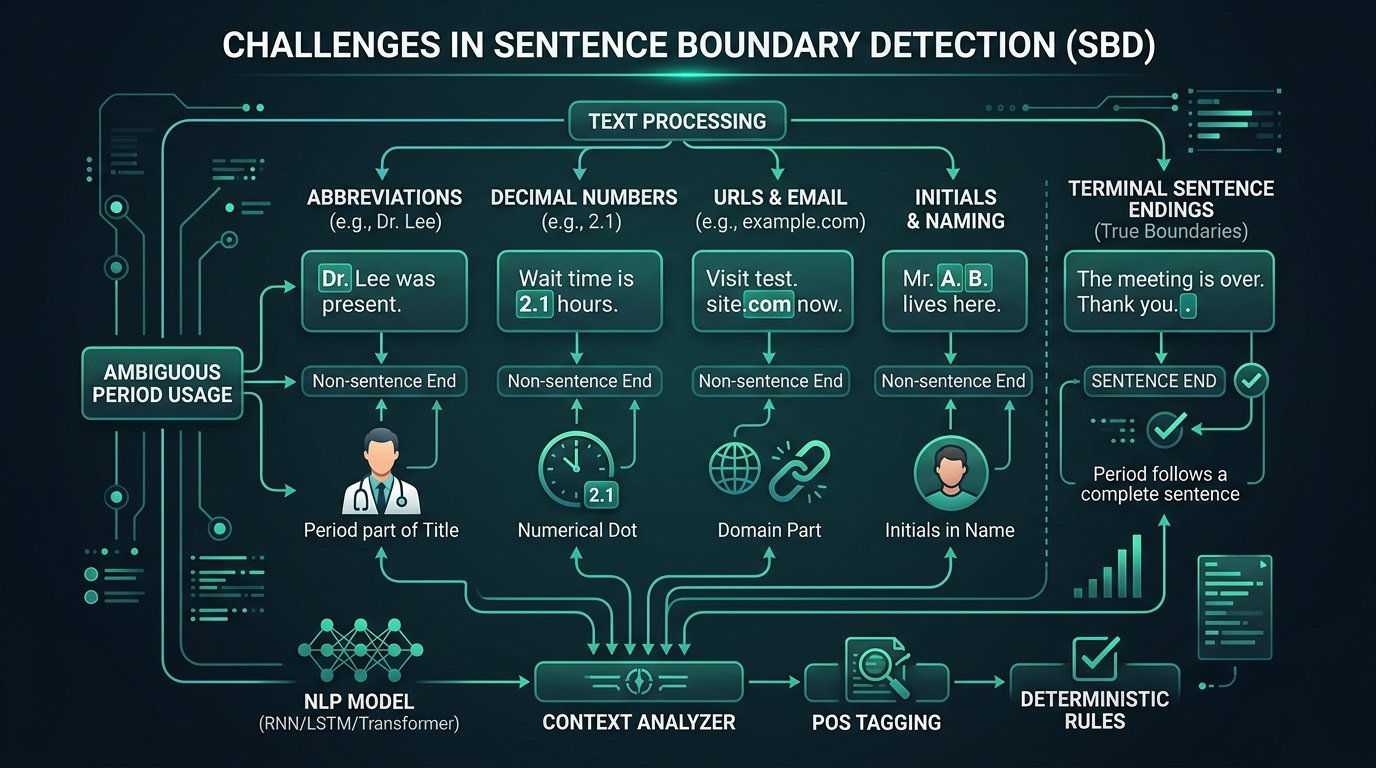
According to the Unicode Standard Annex #29 (TR29) on text segmentation, sentence boundaries must combine punctuation analysis with whitespace and capitalization checks. Because syntactic variations are vast, sentence counts should be treated as estimates unless coupled with specialized language parsers.
How Word Count Is Calculated into Reading and Speaking Time Estimates
Once volume is known, creators rely on time estimates to gauge reader engagement. How word count is calculated directly governs the accuracy of silent reading and spoken presentation durations.
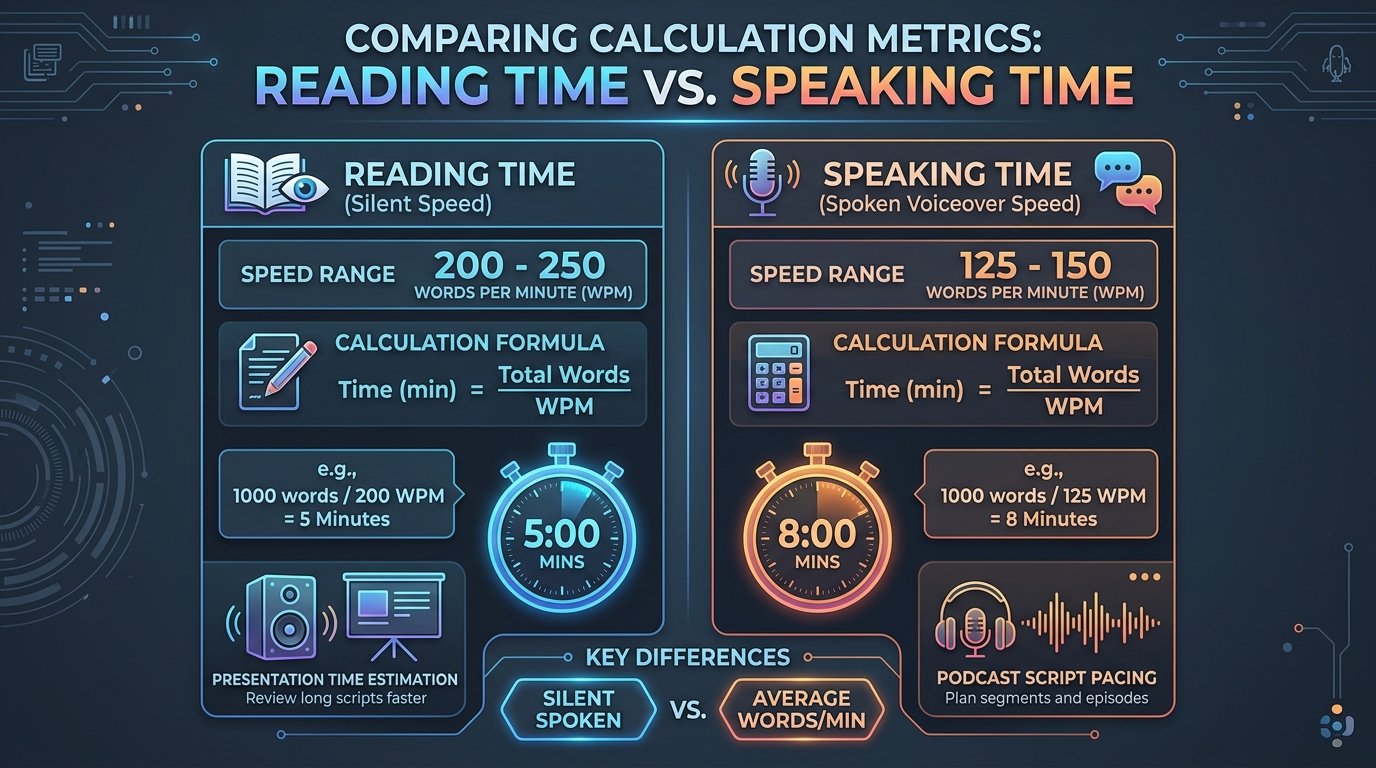
Silent reading time uses a well-established cognitive baseline formula:
Reading Time = Word Count ÷ Assumed Reading Speed
Scientific cognitive studies show that average adult literate readers consume non-technical English prose at between 200 and 250 words per minute (WPM). When an essay or editorial contains 1,000 words and the software assumes an industry standard baseline speed of 200 WPM:
1,000 words ÷ 200 WPM = 5 minutes
Actual reading time depends on complexity, layout, vocabulary, and reader familiarity. Technical documentation requires longer absorption time than conversational prose.
Speaking Time Calculations and Acoustic Pacing
Speaking time operates on a lower words-per-minute threshold than silent reading because verbal delivery requires strategic pauses, vocal inflection, breathing intervals, and comprehension time. A document of 1,000 words takes noticeably longer to speak aloud than to scan silently.
Industry speech coaches and audio engineers calibrate spoken pacing between 125 and 150 WPM. Accurately knowing how word count is calculated into spoken timing is essential when preparing:
- Presentations: Keeping slide remarks within event schedules.
- Voiceovers: Synchronizing narration with video timecodes.
- Speeches: Maintaining audience engagement without rushing delivery.
- Tutorials: Pacing instructions so viewers can follow screen steps.
- Podcasts: Structuring conversational segments and interviews.
- Video scripts: Fitting commercials into 30-second or 60-second slots.
How to Count Words Accurately Using EzzDo’s Online Counter
When preparing documents for submission, relying on a dedicated web tool provides instant clarity across all text metrics. Using EzzDo’s in-browser utility illustrates clearly how word count is calculated through transparent client-side algorithms.
Follow these straightforward steps to inspect your text metrics:
- Open the Tool: Navigate to EzzDo Word Counter in any desktop or mobile browser.
- Input Your Text: Paste your manuscript, paste copied web content, or type directly into the input workspace.
- Review Core Totals: Observe readouts for total words, characters with/without spaces, sentences, and paragraphs.
- Inspect Time Estimates: Check silent reading time and spoken duration to gauge audience engagement.
- Clean Duplicate Entries: If analyzing lists, strip repetitive rows with EzzDo’s Duplicate Line Remover before counting.
- Compare Against Requirements: Check your final metrics against guidelines required by your publisher or university.
All processing within EzzDo tools executes strictly inside your browser memory using JavaScript. Your sensitive documents and private manuscripts are never sent across the internet to third-party servers. Local processing guarantees complete privacy while delivering instantaneous metrics.
Comparison: Why WordPress, Microsoft Word, and Google Docs Disagree
Writers frequently discover that pasting identical content into Microsoft Word, Google Docs, Apple Pages, and WordPress produces different numbers. Understanding why these variations occur demonstrates how word count is calculated by contrasting software architectures.
| Processing Engine | Hyphenated Words | Embedded Numbers | Punctuation / Contractions | Primary Focus |
|---|---|---|---|---|
| Microsoft Word | Counts as 1 word (e.g. client-side = 1) | Counts digits as words | Keeps contractions together (don’t = 1) | Desktop print and office publishing |
| Google Docs | Counts as 1 word (matches Word) | Counts digits as words | Keeps contractions together | Collaborative web document editing |
| WordPress Editor | Varies by block and Gutenberg parser | Counts numbers in blocks | Strips HTML tags before lexical parsing | Web content management and HTML rendering |
| EzzDo Word Counter | Standardized tokenization | Full integer & decimal tokens | Keeps contractions intact; cleans whitespaces | Instant private in-browser metric analysis |
Command-Line wc -w | Splits strictly at whitespace | Counts any non-whitespace block | Punctuation attached to words | Raw Unix byte and ASCII whitespace counting |
As shown in the table, standard word processors treat hyphenated compounds as single entries, whereas low-level Unix utilities like wc -w split strictly at ASCII whitespace boundaries. Furthermore, web content management platforms like WordPress filter HTML block comments, block delimiters, and media captions before calculating visible word volume for authors.
When publishing online content, authors can consult guidelines from the W3C Internationalization Working Group regarding boundary detection in multilingual documents. Because each environment adopts distinct lexical rules, understanding how word count is calculated across tools prevents unexpected submission surprises.
Frequently Asked Questions About How Word Count Is Calculated
Here are answers to the most common technical questions regarding how word count is calculated across software environments, editorial offices, and digital content platforms.
7-Step Pre-Submission Text Audit Checklist
Before submitting any document against strict word or character limits, execute this structured audit checklist to ensure that how word count is calculated satisfies your target organization’s expectations:
- Review Official Guidelines: Check if your submission portal specifies Microsoft Word or general totals.
- Check Exclusions: Verify whether headings, abstracts, references, and captions are excluded.
- Audit Hyphenated Terms: Review all compound terms to maintain consistent editorial hyphenation styles.
- Inspect Number Formats: Decide whether numbers should be digits (42) or words (forty-two).
- Strip Redundant Spaces: Run drafts through a counter to normalize tab spaces and double spaces.
- Calculate Speaking Rates: If preparing a speech or script, calculate duration using 130 WPM pacing.
- Verify Local Privacy: Count drafts in client-side tools like EzzDo so text is never stored on external servers.
By understanding exactly how word count is calculated behind the scenes, you can submit every manuscript, academic thesis, and proposal with complete confidence in its numerical accuracy.