
UUID v4 Explained: Format, Uses and Collision Probability
Modern microservices and distributed databases rely on universally unique identifiers to coordinate records globally. With UUID v4 explained in comprehensive detail, engineers can understand how 128-bit pseudorandom identifiers prevent collisions, decouple microservices from central counters, and maintain data integrity without coordination.
Unlike sequential integers, random identifiers can be minted instantly by edge servers, mobile devices, or background workers without primary key conflicts. Having UUID v4 explained clearly provides the foundation for designing resilient backend systems that scale horizontally across cloud clusters.
To generate cryptographically secure identifiers in your browser, explore EzzDo’s free UUID/GUID Generator. If ingesting structured payloads, format them using the JSON Formatter or flatten records with the JSON to CSV Converter.
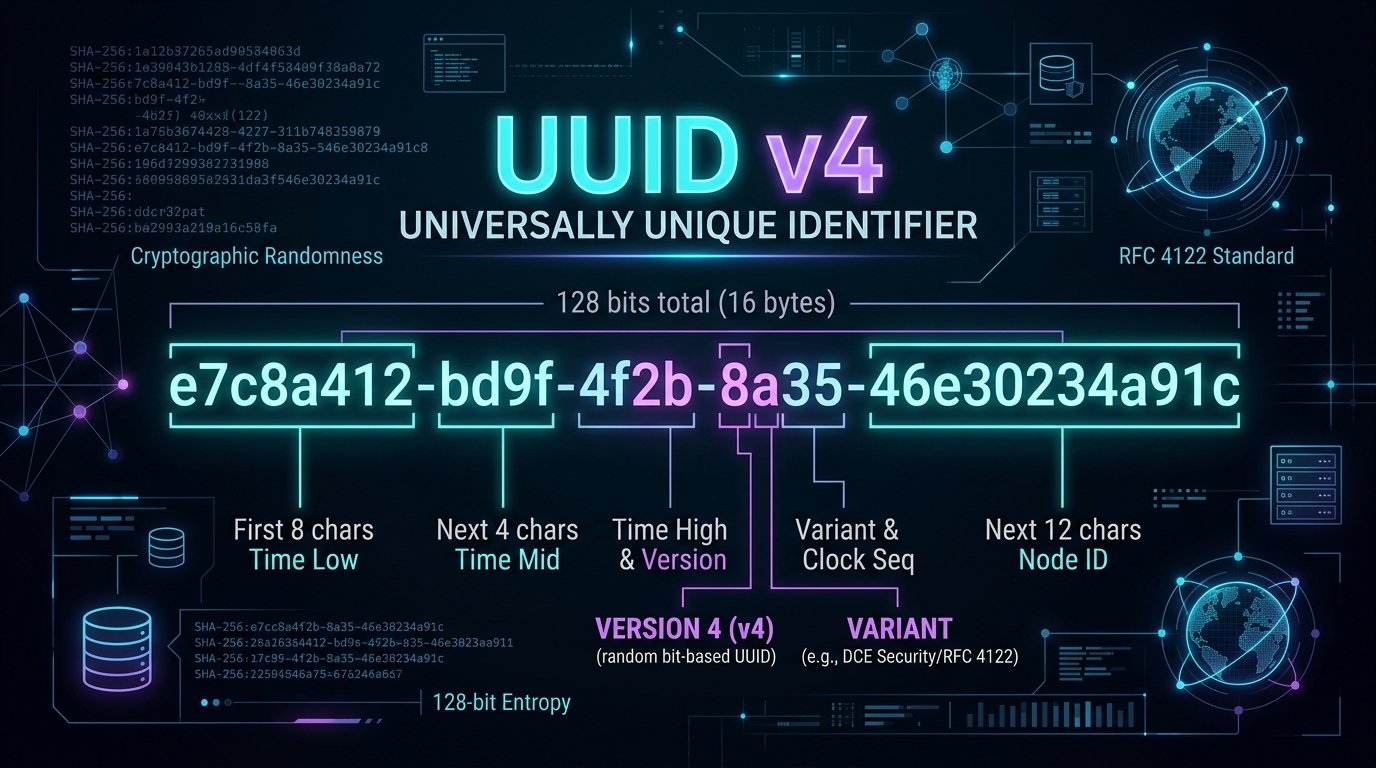
Table of Contents
UUID v4 at a Glance: Specifications and Anatomy
Review this technical specifications table summarizing the core properties of UUID v4 explained under internet standards:
| Dimension | Property | Standard | Consideration |
|---|---|---|---|
| Bit Length | 128 bits (16 bytes) | RFC 4122 / 9562 | Fits native 16-byte binary SQL columns |
| String Format | 36 characters (32 hex + 4 hyphens) | Canonical 8-4-4-4-12 | Consumes 36 bytes in ASCII columns |
| Entropy Bits | 122 pseudo-random bits | v4 bitmask | Yields 5.3 x 10^36 variations |
| Version | Digit “4” in group 3 | Bits 48-51 | Identifies random generation |
| Variant | Fixed bits 10x in group 4 | Bits 64-65 | Standard Leach-Salz layout |
| Complexity | O(1) algorithmic time | OS entropy pool | Zero network overhead or coordination |
As formalized in RFC 4122 and modernized in RFC 9562, having UUID v4 explained reinforces why version 4 remains the most ubiquitous format across modern cloud architectures.
What Does a UUID Look Like? The 8-4-4-4-12 Format
A canonical UUID is a 128-bit number displayed as thirty-two hexadecimal digits separated into five segments by hyphens:
550e8400-e29b-41d4-a716-446655440000
xxxxxxxx-xxxx-4xxx-yxxx-xxxxxxxxxxxx
|  8 hex |4 hex|4 hex|4 hex|  12 hex  |
When analyzing this structure with UUID v4 explained from an architectural standpoint, the text representation consists of five components:
- Segment 1 (8 hex / 32 bits): Lower-order pseudo-random entropy bits.
- Segment 2 (4 hex / 16 bits): Mid-order pseudo-random entropy bits.
- Segment 3 (4 hex / 16 bits): Nibble locked to
4, plus 12 random bits. - Segment 4 (4 hex / 16 bits): Variant bits (
8,9,a,b), plus 14 random bits. - Segment 5 (12 hex / 48 bits): Forty-eight random bits replacing legacy MAC addresses.
Understanding this visual grouping clarifies why UUID v4 explained represents a fundamental transition from hardware-coupled legacy identifiers to pure statistical entropy.
How Version and Variant Bits Work in UUID v4
Standard compliance reserves 6 bits for critical metadata markers. Examining this layout architecture at the binary level exposes exactly how these reserved fields operate:
UUID v4 Explained: The Version Nibble
Bits 48 through 51 define the UUID version (the first char of the third block, e.g., xxxx-4xxx). Because these four bits are always forced to binary 0100, this character will always be 4 in any valid version 4 UUID.
The Variant Nibble (Bits 64 to 67)
Bits 64 and 65 define the variant. Under RFC 4122 and RFC 9562, standard variants set these bits to binary 10. Consequently, the first character of the fourth segment must always be 8, 9, a, or b.
Subtracting 6 reserved bits from 128 total bits leaves exactly 122 bits of cryptographic entropy. With UUID v4 explained across both nibbles, developers can easily validate identifiers using simple bitmasking logic.
UUID v4 vs Other Versions (v1, v3, v5, v7)
Compare how version 4 contrasts with alternative UUID standards. Having UUID v4 explained alongside historical and modern counterparts clarifies why different algorithms exist:
| Version | Algorithm | Predictability | Index Impact | Primary Use |
|---|---|---|---|---|
| v1 | Timestamp + MAC | High (exposes MAC) | Good sequential locality | Legacy intranet systems |
| v3 | MD5 namespace hash | Deterministic | Random distribution | Deterministic namespace IDs |
| v4 | 122 random bits | Zero predictability | Page splits under write load | General distributed IDs, APIs |
| v5 | SHA-1 namespace hash | Deterministic | Random distribution | Deterministic entity mappings |
| v7 | Unix ms timestamp + random | Time-ordered | Excellent clustering | Modern database primary keys |
While UUID v7 provides temporal sorting advantages for database indexing, UUID v4 explained demonstrates why version 4 remains the universal standard for tokens, trace IDs, distributed events, and APIs where leaking timestamp information is undesirable.
Common Enterprise and Distributed System Use Cases
Organizations deploy version 4 identifiers across diverse architectures. Having UUID v4 explained in production contexts demonstrates how decoupled architectures eliminate database bottlenecks:
- Microservice Primary Keys: Services generate records independently across regions without central ID coordination.
- Offline Mobile Apps: Devices generate entities locally and sync seamlessly once connected.
- API Correlation IDs: Tracking transactions across services requires a unique identifier (e.g.,
X-Request-ID). - Queue Message IDs: Task runners like Celery and Kafka assign UUID v4 identifiers to each job for idempotency.
- Session Tokens: Carts and upload sessions utilize UUIDs as transient references before registration.
- Object Storage Keys: S3 stores use random UUID prefixes to balance partition traffic.
Studying how UUID v4 explained solves these challenges allows engineering teams to build resilient distributed backends that scale horizontally without communication overhead.
UUIDs vs Sequential Auto-Increment Database IDs
The choice between sequential numeric keys (such as SQL BIGINT AUTO_INCREMENT) and random UUIDs is a critical architectural decision. Having UUID v4 explained across both paradigms reveals crucial trade-offs:
Advantages of Sequential Numeric IDs
- Compact Storage: An 8-byte
BIGINTrequires half the storage of binary UUIDs and one-quarter of string UUIDs. - Optimal Clustering: New rows append strictly to index page ends, preventing page fragmentation.
- Readability: Numbers like customer
#1042are simpler to communicate verbally.
Vulnerabilities of Sequential Numeric IDs
- Business Intelligence Leakage: Competitors infer sales velocity by observing order increments.
- IDOR Security Risks: Attackers seeing profile URL
/users/501scrape/users/502if authorization fails. - Multi-Master Collisions: Independent databases allocating sequential integers produce duplicate IDs.
When evaluated with UUID v4 explained systematically, random identifiers eliminate enumeration vulnerabilities and multi-region write contention while trading off index compactness.
Can Two UUID v4 Values Collide? The Math Behind 122 Bits
One of the most persistent inquiries developers encounter is whether two independently generated version 4 UUIDs can ever be identical. With UUID v4 explained mathematically, we evaluate the precise statistical mechanics of the Birthday Problem.
Because 6 bits are reserved for standard markers, a version 4 UUID possesses 122 bits of variable entropy. The total number of distinct possible identifiers is:
2^122 ≈ 5.317 x 10^36 possible identifiersIn probability theory, the probability p of encountering a duplicate among n values from keyspace N = 2^122 is calculated via p(n) ≈ 1 - exp(-n^2 / (2 * N)):
- Generating 1 Billion UUIDs: Collision probability is approximately
9.4 x 10^-20. - Generating 1 Trillion UUIDs: At one trillion identifiers, collision probability is only
9.4 x 10^-14. - 50% Collision Threshold: Requires generating
2.71 x 10^18UUIDs. Minting one billion UUIDs per second continuously takes over 85 years of nonstop generation to reach a 50% collision likelihood.
Therefore, having UUID v4 explained with mathematical rigor proves that for all practical engineering purposes, collisions with a cryptographically sound random generator are virtually impossible.
Database Indexing Traps: B-Tree Fragmentation and Storage
While version 4 collision probability is practically zero, using random UUIDs as clustered primary keys introduces performance hurdles. Having UUID v4 explained in the context of database internal engines highlights critical storage best practices:
The Phenomenon of B-Tree Page Splits
Relational databases store table data clustered by primary key in B+ Tree structures. Because version 4 identifiers are entirely random, each inserted row lands in an arbitrary position within the index tree:
- Page Splits: When an index leaf page fills up, inserting a random key forces the engine to split the page into two half-empty pages.
- I/O Thrashing: As the table exceeds RAM buffer capacity, random inserts trigger disk I/O to swap cold index pages into memory.
- Index Bloat: Repeated page splits result in leaf pages that are only 50% to 70% full, inflating storage overhead.
Storage Format Optimization: 16 Bytes vs 36 Bytes
Storing UUIDs as text strings (VARCHAR(36)) requires 36 bytes per row, plus string comparison overhead. In contrast, storing raw binary (BINARY(16)) or using PostgreSQL’s native UUID type consumes only 16 bytes, cutting memory requirements by more than 55%.
For high write throughput, modern teams combine UUID v4 explained concepts with time-ordered alternatives like UUID v7 for clustered keys while retaining version 4 for public API references.
UUIDs Are Not Secrets: Security and Access Control Rules
A widespread anti-pattern is assuming that an entity is secure simply because its URL contains a seemingly unguessable UUID. Having UUID v4 explained from a cybersecurity perspective exposes why identifier obscurity must never substitute for cryptographic authorization:
The Myth of “Unguessable” Public URLs
Engineers often create endpoints like /invoice/a1b2c3d4-e5f6-4a7b-8c9d-0e1f2a3b4c5d and omit authentication, reasoning no attacker could guess it. This fails because URLs are logged in browser histories, web server logs, corporate proxies, and leaked via HTTP Referer headers.
Pseudo-Random Number Generator (PRNG) Vulnerabilities
A version 4 UUID is only as strong as its random generator. If a developer uses a weak generator (such as Math.random()), an attacker observing generated identifiers can reconstruct seed state and predict past and future UUIDs.
Always verify that your libraries invoke a CSPRNG, such as crypto.getRandomValues(). When UUID v4 explained is coupled with strict server authentication, role-based access control, and rate limiting, your applications remain secure.
UUID v4 Explained: 7 Best Ways to Generate Identifiers
To ensure high performance, security, and reliability when producing identifiers, adhere to these seven industry best practices for UUID v4 explained:
- 1. Always Use Cryptographic Entropy: Never rely on basic random functions. Leverage operating system entropy pools (such as
crypto.randomUUID()or Python’suuid.uuid4()) to guarantee unguessable randomness. - 2. Validate Incoming Strings Strictly: Use standardized regex (
^[0-9a-fA-F]{8}-[0-9a-fA-F]{4}-4[0-9a-fA-F]{3}-[89abAB][0-9a-fA-F]{3}-[0-9a-fA-F]{12}$) to reject malformed payloads. - 3. Enforce Unique Constraints: Always place a
UNIQUEconstraint or primary key definition on UUID database columns. - 4. Store as 16-Byte Binary Values: Reduce memory consumption and index bloat by packing canonical string UUIDs into native
UUIDorBINARY(16)columns. - 5. Preserve Lowercase Formatting: Standardizing on lowercase hexadecimal characters avoids comparison mismatches in caching layers like Redis.
- 6. Protect Endpoints with Authorization: Never treat a UUID as an access token. Always authenticate requests using verified JWTs or session cookies.
- 7. Leverage Browser Generation: When preparing mock datasets, use EzzDo’s free UUID/GUID Generator for fast, private batch creation.
Production Code Examples: Node.js, Python, Go, and SQL
Integrating version 4 identifiers into production applications is straightforward. Here is UUID v4 explained with production-grade syntax for modern software stacks:
Node.js and Browser JavaScript (Native Web Crypto)
import { randomUUID } from 'node:crypto';

// Generate a cryptographically secure UUID v4
const newId = randomUUID();
console.log('UUID v4:', newId);

// Validate version 4 format with regex
const isValid = /^[0-9a-f]{8}-[0-9a-f]{4}-4[0-9a-f]{3}-[89ab][0-9a-f]{3}-[0-9a-f]{12}$/i.test(newId);
console.log('Valid:', isValid); // true
Python Standard Library (uuid Module)
import uuid

user_id = uuid.uuid4()
print("UUID:", str(user_id))
print("Version:", user_id.version)  # 4

# Raw 16-byte binary for database storage
binary_bytes = user_id.bytes
print("Bytes:", len(binary_bytes))  # 16
Go (google/uuid Package)
package main

import (
    "fmt"
    "github.com/google/uuid"
)

func main() {
    id := uuid.New()
    fmt.Printf("UUID v4: %s (v%d)
", id.String(), id.Version())
}
SQL and PostgreSQL Native Generation
-- PostgreSQL native UUID table
CREATE TABLE customer_orders (
    order_id UUID PRIMARY KEY DEFAULT gen_random_uuid(),
    customer_email VARCHAR(255) NOT NULL,
    total_amount NUMERIC(10, 2) NOT NULL
);
Having UUID v4 explained with native code samples allows developers to deploy robust identifier generation across their technical stack immediately.
Common Mistakes When Implementing UUID v4 Identifiers
Even seasoned backend developers make subtle implementation mistakes with version 4 identifiers. With UUID v4 explained for system reliability, review these common pitfalls to keep production performant:
- Non-Cryptographic Randomness: Using pseudo-random generators seeded by time makes IDs predictable and subject to collision.
- Index Fragmentation: Using random UUIDs as clustered keys on high-insert tables causes severe B-Tree page thrashing. Consider UUID v7 instead.
- Storing Strings in Databases: Storing 36-byte strings instead of native 16-byte binary types balloons table and index sizes.
- Stripping Hyphens Inconsistently: Removing hyphens creates confusion when integrating with APIs expecting canonical formatting.
- Treating UUIDs as Capability Tokens: Relying on unguessable URLs without validating session permissions leaves endpoints vulnerable.
- Case Sensitivity Mismatches: Storing uppercase strings in Redis while searching for lowercase causes cache misses unless normalized.
Awareness of these pitfalls ensures that having UUID v4 explained translates directly into resilient, high-speed software architecture.
Frequently Asked Questions
Find answers to common technical questions regarding how UUID v4 explained applies to real-world development:
Reviewing these answers with UUID v4 explained resolves common doubts regarding formatting, uniqueness guarantees, and production database storage.
UUID v4 Architecture and Implementation Checklist
Verify each item on this technical checklist for UUID v4 explained before production deployment:
- Entropy Pool: Verify servers have active, non-blocking entropy sources available.
- Format Standardization: Standardize on 36-character canonical lowercase strings for network payloads.
- Column Type: Choose native
UUIDorBINARY(16)columns for database tables. - Regex Validation: Enforce UUID regex validation on all user-supplied query parameters.
- Constraint Definition: Place
UNIQUEconstraints on database identifier columns. - Access Control: Confirm protected endpoints enforce session authentication rather than identifier obscurity.
- Tool Verification: Use EzzDo’s free UUID/GUID Generator for instant test data generation.
Mastering Distributed Identifiers with UUID v4
Universally unique identifiers represent an elegant architectural solution in distributed computing. Having UUID v4 explained thoroughly illustrates how 122 bits of cryptographic randomness liberate modern software from sequential bottlenecks, single-point-of-failure database auto-increments, and multi-region replication conflicts.
By pairing cryptographically secure entropy pools with sound database indexing strategies and strict server authorization, developers can build globally scalable, collision-free backends with absolute confidence. Enhance your developer workflow today with EzzDo’s client-side suite: create instant keys with our UUID/GUID Generator, validate schemas with the JSON Formatter, and convert tabular datasets using our JSON to CSV Converter to power your next engineering breakthrough with UUID v4 explained. Key qualities: engineering, reliability, infrastructure, optimization.
How to Convert JSON to CSV Without Losing Important Data
Modern data pipelines frequently require engineers and analysts to convert JSON to CSV to transition API payloads into spreadsheets and relational databases. While JavaScript Object Notation excels at representing hierarchies, comma-separated values remain the global standard for spreadsheet analysis. Mastering this conversion guarantees critical numbers and relational records translate without corruption.
Transforming complex objects into flat tabular grids presents subtle technical hurdles. Developers often struggle when arrays collapse into unreadable strings, missing attributes produce mismatched columns, or automated spreadsheet parsers strip leading zeros from customer identifiers. Knowing how to convert JSON to CSV properly eliminates these integration bottlenecks while preserving structural fidelity.
To execute secure client-side transformations without transmitting sensitive records to remote servers, utilize EzzDo’s free JSON to CSV Converter. Before processing unformatted feeds, validate your syntax using the JSON Formatter, and clean URL-encoded parameters with the URL Encoder Decoder to ensure error-free parsing.

Table of Contents
JSON vs CSV at a Glance
Before examining technical flattening strategies, review this comparison table outlining the core architectural differences when you convert JSON to CSV:
| Feature / Attribute | JSON Format (RFC 8259) | CSV Format (RFC 4180) | Conversion Consideration |
|---|---|---|---|
| Data Model | Hierarchical tree (objects, arrays, primitives) | Flat two-dimensional grid (rows, columns) | Nested children must be flattened into dot-notated columns |
| Type Preservation | Native strings, numbers, booleans, null | Text-only string values | Receiving software must re-infer data types |
| Schema Consistency | Flexible / polymorphic keys per object | Strictly rigid column count per row | Missing keys require empty placeholder commas |
| Human Readability | Structured brackets and key-value pairs | Delimited lines readable in Excel and Calc | CSV offers faster manual filtering in spreadsheet tools |
| Standard Specification | IETF RFC 8259 | IETF RFC 4180 | Adherence to RFC escaping rules prevents parsing crashes |
Understanding JSON and CSV Structures
JSON represents data hierarchically using key-value pairs and ordered lists, standardized under IETF RFC 8259. A collection of employee records is typically stored as an array of structured objects:
[
  { "id": 101, "name": "Alice", "department": "Sales", "active": true },
  { "id": 102, "name": "David", "department": "Engineering", "active": false }
]
When you convert JSON to CSV, the property keys become column headers in the first line, while each object becomes a discrete row. The resulting output conforms to RFC 4180 standards:
id,name,department,active
101,Alice,Sales,true
102,David,Engineering,false
This translation functions seamlessly because every record shares identical property keys. Difficulties emerge when payloads contain irregular properties, nested dictionaries, or inner arrays. Furthermore, JSON uses application/json with UTF-8, whereas CSV uses text/csv. Having convert JSON to CSV workflows standardized ensures character encodings remain intact.
Why Arrays of Objects Convert Best
CSV structures require an immutable column layout across all records. Consequently, the optimal structure to convert JSON to CSV is a uniform array of flat objects:
[
  { "sku": "KB-900", "product": "Keyboard", "price": 49.99, "stock": 15 },
  { "sku": "MS-300", "product": "Mouse", "price": 24.99, "stock": 30 }
]
Because both objects contain identical keys, an automated converter maps every record to uniform columns:
sku,product,price,stock
KB-900,Keyboard,49.99,15
MS-300,Mouse,24.99,30
When input records maintain homogeneous attributes, you can convert JSON to CSV predictably without custom data mapping or column reordering. This uniformity allows database ingestion utilities, business intelligence dashboards, and spreadsheet macros to ingest incoming records directly without manual pre-processing.
Handling Missing Properties and Null Values
Real-world API responses frequently omit optional fields or return null values. Consider this polymorphic customer dataset:
[
  { "name": "Alice", "phone": "555-0101", "email": "alice@example.com" },
  { "name": "David", "email": "david@example.com" },
  { "name": "Elena", "phone": null, "email": "elena@example.com" }
]
A robust converter scans all records to construct a unified header union (name,phone,email). It then outputs empty placeholders for missing keys:
name,phone,email
Alice,555-0101,alice@example.com
David,,david@example.com
Elena,,elena@example.com
When you convert JSON to CSV, an empty field represents a missing attribute. In relational databases, empty fields convert into SQL NULL, while spreadsheets treat them as blank cells. Ensure systems distinguish between empty strings and omitted keys.
Flattening Nested JSON Objects
Hierarchical payloads often embed child objects inside parent records. Because spreadsheets cannot display multiple dimensions natively, you must flatten nested hierarchies when you convert JSON to CSV:
{
  "name": "Alice",
  "company": "Acme Corp",
  "address": {
    "city": "Seattle",
    "state": "WA",
    "geo": {
      "lat": 47.6062,
      "lng": -122.3321
    }
  }
}
The standard flattening pattern concatenates parent and child keys using dot notation:
name,company,address.city,address.state,address.geo.lat,address.geo.lng
Alice,Acme Corp,Seattle,WA,47.6062,-122.3321
Dot notation preserves field lineage and guarantees loaders associate nested values with their parent entity accurately. In multi-level hierarchies, dot notation prevents namespace collisions. Having convert JSON to CSV mechanisms with automated recursive flattening guarantees every parameter translates into a unique spreadsheet column.
Handling Arrays Inside JSON Records
Arrays of values represent one of the most challenging aspects of data transformation:
{
  "employee": "Alice",
  "skills": ["Python", "SQL", "Tableau"]
}
When you convert JSON to CSV, engineers deploy five proven strategies to handle array fields depending on downstream reporting needs:
- Delimiter Joining (Recommended for Flat Tables): Join items into one cell using a delimiter:
"Python|SQL|Tableau", preventing column expansion while preserving items. - Raw JSON Stringification: Store the array verbatim as a JSON string inside the cell:
"["Python","SQL","Tableau"]". Useful when downstream scripts must re-parse the array later. - Record Unnesting (Relational Normalization): Duplicate the parent row for every array element, creating separate rows for Alice-Python, Alice-SQL, and Alice-Tableau.
- Positional Columns: Create distinct numbered columns such as
skills.0, skills.1, skills.2. Best when array elements have fixed semantic positions. - Relational Splitting: Export parent entities into
employees.csvand array items intoemployee_skills.csvlinked by anemployee_idforeign key.
Selecting the right serialization method before you convert JSON to CSV prevents data truncation and guarantees your analytical models receive properly structured records.
Commas, Quotes, and RFC 4180 Delimiters
The CSV standard, codified under IETF RFC 4180, governs quoting rules when you convert JSON to CSV:
- Commas Inside Text: Any field containing a comma must be wrapped in double quotation marks:
"Compact, wireless keyboard". Without quotes, parsers split the single string across two columns. - Embedded Quotation Marks: A literal quotation mark inside a text field must be escaped by doubling it (
""):Monitor,"24"" office display". Single backslash escapes (") are invalid in RFC 4180 CSV syntax. - Embedded Line Breaks: Multiline strings must be encapsulated within quotes so parsers do not treat line breaks as new rows:
"Line 1
Line 2"
.
Manual string joining regularly violates escaping rules. Always use dedicated conversion engines to maintain compliance when you convert JSON to CSV.
Convert JSON to CSV: 7 Proven Rules to Prevent Data Loss
To ensure consistent output across enterprise data pipelines, follow these 7 essential operational guidelines when you convert JSON to CSV:
Rule 1: Pre-Validate Syntax Before Processing
Malformed brackets or trailing commas cause converters to crash. Always pre-validate input using a syntax checker before running transformations.
Rule 2: Build a Comprehensive Header Schema
Scan the entire dataset rather than the first object. Compiling a global key union prevents dropping properties from later records.
Rule 3: Use Consistent Dot-Notation for Nested Objects
Flatten child dictionaries using clear prefixes like user.address.zipcode to preserve hierarchy for database loaders.
Rule 4: Quote Values Containing Commas and Line Breaks
Adhere strictly to RFC 4180 quotation rules to prevent column shifting when text fields contain addresses or punctuation.
Rule 5: Protect Leading Zeros and Large Numbers
Postal codes like 01234 risk losing leading zeros in Excel. Format numeric strings explicitly as text.
Rule 6: Define Explicit Array Serialization Policies
Standardize whether lists are joined with delimiters or unnested into multiple rows before executing bulk data exports.
Rule 7: Audit the Output with a Dedicated Viewer
Inspect rendered CSV files in a text editor to confirm line endings and quoting before importing into production systems.
How to Convert JSON to CSV with EzzDo
Executing client-side transformations is fast and secure with EzzDo’s verified web utility. Follow this step-by-step workflow to convert JSON to CSV:
- Open the Tool: Navigate to EzzDo’s free JSON to CSV Converter.
- Paste Your Payload: Paste your JSON array into the editor. If input contains syntax errors, validate it first with the JSON Formatter.
- Select Flattening Options: Choose your preferred handling for nested objects and array delimiters.
- Convert Instantly: Click convert to process records directly inside your browser memory without server delays.
- Preview and Export: Review the generated tabular output in the integrated preview window, copy the data to your clipboard, or download your clean CSV file.
By leveraging browser-based processing, you can transform data files instantly while ensuring proprietary customer lists and API dumps remain completely confidential.
Programmatic Conversion: Python, Node.js, and CLI Tools
For backend workflows and scheduled pipelines, developers frequently convert JSON to CSV using Python, Node.js, or command-line utilities.
Python Implementation
Python’s built-in csv library provides granular delimiter and escape control:
import json
import csv

with open('data.json', 'r', encoding='utf-8') as f:
    data = json.load(f)

# Extract global union of headers across all records
headers = sorted(list({k for row in data for k in row.keys()}))
with open('output.csv', 'w', newline='', encoding='utf-8') as f:
    writer = csv.DictWriter(f, fieldnames=headers, quoting=csv.QUOTE_MINIMAL)
    writer.writeheader()
    writer.writerows(data)
Node.js Implementation
In Node.js, the json2csv library handles recursive object flattening cleanly:
import fs from 'fs';
import { Parser } from 'json2csv';

const raw = JSON.parse(fs.readFileSync('data.json', 'utf8'));
const parser = new Parser({ flatten: true, flattenSeparator: '.' });
const csvOutput = parser.parse(raw);
fs.writeFileSync('output.csv', csvOutput, 'utf8');
Command-Line Conversion Using jq
In Linux server environments, DevOps engineers often use jq to convert JSON to CSV in automated shell scripts:
# Flatten JSON array into CSV using jq:
jq -r '(map(keys) | add | unique) as $cols |
       map(. as $row | $cols | map($row[.] // "")) as $rows |
       $cols, $rows[] | @csv' input.json > output.csv
Spreadsheet Traps: Excel, Numbers, and Google Sheets
Even when a CSV file adheres strictly to RFC 4180 standards, desktop spreadsheet software can silently alter your data upon import. When you convert JSON to CSV, safeguard against these four common spreadsheet traps:
- Stripped Leading Zeros: Excel treats numerical strings like postal codes (
00451) as integers, converting them to451. Protect codes by importing them explicitly as text. - Large Number Mangling: Numbers exceeding 15 digits (such as 64-bit IDs or credit card numbers) get converted into scientific notation (
1.23E+15), truncating final digits. - Automatic Date Formatting: Strings formatted like
10-12-2024may convert automatically between month-day and day-month depending on user locale settings. - Formula Injection (CSV Injection): Fields starting with
=,+,-, or@can trigger formula execution in Excel. Sanitize input strings by prepending an apostrophe or single quote before opening spreadsheets. - UTF-8 BOM Omission: Opening UTF-8 files without a Byte Order Mark causes accented characters and currency symbols to display as garbled text.
Common Data Conversion Mistakes to Avoid
Auditing enterprise migration logs reveals repeating pitfalls when engineers convert JSON to CSV:
1. Reading Headers From Only the First Record
If later JSON records contain keys omitted from the first record, an incomplete header scan permanently drops those columns.
2. Ignoring UTF-8 Byte Order Marks (BOM)
Opening UTF-8 files in older versions of Excel without a BOM can cause accented characters and emojis to display as corrupted text.
3. Unquoted Multiline Strings
Failing to encapsulate text fields containing line breaks causes spreadsheet parsers to split single records across multiple rows.
4. Time Zone and Timestamp Drift
Converting ISO-8601 timestamps (2026-10-04T12:00:00Z) into localized spreadsheet dates often causes unexpected date shifts across global teams. Always preserve explicit UTC offsets when you convert JSON to CSV.
Client-Side Processing and Data Privacy
Data privacy is critical when transforming proprietary datasets, customer registries, or API credentials. Traditional online file converters upload your data to remote web servers, creating severe compliance risks under GDPR, HIPAA, and CCPA regulations.
When you use EzzDo’s JSON to CSV Converter, all parsing and flattening occurs locally inside your web browser’s memory using client-side JavaScript. Your records are never transmitted across the network, ensuring complete confidentiality for proprietary business information.
Because no backend servers process or retain your uploaded files, you can convert JSON to CSV with complete confidence, knowing that sensitive corporate metrics and customer privacy remain fully shielded.
Frequently Asked Questions
Find answers to common technical questions regarding how to convert JSON to CSV accurately:
Pre-Conversion Data Integrity Checklist
Before exporting datasets to production systems, run through this verification checklist to guarantee reliable output when you convert JSON to CSV:
- Syntax Validation: Confirm input JSON contains valid brackets, quotes, and commas.
- Global Key Union: Ensure column headers account for all objects in the array.
- Dot-Notation Structure: Verify nested object paths follow clear hierarchical conventions.
- Array Handling Strategy: Standardize delimiter joining or row unnesting across records.
- RFC 4180 Escaping: Confirm strings with commas or quotes are properly encapsulated.
- Spreadsheet Protection: Check that leading zeros and large IDs are preserved during import.
- Tool Verification: Test conversion in EzzDo’s JSON to CSV Converter before automated scheduling.
Mastering JSON to CSV Transformation
Understanding how to convert JSON to CSV effectively bridges modern web services and business analytics workflows across engineering organizations worldwide. By choosing the right flattening patterns for nested objects, properly escaping special characters, and guarding against spreadsheet auto-formatting traps, you protect critical data integrity across all downstream applications and relational warehouses.
Streamline your developer workflow today with high-performance browser tools and reliable utilities. Use EzzDo’s secure client-side JSON to CSV Converter for rapid transformations, ensure payload health with the JSON Formatter, and handle encoded queries with the URL Encoder Decoder to build bulletproof data pipelines.
Base64 Encoding vs URL Encoding
When engineering web architectures, APIs, and data transfer workflows, developers regularly format payloads across network protocols. The technical comparison of Base64 encoding vs URL encoding frequently creates confusion because both schemes transform data into text representations. However, Base64 encoding vs URL encoding represents two fundamentally different operations created for distinct engineering purposes. Evaluating Base64 encoding vs URL encoding correctly ensures you transmit data intact without corrupting bytes or introducing security vulnerabilities.
Base64 maps binary octets into 64 ASCII characters so binary objects travel safely across text channels. URL encoding escapes characters that conflict with URI syntax. Neither method provides data confidentiality.
To test values inside your browser privately, use EzzDo’s free Base64 Encoder and Decoder, URL Encoder and Decoder, and JSON Formatter. All three execute locally with zero server uploads.
Table of Contents
Base64 Encoding vs URL Encoding at a Glance
To understand the architectural landscape of Base64 encoding vs URL encoding, review this comparison table summarizing their foundational characteristics:
| Feature | Base64 | URL Encoding |
|---|---|---|
| Primary purpose | Convert binary data into printable ASCII text. | Escape reserved characters within URI components. |
| Input | Binary byte sequences or serialized text bytes. | Characters and octets placed into URI sections. |
| Typical output | Alphanumeric string [A-Za-z0-9+/] with optional [=]. | ASCII text where unsafe bytes become %XX hex triplets. |
| Common characters | A–Z, a–z, 0–9, +, /, and = padding. | Alphanumerics, percent sign (%), and hex digits. |
| Size effect | Expands data by ~33.3% (4 chars per 3 input bytes). | Variable: 0% unreserved; +200% per escaped byte. |
| Reversible | Yes, deterministic two-way conversion. | Yes, deterministic two-way conversion. |
| Compression | No. Base64 increases data size; never compresses. | No. URL encoding replaces characters; never compresses. |
| Encryption | No. Base64 provides zero confidentiality. | No. URL encoding provides zero confidentiality. |
| Typical uses | MIME email parts, data URLs, PEM keys, JSON binary. | Query parameters, form submissions, URI paths. |
| URL compatibility | Standard Base64 contains characters (+, /, =) requiring escaping. | Native and purpose-built for URI syntax. |
| Relevant standard | RFC 4648 | RFC 3986 |
This side-by-side analysis highlights the central difference in Base64 encoding vs URL encoding: Base64 translates raw binary bytes into printable text for transport gateways, whereas percent encoding enforces URI grammar rules so dynamic parameters coexist with routing syntax.
What Is Base64 Encoding?
Base64 is a binary-to-text representation scheme defined in RFC 4648 that converts arbitrary byte sequences into 64 printable ASCII characters. In Base64 encoding vs URL encoding, Base64 ensures transport compatibility across text-only systems.
The standard alphabet comprises uppercase letters (A–Z), lowercase letters (a–z), digits (0–9), plus (+), slash (/), and equals (=) padding. For example, the input word Hello:
Input: Hello -> Bytes: [0x48, 0x65, 0x6C, 0x6C, 0x6F] -> Base64: SGVsbG8=Software serializes non-ASCII characters to bytes using UTF-8 before applying Base64 mapping.
How Base64 Encoding Works
Understanding the conversion mechanism explains how Base64 encoding vs URL encoding handles data at the byte level:
- Byte Input: Input data is read as 8-bit bytes (groups of 3 bytes total 24 bits).
- Bit Grouping: The 24 bits are partitioned into four 6-bit units (values 0–63).
- Character Mapping: Each 6-bit index maps to an RFC 4648 character.
- Padding: If byte count is not divisible by 3, zero bits fill the final unit and
=aligns output.
This yields the formula: Encoded length = 4 × ceiling(original byte length ÷ 3), producing ~33.3% overhead.
Common Uses for Base64
In web development, Base64 is used for MIME email attachments, small data URLs, binary fields in JSON, and PEM certificates. Embedding large files as Base64 in HTML increases payload weight by 33.3%, inflates memory usage, and prevents caching. In Base64 encoding vs URL encoding, Base64 provides transport compatibility rather than delivery efficiency. Test your payloads with EzzDo’s Base64 Encoder and Decoder.
What Is URL Encoding?
URL encoding, formally termed percent encoding, is specified in RFC 3986. It represents characters safely within Uniform Resource Identifiers. In Base64 encoding vs URL encoding, percent encoding targets address grammar.
Unsafe or reserved characters are replaced by a percent sign (%) followed by the two-digit hexadecimal byte value. Examples include space (%20), ampersand (%26), hash (%23), and literal plus (%2B). For instance, the query value private PDF tools encodes to private%20PDF%20tools.
Why URLs Need Encoding
Characters such as ?, &, =, #, /, %, and + have reserved structural roles in URLs. In Base64 encoding vs URL encoding, encoding ensures data characters do not break web address parsing. In https://example.com/search?q=pdf&image, the unencoded ampersand splits parameters. Properly encoding produces https://example.com/search?q=pdf%26image, preserving query integrity.
Base64 Encoding vs URL Encoding: Key Differences
To choose appropriately between Base64 encoding vs URL encoding, evaluate these seven core engineering differences:
- Purpose: Base64 bridges binary into text; URL encoding escapes URI characters. Choose Base64 for binary files; choose URL encoding for URI values.
- Input: Base64 accepts arbitrary bytes; URL encoding accepts URI parameter strings. Choose Base64 for non-text bytes; choose URL encoding for parameters.
- Output: Base64 outputs 64 ASCII characters; URL encoding outputs %XX hex triplets.
- Size: Base64 expands data by ~33.3%; URL encoding expands only escaped bytes (200%).
- URL Compatibility: URL encoding is natively URL-safe; standard Base64 requires escaping.
- Reserved Characters: Base64 uses characters that conflict with URLs; URL encoding protects them.
- Use Cases: Base64 powers email MIME parts and data URLs; URL encoding powers query parameters.
Neither Encoding Method Is Encryption
A critical rule in web architecture is that encoding is not encryption. In Base64 encoding vs URL encoding, both algorithms are completely reversible representations. Anyone with access to the encoded text can decode it immediately without a key or password.
Never use either method to protect passwords, API keys, tokens, or credentials. Confidential data requires authenticated encryption (AES-256), salted hashing (Argon2id), and secure key storage. Query parameters remain exposed in browser history and server logs regardless of HTTPS.
Does Base64 Reduce File Size?
The clear technical answer is No. Base64 increases data size by approximately 33.3% because it encodes 3 binary bytes (24 bits) into 4 ASCII characters (32 bits). A 3 MB binary image expands to 4 MB of Base64 text. Base64 serves representation and compatibility, not compression. When comparing Base64 encoding vs URL encoding, use gzip or brotli when data reduction is needed.
Base64, Base64url and URL Encoding
Standard Base64 contains +, /, and =, which require special handling in URLs. RFC 4648 Section 5 defines Base64url, which replaces + with - and / with _, while omitting trailing = padding. In the study of Base64 encoding vs URL encoding, Base64url remains a binary-to-text representation scheme, distinct from percent encoding.
Can Base64 Be Placed in a URL?
Yes, but unescaped standard Base64 causes data corruption because URL parsers interpret + as spaces and / as path delimiters. When managing Base64 encoding vs URL encoding in web links, developers must either percent-encode standard Base64 (converting + to %2B, / to %2F, = to %3D) or adopt Base64url.
Understanding %20 and the Plus Sign
Under RFC 3986, %20 is the standard percent-encoded sequence for a space in all URI contexts. In application/x-www-form-urlencoded query data, a plus sign (+) represents a space, whereas in URI paths it represents a literal plus. In Base64 encoding vs URL encoding, encode literal pluses as %2B to prevent parser confusion.
Encoding Text Correctly with UTF-8
Base64 operates on bytes rather than abstract characters. When processing international text like café, こんにちは, or ✓, software must first serialize strings into UTF-8 bytes. Legacy JavaScript btoa() throws errors on non-ASCII characters without prior byte encoding. Distinguishing byte serialization from address escaping is essential in Base64 encoding vs URL encoding.
Practical Web Development Examples
Examine these production scenarios illustrating Base64 encoding vs URL encoding in web applications:
Base64 Encoding vs URL Encoding for Query Parameters
const term = "PDF & OCR Tools";
const safeUrl = `https://ezzdo.site/search?q=${encodeURIComponent(term)}`;
// Output: https://ezzdo.site/search?q=PDF%20%26%20OCR%20Tools
Encoding Small Text with Base64
const bytes = new TextEncoder().encode("Hello EzzDo");
const base64 = btoa(String.fromCharCode(...bytes)); // SGVsbG8gRXp6RG8=
Embedding a Small Image as a Data URL
Small icons can be embedded via data URLs: data:image/png;base64,iVBORw0KGgo.... Avoid large files to prevent size inflation.
Sending Binary Data in JSON
JSON requires text; Base64 allows binary signatures to be included inside JSON attributes. For large transfers, multipart streams are preferred.
Using Base64url in Tokens
JSON Web Tokens (JWT) use Base64url to allow headers and claims to pass safely in HTTP headers without URL escaping. Payloads remain readable.
Common Base64 and URL-Encoding Mistakes
Avoid these 15 frequent developer mistakes when working with Base64 encoding vs URL encoding:
- Base64 as encryption: Reversible without keys. Fix: Use AES-256.
- URL encoding as privacy: Visible in logs. Fix: Avoid secrets in URLs.
- Encoding entire URLs: Breaks path syntax. Fix: Escape query values only.
- Unencoded query values: Symbols split parameters. Fix: Use
encodeURIComponent(). - Double encoding: Creates corrupt
%2520. Fix: Encode once at boundaries. - Multiple decoding passes: Bypasses security filters. Fix: Decode once.
- Confusing %20 with +: Pluses in paths are literal. Fix: Use
%20. - Standard Base64 in queries: Plus and slash break URLs. Fix: Use Base64url.
- Stripping required padding: Strict decoders fail. Fix: Retain
=. - Padding in Base64url: JWT specifications fail. Fix: Omit
=padding. - Large files in Base64: Expands size 33.3%. Fix: Use multipart streams.
- Ignoring UTF-8 serialization: Corrupts text. Fix: Convert to UTF-8 bytes.
- Logging decoded parameters: Exposes tokens. Fix: Sanitize application logs.
- Assuming tokens are confidential: Signatures verify authenticity only. Fix: Encrypt payloads.
- Wrong encoder for components: Rules differ. Fix: Match encoder to URI context.
Security Risks of Incorrect Decoding
Improper decoding causes vulnerabilities in Base64 encoding vs URL encoding pipelines, including validation bypasses, path traversal, and open redirects. Multiple decoding cycles allow attackers to hide attacks via %252E%252E%252F. Always decode untrusted input once at ingestion and validate parameters against strict schemas using trusted platform APIs.
How to Use EzzDo’s Encoding Tools
EzzDo provides client-side developer tools for testing Base64 encoding vs URL encoding conversions with total privacy. All operations execute inside browser memory without server uploads.
Using the Base64 Encoder and Decoder
Follow these steps on EzzDo’s Base64 Encoder and Decoder: 1) Open tool. 2) Select Encode or Decode. 3) Enter text. 4) Process payload. 5) Inspect output. 6) Copy result. 7) Avoid pasting production credentials.
Using the URL Encoder and Decoder
To format query strings safely with EzzDo’s URL Encoder and Decoder: 1) Open tool. 2) Paste parameter value. 3) Choose Encode or Decode. 4) Process instantly. 5) Inspect percent sequences. 6) Insert into URI. 7) Test final URLs.
Which Encoding Method Should You Use?
Selecting between Base64 encoding vs URL encoding depends on the technical scenario. Review this architectural decision table:
| Situation | Recommended Method | Technical Reason |
|---|---|---|
| Search phrase in query string | URL Encoding | Escapes spaces and reserved delimiters like ampersands. |
| Small binary object in JSON | Base64 Encoding | JSON requires text; Base64 bridges binary octets. |
| Small icon in CSS stylesheet | Base64 (Data URL) | Embeds bytes inline to eliminate HTTP request latency. |
| Binary token in URL parameter | Base64url | Replaces + and / with URL-safe characters – and _. |
| Protecting user password | Neither Method | Encoding is not encryption; use Argon2id hashing. |
| Reducing binary file size | Neither Method | Base64 expands size by ~33.3%; use gzip compression. |
| Hiding confidential secrets | Neither Method | Encoding provides zero confidentiality; use AES-256. |
| Ampersand inside parameter value | URL Encoding | Replaces & with %26 to prevent query string truncation. |
Frequently Asked Questions
Can URL encoding replace Base64 encoding?
No. In Base64 encoding vs URL encoding, URL encoding escapes reserved URI characters, whereas Base64 bridges raw binary octets into a 64-character text alphabet.
Is Base64 safe for passwords?
No. Base64 is reversible in milliseconds without keys. Passwords require salted cryptographic hashes like Argon2id or bcrypt.
Why does Base64 sometimes end with an equals sign?
The equals sign (=) is padding to align byte sequences not divisible by three into four-character blocks.
Is %20 the same as a plus sign?
No. %20 is standard URI space encoding. A plus sign represents spaces only in form query strings.
Is Base64 a form of encryption?
No. Base64 is an open data format with zero cryptographic keys and zero confidentiality.
Does URL encoding hide private information?
No. URL encoding escapes characters; encoded values remain visible in browser histories and server logs.
Does Base64 make files smaller?
No. Base64 increases data size by ~33.3%, converting every 3 binary bytes into 4 ASCII text characters.
What is Base64url?
Base64url (RFC 4648) replaces + with - and / with _, omitting padding characters for web safety.
Can Base64 be used in query strings?
Yes, provided you use Base64url or percent-encode standard Base64 characters (+, /, =) to prevent parser corruption.
Should an entire URL be encoded?
No. Encoding entire URLs escapes scheme delimiters (://) and breaks routing. Encode only individual parameter values.
What happens if a value is encoded twice?
Double encoding converts percent signs to %25, producing broken strings like %2520 instead of intended characters.
Does HTTPS make encoded query values private?
HTTPS protects network transport, but query strings remain exposed in browser history, proxy logs, and analytics.
Can Unicode text be converted directly to Base64?
Unicode text must be serialized to UTF-8 bytes first. Legacy btoa() throws exceptions on multi-byte characters.
Is a Base64-encoded token secure?
In formats like JWT, payloads are Base64url-encoded and readable by anyone. Signatures verify authenticity, not secrecy.
When should I use percent encoding?
In Base64 encoding vs URL encoding decisions, use percent encoding whenever you insert dynamic values into query strings, API paths, or web form submissions.
Final Base64 and URL-Encoding Checklist
Review this developer checklist to ensure standard compliance and security in Base64 encoding vs URL encoding workflows:
- Identify problem: Bridge binary with Base64; escape URI characters with percent encoding.
- Determine data type: Process binary with Base64; format URI queries with percent encoding.
- Determine component: Match escaping rules to query parameters or path segments.
- Use UTF-8: Serialize international characters to UTF-8 bytes before Base64 conversion.
- Standard Base64: Format MIME parts and JSON payloads under RFC 4648.
- Base64url: Adopt the
-and_alphabet for URL-safe tokens. - Percent-encode values: Never encode whole URLs; escape parameter values independently.
- Avoid double encoding: Escape data once at transport boundaries.
- Ingestion decoding: Decode parameters once and validate schemas immediately.
- Never treat encoding as encryption: Deploy AES-256 for confidentiality and Argon2id for passwords.
- Keep secrets out of URLs: Prevent credential leakage in query strings and logs.
- Test implementations: Verify output compatibility with verified developer utilities.
Choosing Between Base64 and URL Encoding
In conclusion, the decision between Base64 encoding vs URL encoding depends on your architectural layer. Base64 is an essential binary-to-text bridge allowing binary files and keys to travel safely through ASCII systems. URL encoding acts as the syntax guardian of web addresses, ensuring parameters and symbols coexist safely.
By understanding the technical boundaries of Base64 encoding vs URL encoding and remembering neither provides encryption, developers build reliable applications. To convert data and test query strings inside your browser with 100% privacy, bookmark EzzDo’s free Base64 Encoder and Decoder and URL Encoder and Decoder.
Unix Timestamp Converter: Seconds vs Milliseconds
Unix timestamps provide a compact, universal way to represent dates and times across every programming language, database and operating system. Whether you are building APIs, debugging server logs, or comparing authentication tokens, you will encounter Unix timestamps regularly. A Unix timestamp converter is the fastest way to decode these numeric values into human-readable dates.
A value such as 1767225600 may initially appear meaningless. Once you feed it into a reliable Unix timestamp converter, however, it instantly reveals a precise date and time. You can decode any timestamp right now with EzzDo’s free Unix Timestamp Converter.
In this comprehensive guide you will learn exactly what Unix timestamps are, how to distinguish seconds from milliseconds, why UTC matters, how to avoid the most common conversion mistakes, and how to use a Unix timestamp converter effectively in your daily workflow.
Table of Contents
What Is a Unix Timestamp?
A Unix timestamp represents the total number of seconds (or milliseconds) that have elapsed since a fixed starting point known as the Unix epoch:
January 1, 1970 at 00:00:00 UTC
This epoch was chosen by the creators of the Unix operating system in the early 1970s. Every second that passes increases the timestamp value by one. The system is elegantly simple: a single integer encodes an exact moment in time.
Here are a few landmark examples to illustrate how the counting works:
- 0 — January 1, 1970 at 00:00:00 UTC (the epoch itself)
- 60 — One minute after the epoch
- 3600 — One hour after the epoch
- 86400 — One full day after the epoch
- 1000000000 — September 9, 2001 at 01:46:40 UTC (the billennium)
- 1767225600 — A date in 2026
Unix timestamps are useful because computers can store and compare a single number far more efficiently than they can parse dozens of differently formatted date strings. A Unix timestamp converter translates that efficient number back into something humans can read at a glance.
How a Unix Timestamp Converter Works
This converter accepts a numeric timestamp and performs a straightforward calculation. It takes the number of seconds since the epoch and maps them to a calendar date and clock time.
The conversion formula is deterministic: given the same input, every correct converter will produce exactly the same output. There is no ambiguity, no locale dependency and no daylight saving adjustment baked into the raw value.
Modern converters, including the free EzzDo Unix Timestamp Converter, also handle millisecond timestamps, display results in both UTC and your local timezone, and output standardized ISO 8601 strings. The entire conversion runs inside your browser, so nothing is sent to a server.
Step-by-Step Conversion Process
- Open the Unix Timestamp Converter.
- Enter your numeric timestamp into the input field.
- The tool automatically detects whether the value is in seconds (10 digits) or milliseconds (13 digits).
- Review the converted UTC date, local date and ISO 8601 output.
- Copy whichever format you need for your application, log analysis or documentation.
Seconds Versus Milliseconds: How to Tell the Difference
One of the most common sources of confusion when working with Unix timestamps is the difference between seconds and milliseconds. A reliable Unix timestamp converter handles both, but understanding the distinction prevents costly bugs.
Timestamps in Seconds
A timestamp expressed in seconds typically contains 10 digits for dates in the current era:
1767225600This is the traditional Unix format. A Unix timestamp converter recognizes this format automatically. Most server-side languages (Python, PHP, Ruby, Go, C) and many REST APIs return timestamps in seconds.
Timestamps in Milliseconds
A timestamp expressed in milliseconds typically contains 13 digits:
1767225600000JavaScript’s built-in Date object, Java’s System.currentTimeMillis(), and many front-end frameworks use milliseconds. The additional three digits represent thousandths of a second, providing finer granularity. A Unix timestamp converter can handle either format seamlessly.
Conversion Between Seconds and Milliseconds
There are exactly 1,000 milliseconds in one second. The conversions are straightforward:
- Milliseconds to seconds: divide by 1,000 —
1767225600000 ÷ 1000 = 1767225600 - Seconds to milliseconds: multiply by 1,000 —
1767225600 × 1000 = 1767225600000
Warning sign: If a converted date appears thousands of years in the future, your program has almost certainly interpreted a millisecond timestamp as seconds. A quick digit count with your Unix timestamp converter will confirm the unit. EzzDo’s Unix timestamp converter automatically detects the format based on digit count, eliminating this source of confusion.
Why UTC Matters for Unix Timestamps
Every Unix timestamp is anchored to Coordinated Universal Time (UTC). The raw numeric value does not embed any local timezone information. This is a feature, not a limitation — it means two servers on opposite sides of the planet will agree on the same timestamp for the same instant.
However, when a browser or application displays that timestamp, it applies the viewer’s local timezone offset. The same timestamp can therefore render as different clock times in different locations:
- Los Angeles (UTC−8): January 1 at 8:00 AM
- London (UTC±0): January 1 at 4:00 PM
- Tokyo (UTC+9): January 2 at 1:00 AM
The underlying moment in time has not changed. Only the human-readable representation differs. A Unix timestamp converter makes this clear by showing both UTC and local results simultaneously.
Best Practices for Timezone Handling
- Store timestamps in UTC. Always persist Unix timestamps or ISO 8601 UTC strings in your database.
- Convert to local time at the display layer. Let the front end or reporting tool apply the user’s timezone preference.
- Debug in UTC first. When investigating a timestamp discrepancy, compare raw UTC values before examining local conversions.
- Use a Unix timestamp converter that shows both. EzzDo’s converter displays UTC and local results side by side, eliminating guesswork.
Common Unix Timestamp Mistakes and How to Avoid Them
Even experienced developers run into timestamp pitfalls. Here are the five most frequent errors and practical solutions.
1. Mixing Up Seconds and Milliseconds
This is by far the most common Unix timestamp error. JavaScript natively works in milliseconds, while Python’s time.time() and most Unix command-line tools return seconds. Feeding a millisecond value into a function that expects seconds — or vice versa — produces wildly incorrect dates.
Solution: Count the digits. Ten digits means seconds; thirteen digits means milliseconds. Use a Unix timestamp converter to verify before inserting values into production code.
2. Ignoring Timezone Offsets
A timestamp may be perfectly correct even when the displayed local time looks “wrong.” This happens when developers compare a UTC timestamp against an expected value that is actually in local time.
Solution: Always compare UTC to UTC. Convert to local time only at the presentation layer, never during storage or comparison logic.
3. Treating Timestamps as Strings
Sorting timestamp strings alphabetically can produce unexpected and incorrect orderings, especially when timestamps have different digit lengths (for example, a nine-digit timestamp from the 1990s sorted alongside a ten-digit timestamp from the 2000s).
Solution: Store and compare timestamps as integers or long numbers. Parse string representations into numeric types before performing any ordering or arithmetic. When in doubt, paste the value into a Unix timestamp converter to confirm it represents a valid date.
4. Converting in the Wrong Direction
Multiplying when you should divide — or dividing when you should multiply — produces dates that are either impossibly far in the past or absurdly far in the future.
Solution: Always verify the digit count of your source value first. A 13-digit value divided by 1,000 yields seconds. A 10-digit value multiplied by 1,000 yields milliseconds. Use a Unix timestamp converter to double-check your result.
5. Assuming Every System Uses Unix Time
Not all systems use the Unix epoch. Microsoft’s FILETIME and .NET’s DateTime.Ticks count from January 1, 1601. Apple’s Core Data uses January 1, 2001. GPS time uses January 6, 1980.
Solution: Always read the source system’s documentation to confirm the epoch and unit before converting. Do not assume Unix time unless it is explicitly stated.
Understanding ISO 8601 Date Format
When you run a timestamp through a Unix timestamp converter, the output often includes an ISO 8601 formatted string. This international standard provides an unambiguous, human-readable representation of dates and times.
A typical ISO 8601 string looks like this:
2026-01-01T00:00:00.000ZBreaking this down:
- 2026-01-01 — The date in year-month-day order
- T — A separator between the date and time portions
- 00:00:00.000 — The time in hours, minutes, seconds and milliseconds
- Z — Indicates UTC (Zulu time)
ISO 8601 strings are the preferred format for API responses, log entries and configuration files because they are sortable, unambiguous and internationally recognized. Unix timestamps, meanwhile, are ideal for storage and computation. A good Unix timestamp converter lets you move effortlessly between both formats.
Real-World Use Cases for a Unix Timestamp Converter
Understanding when and why you need a Unix timestamp converter helps you appreciate its value beyond simple curiosity.
API Development and Integration
REST APIs frequently include timestamps in their request and response payloads. When integrating with a third-party service, you may receive timestamps in seconds, milliseconds or ISO 8601 format. A Unix timestamp converter helps you verify that the values you receive match the dates you expect, catching integration bugs before they reach production. Keep a Unix timestamp converter bookmarked during integration work.
Database Debugging
Many databases store creation and modification dates as Unix timestamps. When investigating a data inconsistency, converting raw timestamp columns into human-readable dates is the fastest way to correlate events. EzzDo’s Unix Timestamp Converter makes this a one-step process.
Server Log Analysis
Web server logs, application logs and security audit trails often record events using Unix timestamps. When tracing an incident, converting these timestamps reveals exactly when each event occurred and in what sequence. A Unix timestamp converter eliminates manual math and reduces the risk of errors during high-pressure debugging sessions.
Authentication and Token Validation
JSON Web Tokens (JWTs) and OAuth tokens include iat (issued at), exp (expiration) and nbf (not before) claims expressed as Unix timestamps in seconds. A Unix timestamp converter lets you instantly verify whether a token is expired, not yet valid, or issued at an unexpected time.
Scheduling and Cron Jobs
Scheduled tasks and cron jobs often reference Unix timestamps for their next execution time. A Unix timestamp converter confirms that jobs are scheduled correctly and helps diagnose timing issues in automated workflows.
Unix Timestamp Converter: Programming Language Quick Reference
Different programming languages handle Unix timestamps in different ways. Here is a quick reference for the most popular languages.
JavaScript
JavaScript’s Date.now() returns the current timestamp in milliseconds. To get seconds, divide by 1,000:
const milliseconds = Date.now();           // 1767225600000
const seconds = Math.floor(Date.now() / 1000); // 1767225600
To convert a Unix timestamp back to a date:
const date = new Date(1767225600 * 1000);  // Multiply seconds by 1000
console.log(date.toISOString());           // "2026-01-01T00:00:00.000Z"
Python
Python’s time module returns timestamps in seconds (as a float):
import time
timestamp = time.time()  # e.g. 1767225600.123456
To convert a Unix timestamp to a datetime:
from datetime import datetime, timezone
dt = datetime.fromtimestamp(1767225600, tz=timezone.utc)
print(dt.isoformat())  # "2026-01-01T00:00:00+00:00"
PHP
PHP’s time() function returns the current Unix timestamp in seconds:
$timestamp = time();  // e.g. 1767225600
$date = date('c', $timestamp);  // "2026-01-01T00:00:00+00:00"
Java
Java’s System.currentTimeMillis() returns milliseconds:
long millis = System.currentTimeMillis();  // 1767225600000
long seconds = millis / 1000;              // 1767225600
Go
Go’s time.Now().Unix() returns seconds:
seconds := time.Now().Unix()           // 1767225600
millis := time.Now().UnixMilli()       // 1767225600000
When working across multiple languages, a Unix timestamp converter serves as a neutral verification tool to confirm that all systems agree on the same moment in time.
The Year 2038 Problem
Many older systems store Unix timestamps as 32-bit signed integers. The maximum value a 32-bit signed integer can hold is 2,147,483,647, which corresponds to:
January 19, 2038 at 03:14:07 UTC
After this moment, a 32-bit counter will overflow and wrap around to a negative number, potentially representing a date in December 1901. This is known as the Year 2038 problem or the Unix Millennium Bug.
Modern systems mitigate this by using 64-bit integers, which can represent dates billions of years into the future. However, embedded systems, legacy databases and older firmware may still be vulnerable.
If you are working with systems that might be affected, use a Unix timestamp converter to test boundary values near 2,147,483,647 and verify that your application handles them correctly.
Negative Unix Timestamps: Dates Before 1970
Unix timestamps are not limited to dates after the epoch. Dates before January 1, 1970 are represented using negative values.
For example:
- −86400 — December 31, 1969 at 00:00:00 UTC
- −2208988800 — January 1, 1900 at 00:00:00 UTC (approximately)
Not all systems support negative timestamps reliably. Some languages, databases and libraries may produce errors or unexpected results when encountering negative values. Always test with your specific platform before relying on negative timestamps in production.
A Unix timestamp converter that supports negative values, like the one at EzzDo, is invaluable for verifying historical dates.
Frequently Asked Questions
Can a Unix timestamp represent a date before 1970?
Yes. Dates before the Unix epoch are represented using negative numeric values. For instance, −86400 represents December 31, 1969 at 00:00:00 UTC. However, not all programming languages and database engines support negative timestamps consistently, so always verify with a Unix timestamp converter before depending on this behavior in production.
Does a Unix timestamp include a timezone?
No. A Unix timestamp represents a specific moment relative to UTC and does not embed any timezone information. The timezone is applied only when displaying the timestamp to a human user. This is why a single timestamp can appear as different local times in different regions of the world.
Why does JavaScript use 13-digit timestamps?
JavaScript’s Date system represents time in milliseconds since the Unix epoch, which produces 13-digit numbers for contemporary dates. This design choice provides millisecond-level precision natively. To obtain a 10-digit seconds-based timestamp in JavaScript, divide Date.now() by 1,000 and apply Math.floor().
Can Unix timestamps include decimal values?
Yes. Some programming languages, notably Python, return Unix timestamps as floating-point numbers where the decimal portion represents fractions of a second. For example, 1767225600.500 represents exactly half a second after the integer timestamp. Support for fractional timestamps varies between systems and a Unix timestamp converter may round or truncate these values.
Is the EzzDo Unix timestamp converter private?
Yes. The EzzDo Unix Timestamp Converter performs all calculations directly inside your browser using JavaScript. Your timestamp values are never transmitted to any server. This makes the tool safe to use with sensitive production data, security tokens and internal system timestamps.
What is the difference between Unix time and epoch time?
The terms are often used interchangeably. Both refer to the number of seconds (or milliseconds) since January 1, 1970 at 00:00:00 UTC. Technically, “epoch time” can refer to any system’s chosen starting point, while “Unix time” specifically references the 1970 epoch. In practice, when developers say “epoch time,” they almost always mean Unix time. A Unix timestamp converter handles both terms identically.
How do I get the current Unix timestamp?
Every major programming language provides a built-in function to retrieve the current Unix timestamp. In JavaScript, use Date.now(). In Python, use time.time(). In PHP, use time(). Alternatively, open a Unix timestamp converter tool — EzzDo’s converter displays the current timestamp alongside the conversion interface.
Summary
Unix timestamps are a foundational concept in software development. They provide a simple, unambiguous way to represent any moment in time as a single number. Understanding the difference between seconds and milliseconds, respecting UTC conventions and avoiding common conversion errors will save you hours of debugging.
Whenever you need to decode, verify or convert a Unix timestamp, use EzzDo’s free Unix Timestamp Converter. It handles both seconds and milliseconds, displays UTC and local results, outputs ISO 8601 strings and runs entirely inside your browser for complete privacy.
Bookmark this free Unix timestamp converter, share it with your team and make timestamp confusion a thing of the past.
Working with date ranges? Our Date Difference Calculator guide explains how to find exact days, weeks, months, and business days between any two dates.